苍穹外卖开发日志Day12——数据统计

  • 数据统计
    • Apache ECharts
    • 营业额统计
    • 用户统计
    • 订单统计
    • 销量排名统计
    • 工作台
    • Apache POI
    • 导出运行数据Excel报表

2025.08.01

一、Apache ECharts

1.1 Apache ECharts简介

  • Apache ECharts是一个基于JavaScript的开源可视化图表库,提供了丰富的图表类型和交互功能,适用于数据可视化和分析。
  • 官网地址:Apache ECharts

1.2 入门案例

1.2.1 echartsDemo.html

1
2
3
4
5
6
7
8
9
10
11
12
13
14
15
16
17
18
19
20
21
22
23
24
25
26
27
28
29
30
31
32
33
34
35
36
37
38
39
40
41
42
<!DOCTYPE html>
<html>
<head>
<meta charset="utf-8" />
<title>ECharts</title>
<!-- 引入刚刚下载的 ECharts 文件 -->
<script src="echarts.js"></script>
</head>
<body>
<!-- 为 ECharts 准备一个定义了宽高的 DOM -->
<div id="main" style="width: 600px;height:400px;"></div>
<script type="text/javascript">
// 基于准备好的dom,初始化echarts实例
var myChart = echarts.init(document.getElementById('main'));

// 指定图表的配置项和数据
var option = {
title: {
text: 'ECharts 入门示例'
},
tooltip: {},
legend: {
data: ['销量']
},
xAxis: {
data: ['衬衫', '羊毛衫', '雪纺衫', '裤子', '高跟鞋', '袜子']
},
yAxis: {},
series: [
{
name: '销量',
type: 'bar',
data: [5, 20, 36, 10, 10, 20]
}
]
};

// 使用刚指定的配置项和数据显示图表。
myChart.setOption(option);
</script>
</body>
</html>

1.2.2 运行效果

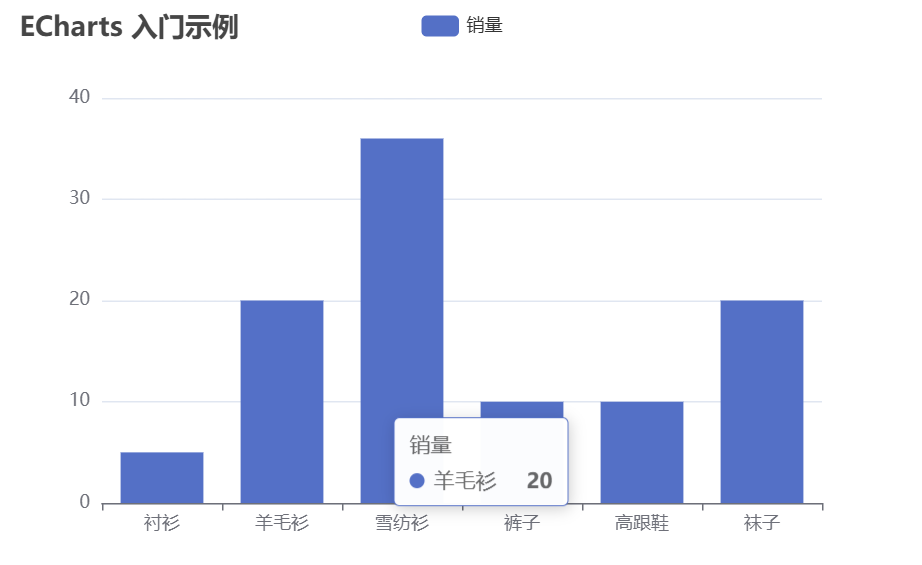
ECharts入门示例

1.3 总结

  • 使用Apache ECharts重点在于研究当前图表所需的数据格式,通常是需要后端提供符合格式要求的动态数据,然后响应给前端来展示图表

二、营业额统计

2.1 营业额统计——功能开发

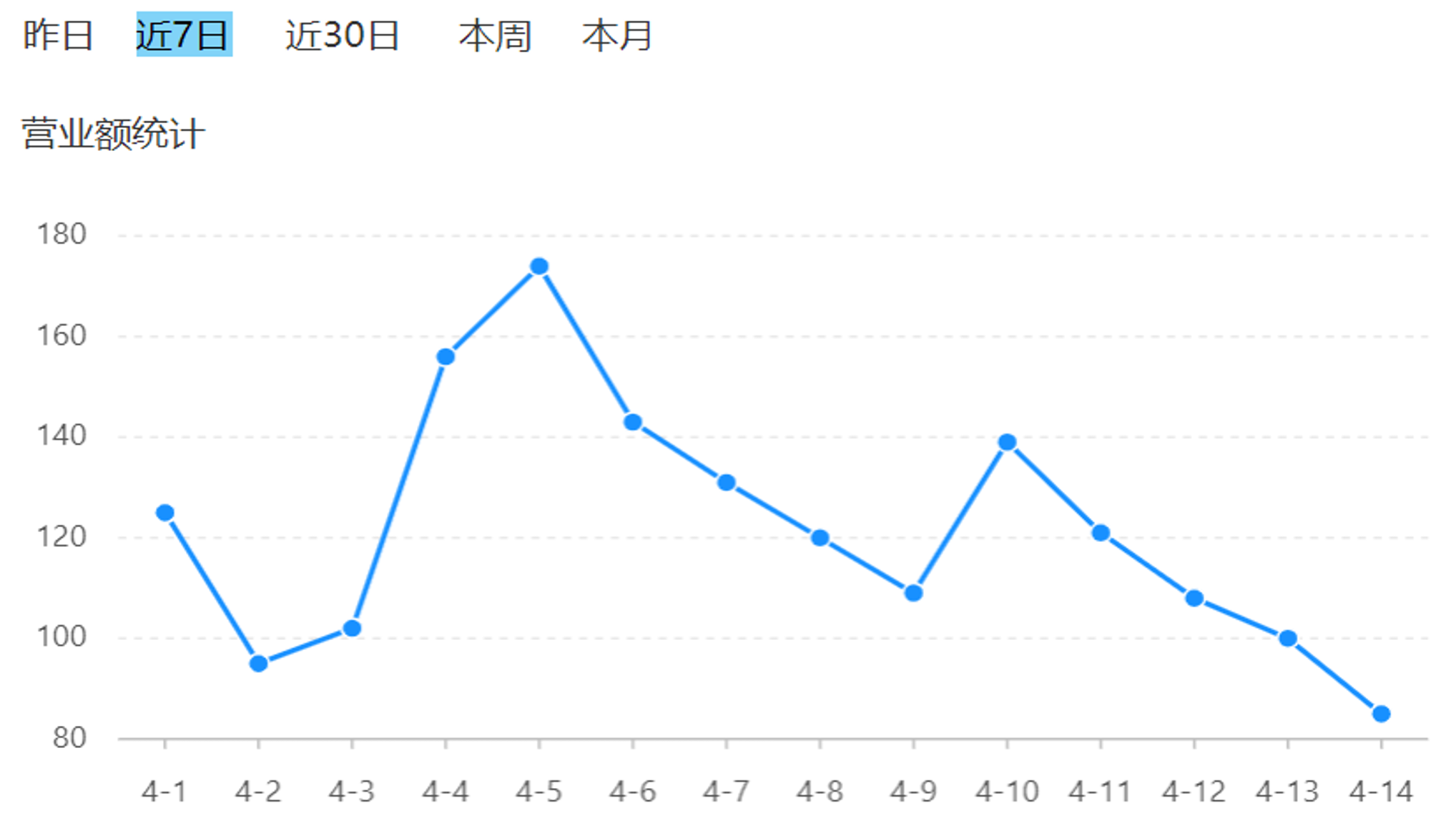
  • 产品原型
  • 业务规则
    • 营业额指订单状态为已完成的订单金额合计
    • 基于可视化报表的折线图展示营业额数据,X轴为日期,Y轴为营业额
    • 根据时间选择区间,展示每天的营业额数据
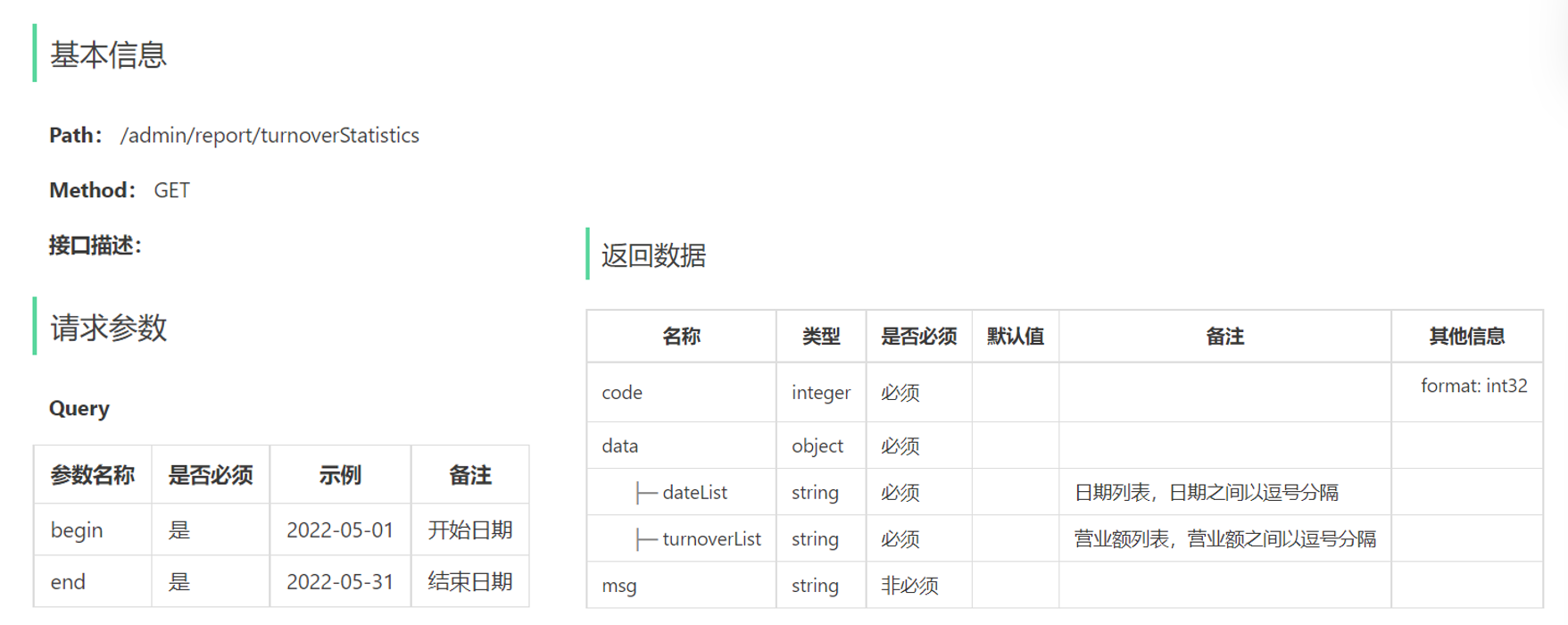
  • 接口设计

2.2 营业额统计——代码实现

2.2.1 ReportController

1
2
3
4
5
6
7
8
9
10
11
12
13
14
15
16
17
18
19
20
21
22
23
24
@RestController
@RequestMapping("/admin/report")
@Api(tags = "数据统计相关接口")
@Slf4j
public class ReportController {

@Autowired
private ReportService reportService;

/**
* 统计营业额
* @param begin
* @param end
* @return
*/
@GetMapping("/turnoverStatistics")
@ApiOperation("统计营业额")
public Result<TurnoverReportVO> turnoverStatistics(
@DateTimeFormat(pattern = "yyyy-MM-dd") LocalDate begin,
@DateTimeFormat(pattern = "yyyy-MM-dd") LocalDate end) {
log.info("统计{}到{}之间的营业额", begin, end);
return Result.success(reportService.getTurnoverStatistics(begin, end));
}
}

2.2.2 ReportService

1
2
3
4
5
6
7
8
9
10
11
12
13
/**
* 统计相关接口
*/
public interface ReportService {

/**
* 统计营业额
* @param begin
* @param end
* @return
*/
TurnoverReportVO getTurnoverStatistics(LocalDate begin, LocalDate end);
}

2.2.3 ReportServiceImpl

1
2
3
4
5
6
7
8
9
10
11
12
13
14
15
16
17
18
19
20
21
22
23
24
25
26
27
28
29
30
31
32
33
34
35
36
37
38
39
40
41
42
43
44
45
46
@Service
public class ReportServiceImpl implements ReportService {

@Autowired
private OrderMapper orderMapper;

/**
* 统计营业额
* @param begin
* @param end
* @return
*/
@Override
public TurnoverReportVO getTurnoverStatistics(LocalDate begin, LocalDate end) {

// 计算dateList
List<LocalDate> dateList = new ArrayList<>();

dateList.add(begin);
while (!begin.equals(end)) {
begin = begin.plusDays(1);
dateList.add(begin);
}

// 计算turnoverList
List<Double> turnoverList = new ArrayList<>();
for (LocalDate date : dateList) {
// 查询date日期对应的营业额
LocalDateTime beginTime = LocalDateTime.of(date, LocalTime.MIN);
LocalDateTime endTime = LocalDateTime.of(date, LocalTime.MAX);

Map map = new HashMap();
map.put("begin", beginTime);
map.put("end", endTime);
map.put("status", Orders.COMPLETED);
Double turnover = orderMapper.sumByMap(map);
turnover = turnover == null ? 0.0 : turnover;
turnoverList.add(turnover);
}

return TurnoverReportVO.builder()
.dateList(StringUtils.join(dateList, ","))
.turnoverList(StringUtils.join(turnoverList, ","))
.build();
}
}

2.2.4 OrderMapper

1
2
3
4
5
6
/**
* 统计营业额
* @param map
* @return
*/
Double sumByMap(Map map);

2.2.5 OrderMapper.xml

1
2
3
4
5
6
7
8
9
10
11
12
13
14
<select id="sumByMap" resultType="java.lang.Double">
select sum(amount) from orders
<where>
<if test="begin != null">
and order_time &gt; #{begin}
</if>
<if test="end != null">
and order_time &lt; #{end}
</if>
<if test="status != null">
and status = #{status}
</if>
</where>
</select>

2.3 营业额统计——功能测试

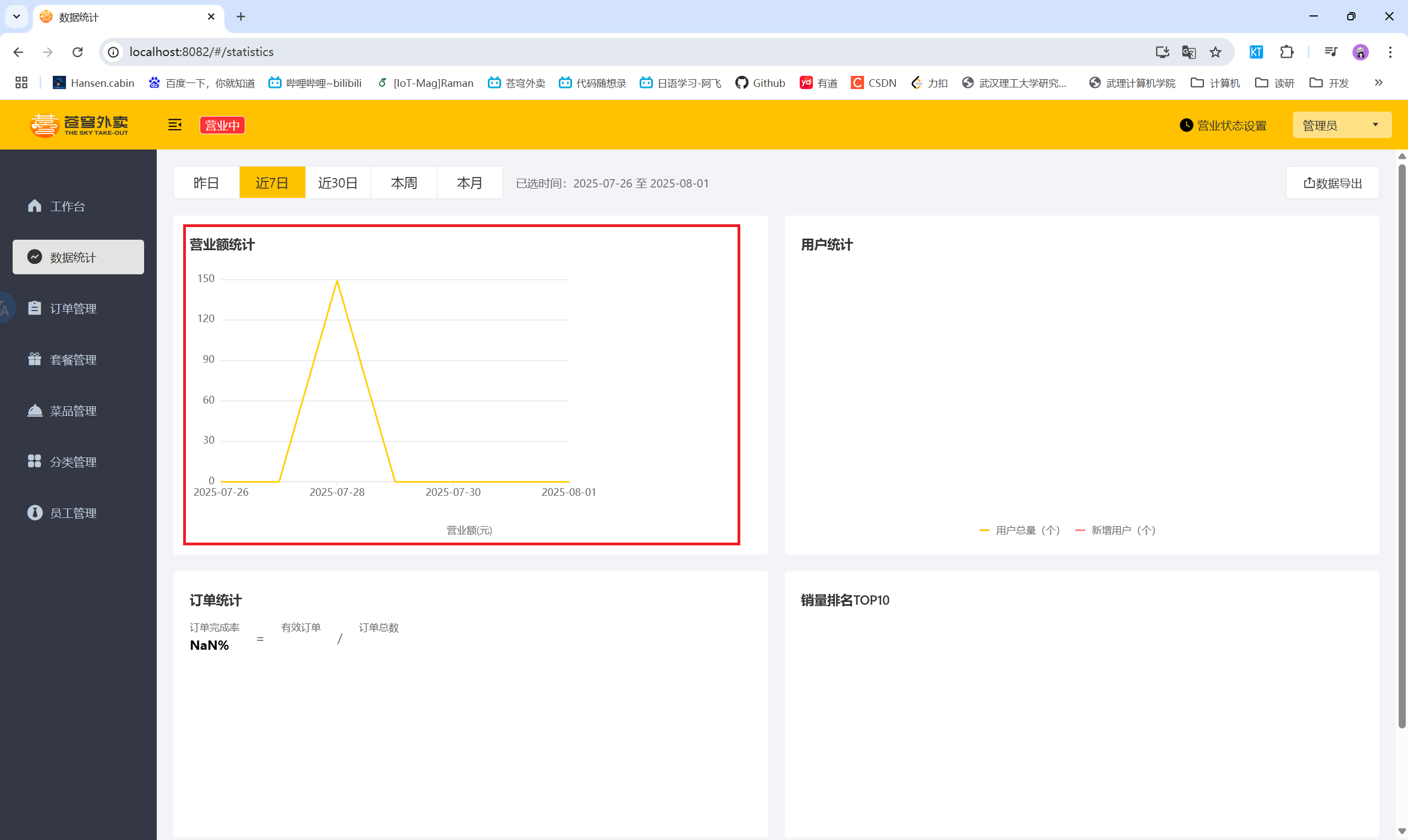
  • 营业额统计

三、用户统计

3.1 用户统计——功能开发

  • 产品原型
  • 业务规则
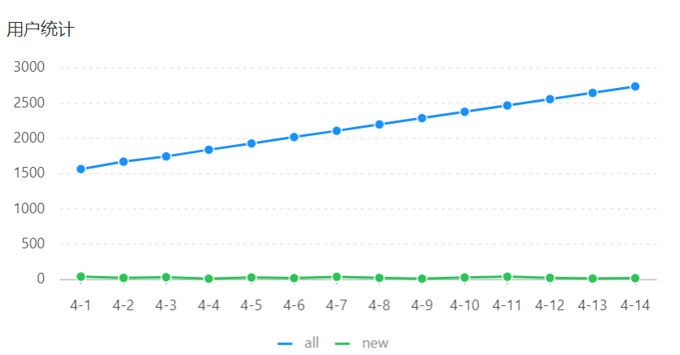
    • 基于可视化报表的折线图展示用户数据,X轴为日期,Y轴为用户数
    • 根据时间选择区间,展示每天的用户总量和新增用户量数据
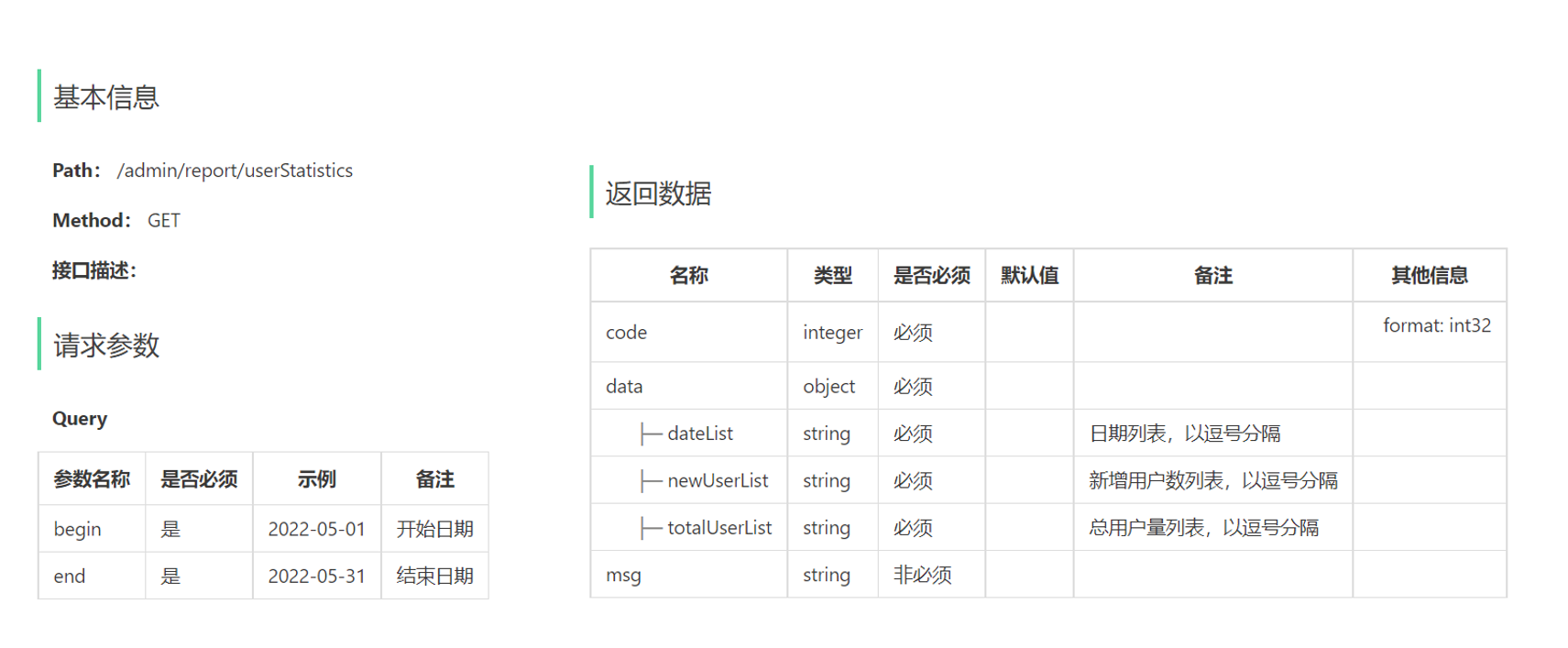
  • 接口设计

3.2 用户统计——代码实现

3.2.1 ReportController

1
2
3
4
5
6
7
8
9
10
11
12
13
14
/**
* 统计用户
* @param begin
* @param end
* @return
*/
@GetMapping("/userStatistics")
@ApiOperation("用户统计")
public Result<UserReportVO> userStatistics(
@DateTimeFormat(pattern = "yyyy-MM-dd") LocalDate begin,
@DateTimeFormat(pattern = "yyyy-MM-dd") LocalDate end) {
log.info("统计{}到{}之间的用户数量", begin, end);
return Result.success(reportService.getUserStatistics(begin, end));
}

3.2.2 ReportService

1
2
3
4
5
6
7
/**
* 统计用户
* @param begin
* @param end
* @return
*/
UserReportVO getUserStatistics(LocalDate begin, LocalDate end);

3.2.3 ReportServiceImpl

1
2
3
4
5
6
7
8
9
10
11
12
13
14
15
16
17
18
19
20
21
22
23
24
25
26
27
28
29
30
31
32
33
34
35
36
37
38
39
40
41
42
43
/**
* 统计用户
* @param begin
* @param end
* @return
*/
@Override
public UserReportVO getUserStatistics(LocalDate begin, LocalDate end) {

// 计算dateList
List<LocalDate> dateList = new ArrayList<>();

dateList.add(begin);
while (!begin.equals(end)) {
begin = begin.plusDays(1);
dateList.add(begin);
}

// 计算totalUserList和newUserList
List<Integer> totalUserList = new ArrayList<>();
List<Integer> newUserList = new ArrayList<>();

for (LocalDate date : dateList) {
// 查询date日期对应的用户数
LocalDateTime beginTime = LocalDateTime.of(date, LocalTime.MIN);
LocalDateTime endTime = LocalDateTime.of(date, LocalTime.MAX);

Map map = new HashMap();
map.put("end", endTime);
Integer totalUser = userMapper.countByMap(map);
map.put("begin", beginTime);
Integer newUser = userMapper.countByMap(map);

totalUserList.add(totalUser);
newUserList.add(newUser);
}

return UserReportVO.builder()
.dateList(StringUtils.join(dateList, ","))
.totalUserList(StringUtils.join(totalUserList, ","))
.newUserList(StringUtils.join(newUserList, ","))
.build();
}

3.2.4 UserMapper

1
2
3
4
5
6
/**
* 统计用户数量
* @param map
* @return
*/
Integer countByMap(Map map);

3.2.5 UserMapper.xml

1
2
3
4
5
6
7
8
9
10
11
<select id="countByMap" resultType="java.lang.Integer">
select count(id) from user
<where>
<if test="begin != null">
and create_time &gt; #{begin}
</if>
<if test="end != null">
and create_time &lt; #{end}
</if>
</where>
</select>

3.3 用户统计——功能测试

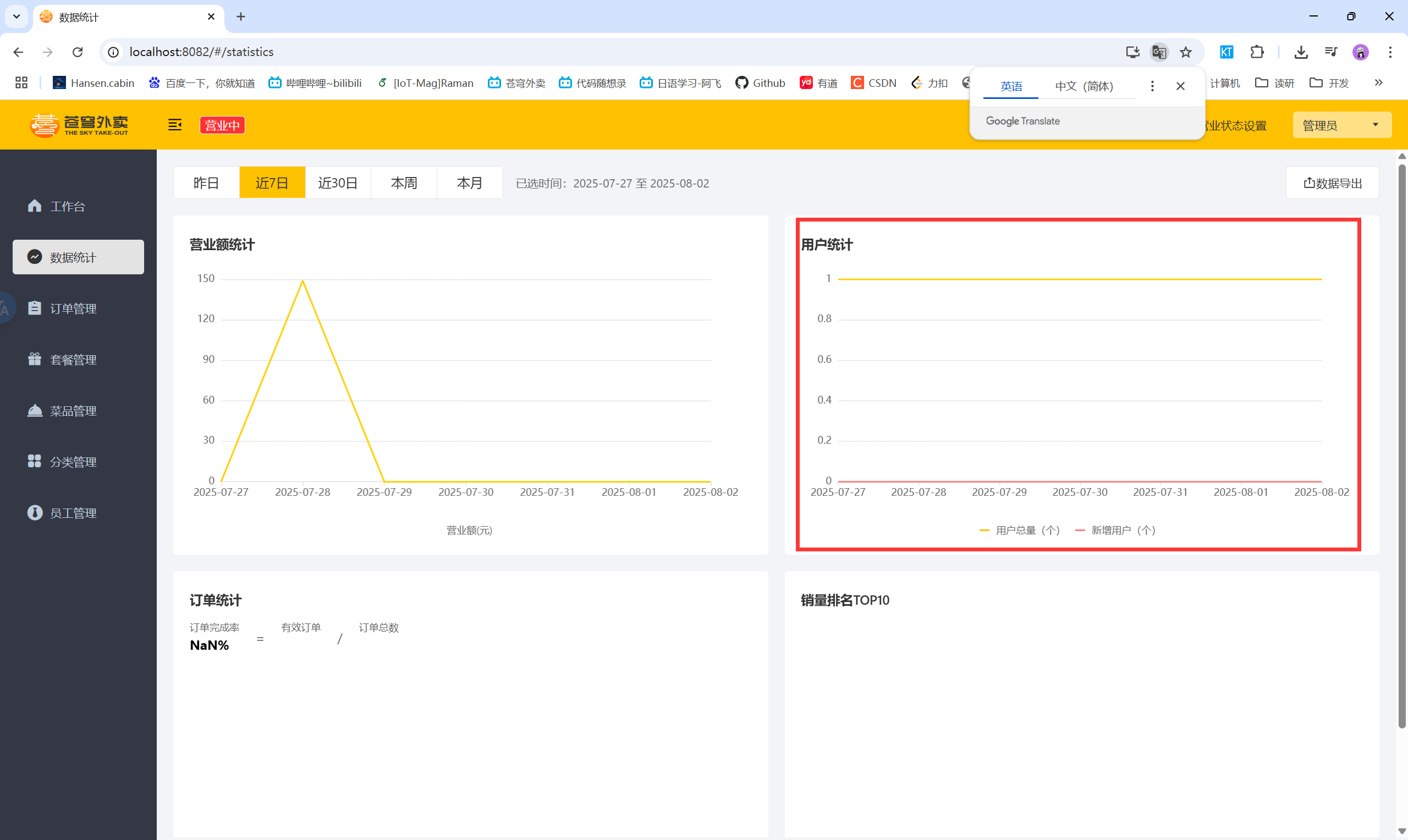
  • 用户统计

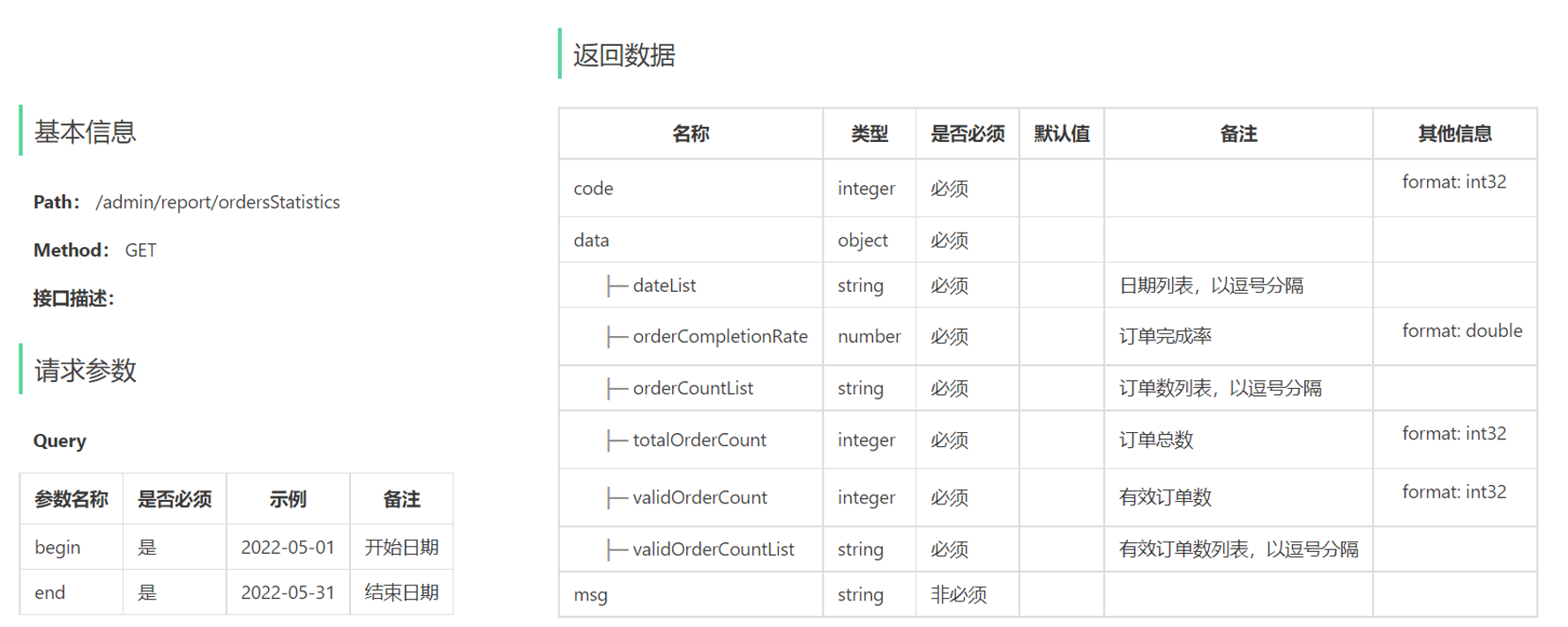
四、订单统计

4.1 订单统计——功能开发

  • 产品原型
  • 业务规则
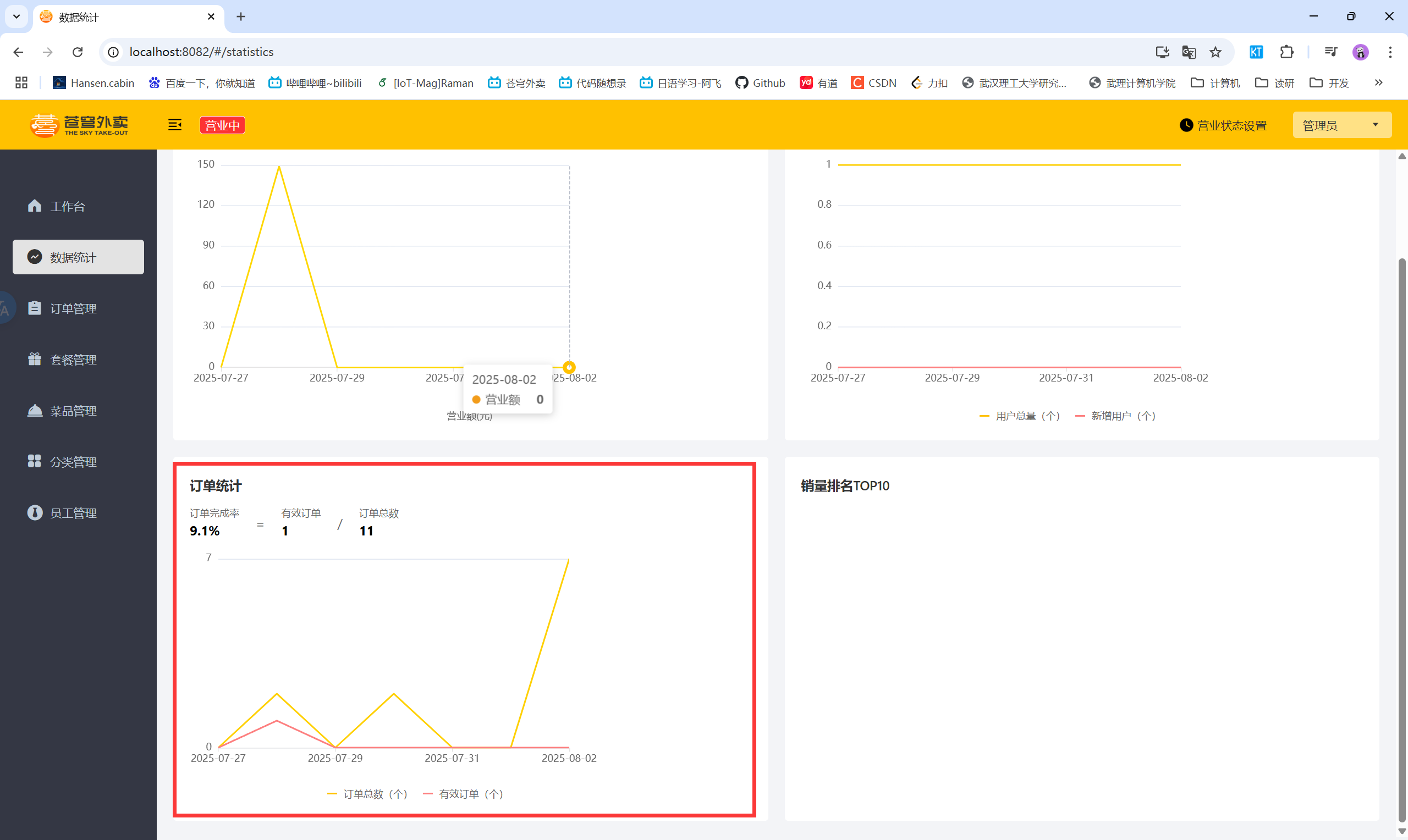
    • 有效订单指状态为 “已完成” 的订单
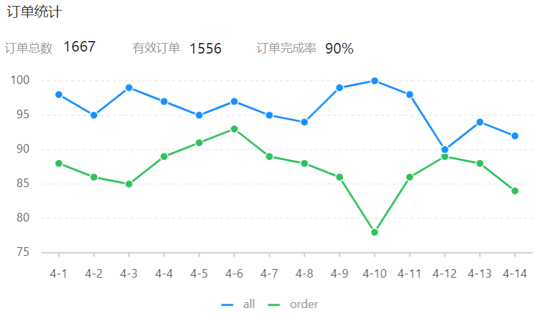
    • 基于可视化报表的折线图展示订单数据,X轴为日期,Y轴为订单数量
    • 根据时间选择区间,展示每天的订单总数和有效订单数
    • 展示所选时间区间内的有效订单数、总订单数、订单完成率,订单完成率 = 有效订单数 / 总订单数 * 100%
  • 接口设计

4.2 订单统计——代码实现

4.2.1 ReportController

1
2
3
4
5
6
7
8
9
10
11
12
13
14
15
/**
* 订单统计
* @param begin
* @param end
* @return
*/
@GetMapping("/ordersStatistics")
@ApiOperation("订单统计")
public Result<OrderReportVO> orderStatistics(
@DateTimeFormat(pattern = "yyyy-MM-dd") LocalDate begin,
@DateTimeFormat(pattern = "yyyy-MM-dd") LocalDate end) {
log.info("<UNK>");
log.info("统计{}到{}之间的订单数量", begin, end);
return Result.success(reportService.getOrdersStatistics(begin, end));
}

4.2.2 ReportService

1
2
3
4
5
6
7
/**
* 统计订单
* @param begin
* @param end
* @return
*/
OrderReportVO getOrdersStatistics(LocalDate begin, LocalDate end);

4.2.3 ReportServiceImpl

1
2
3
4
5
6
7
8
9
10
11
12
13
14
15
16
17
18
19
20
21
22
23
24
25
26
27
28
29
30
31
32
33
34
35
36
37
38
39
40
41
42
43
44
45
46
47
48
49
50
51
52
53
54
55
56
57
58
59
60
/**
* 订单统计
* @param begin
* @param end
* @return
*/
@Override
public OrderReportVO getOrdersStatistics(LocalDate begin, LocalDate end) {

// 计算dateList
List<LocalDate> dateList = new ArrayList<>();

dateList.add(begin);
while (!begin.equals(end)) {
begin = begin.plusDays(1);
dateList.add(begin);
}

// 遍历dateList集合,查询每天的有效订单数和订单总数
List<Integer> orderCountList = new ArrayList<>();
List<Integer> validOrderCountList = new ArrayList<>();
for (LocalDate date : dateList) {
LocalDateTime beginTime = LocalDateTime.of(date, LocalTime.MIN);
LocalDateTime endTime = LocalDateTime.of(date, LocalTime.MAX);

// 查询每天的订单总数
Integer orderCount = getOrderCount(beginTime, endTime, null);
orderCountList.add(orderCount);
// 查询每天的有效订单数
Integer validOrderCount = getOrderCount(beginTime, endTime, Orders.COMPLETED);
validOrderCountList.add(validOrderCount);
}

Integer totalOrderCount = orderCountList.stream().reduce(Integer::sum).get();
Integer validOrderCount = validOrderCountList.stream().reduce(Integer::sum).get();

Double orderCompletionRate = 0.0;
if (totalOrderCount != 0) {
orderCompletionRate = validOrderCount.doubleValue() / totalOrderCount;
}

return OrderReportVO.builder()
.dateList(StringUtils.join(dateList, ","))
.orderCountList(StringUtils.join(orderCountList, ","))
.validOrderCountList(StringUtils.join(validOrderCountList, ","))
.totalOrderCount(totalOrderCount)
.validOrderCount(validOrderCount)
.orderCompletionRate(orderCompletionRate)
.build();
}


private Integer getOrderCount(LocalDateTime begin, LocalDateTime end, Integer status) {
Map map = new HashMap();
map.put("begin", begin);
map.put("end", end);
map.put("status", status);

return orderMapper.countByMap(map);
}

4.2.4 OrderMapper

1
2
3
4
5
6
/**
* 统计订单
* @param map
* @return
*/
Integer countByMap(Map map);

4.2.5 OrderMapper.xml

1
2
3
4
5
6
7
8
9
10
11
12
13
14
<select id="countByMap" resultType="java.lang.Integer">
select count(id) from orders
<where>
<if test="begin != null">
and order_time &gt; #{begin}
</if>
<if test="end != null">
and order_time &lt; #{end}
</if>
<if test="status != null">
and status = #{status}
</if>
</where>
</select>

4.3 订单统计——功能测试

  • 订单统计

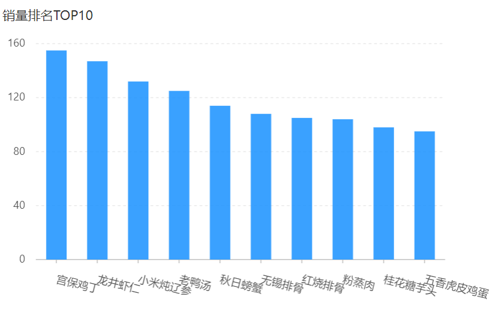
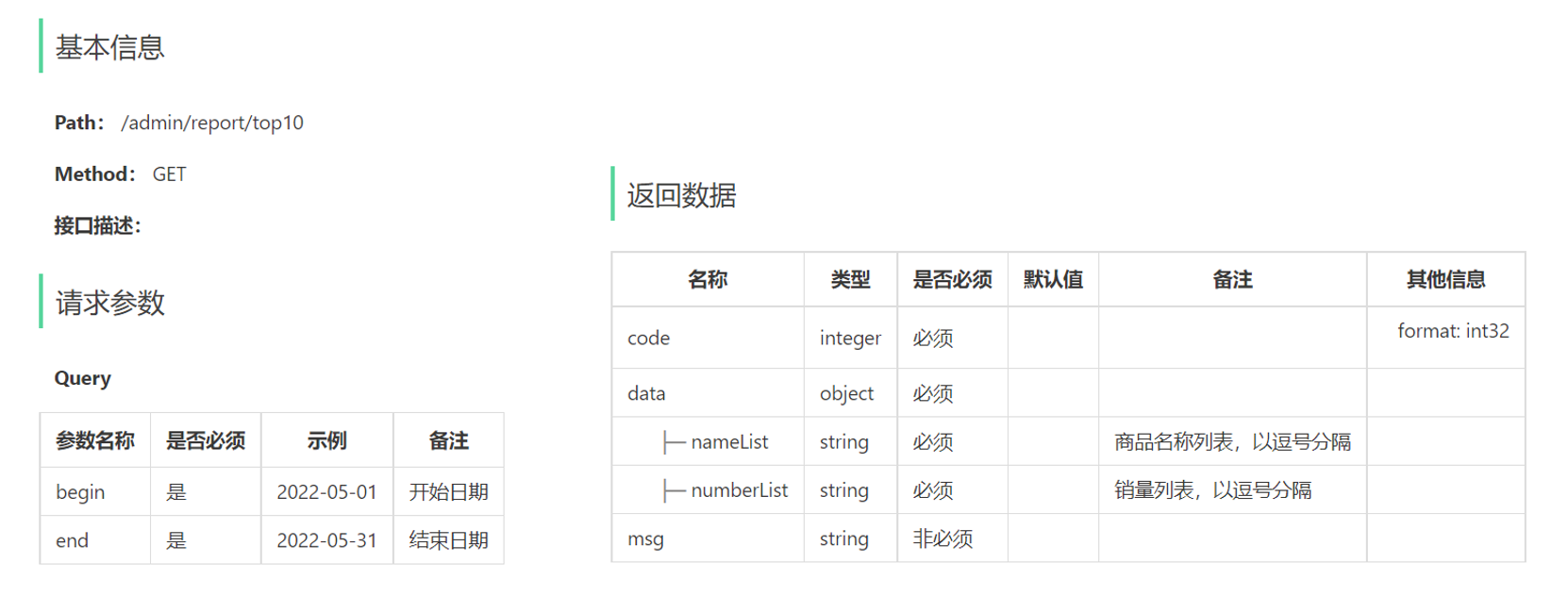
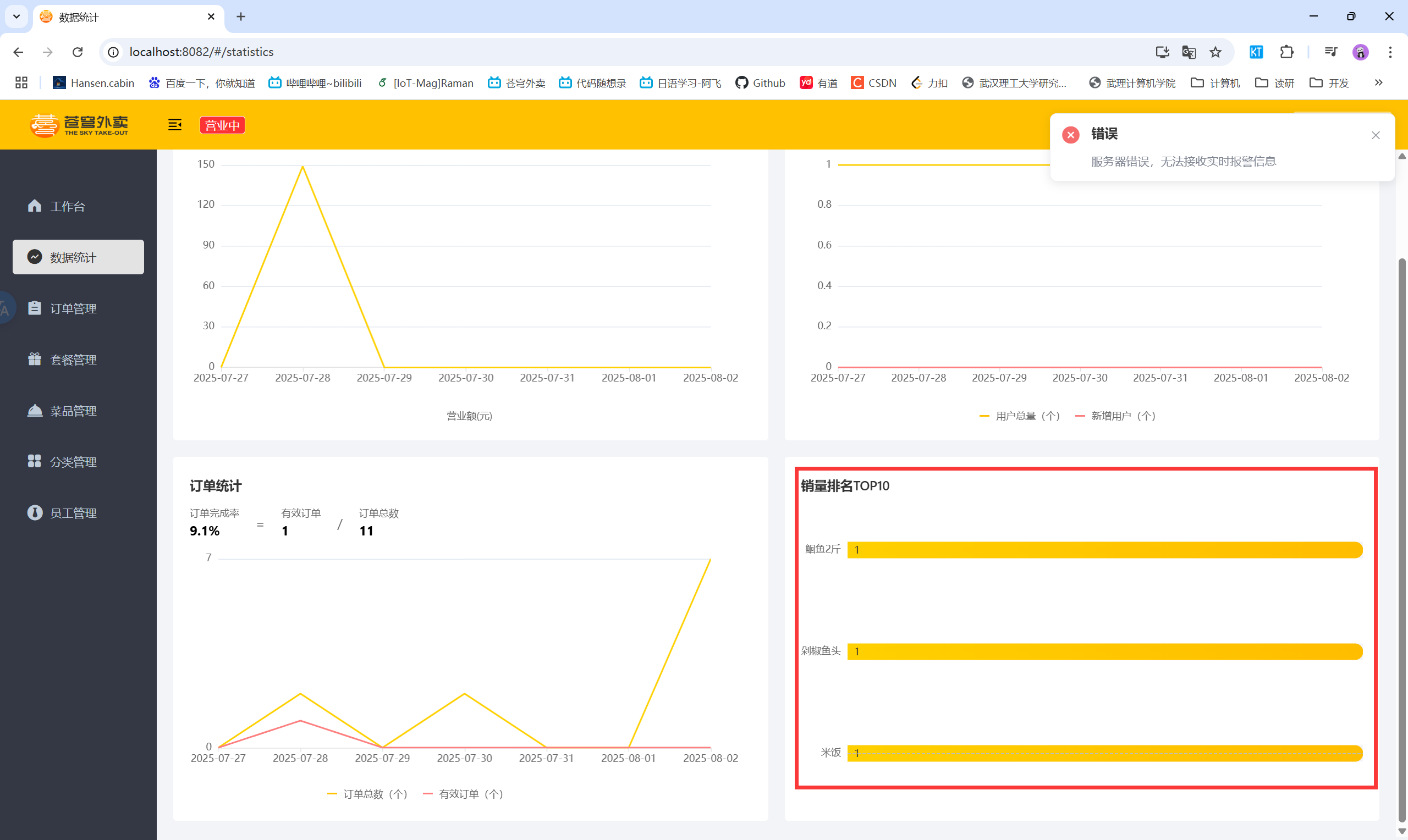
五、销量排名统计

5.1 销量排名统计——功能开发

  • 产品原型
  • 业务规则
    • 根据时间选择区间,展示销量前10的商品(包括菜品和套餐)
    • 基于可视化报表的柱状图降序展示商品销量
    • 此处的销量为商品销售的份数
  • 接口设计

5.2 销量排名统计——代码实现

5.2.1 ReportController

1
2
3
4
5
6
7
8
9
10
11
12
13
14
/**
* 销量排名top10
* @param begin
* @param end
* @return
*/
@GetMapping("/top10")
@ApiOperation("销量排名top10")
public Result<SalesTop10ReportVO> top10(
@DateTimeFormat(pattern = "yyyy-MM-dd") LocalDate begin,
@DateTimeFormat(pattern = "yyyy-MM-dd") LocalDate end) {
log.info("统计{}到{}之间的销量排名top10", begin, end);
return Result.success(reportService.getSalesTop10(begin, end));
}

5.2.2 ReportService

1
2
3
4
5
6
7
/**
* 统计销量排名top10
* @param begin
* @param end
* @return
*/
SalesTop10ReportVO getSalesTop10(LocalDate begin, LocalDate end);

5.2.3 ReportServiceImpl

1
2
3
4
5
6
7
8
9
10
11
12
13
14
15
16
17
18
19
20
21
/**
* 统计销量排名top10
* @param begin
* @param end
* @return
*/
@Override
public SalesTop10ReportVO getSalesTop10(LocalDate begin, LocalDate end) {
LocalDateTime beginTime = LocalDateTime.of(begin, LocalTime.MIN);
LocalDateTime endTime = LocalDateTime.of(end, LocalTime.MAX);

List<GoodsSalesDTO> salesTop10 = orderMapper.getSalesTop10(beginTime, endTime);

List<String> names = salesTop10.stream().map(GoodsSalesDTO::getName).collect(Collectors.toList());
List<Integer> numbers = salesTop10.stream().map(GoodsSalesDTO::getNumber).collect(Collectors.toList());

return SalesTop10ReportVO.builder()
.nameList(StringUtils.join(names, ","))
.numberList(StringUtils.join(numbers, ","))
.build();
}

5.2.4 OrderMapper

1
2
3
4
5
6
7
/**
* 统计销量排名top10
* @param begin
* @param end
* @return
*/
List<GoodsSalesDTO> getSalesTop10(LocalDateTime begin, LocalDateTime end);

5.2.5 OrderMapper.xml

1
2
3
4
5
6
7
8
9
10
11
12
13
14
<select id="getSalesTop10" resultType="com.sky.dto.GoodsSalesDTO">
select od.name, sum(od.number) number
from order_detail od, orders o
where od.order_id = o.id and o.status = 5
<if test="begin != null">
and o.order_time &gt; #{begin}
</if>
<if test="end != null">
and o.order_time &lt; #{end}
</if>
group by od.name
order by number desc
limit 0,10
</select>

5.3 销量排名统计——功能测试

  • 销量排名统计

2025.08.02

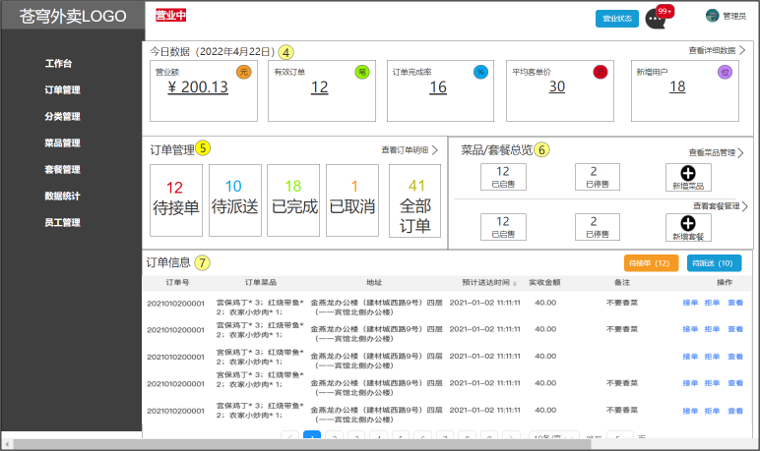
六、工作台

6.1 工作台——功能开发

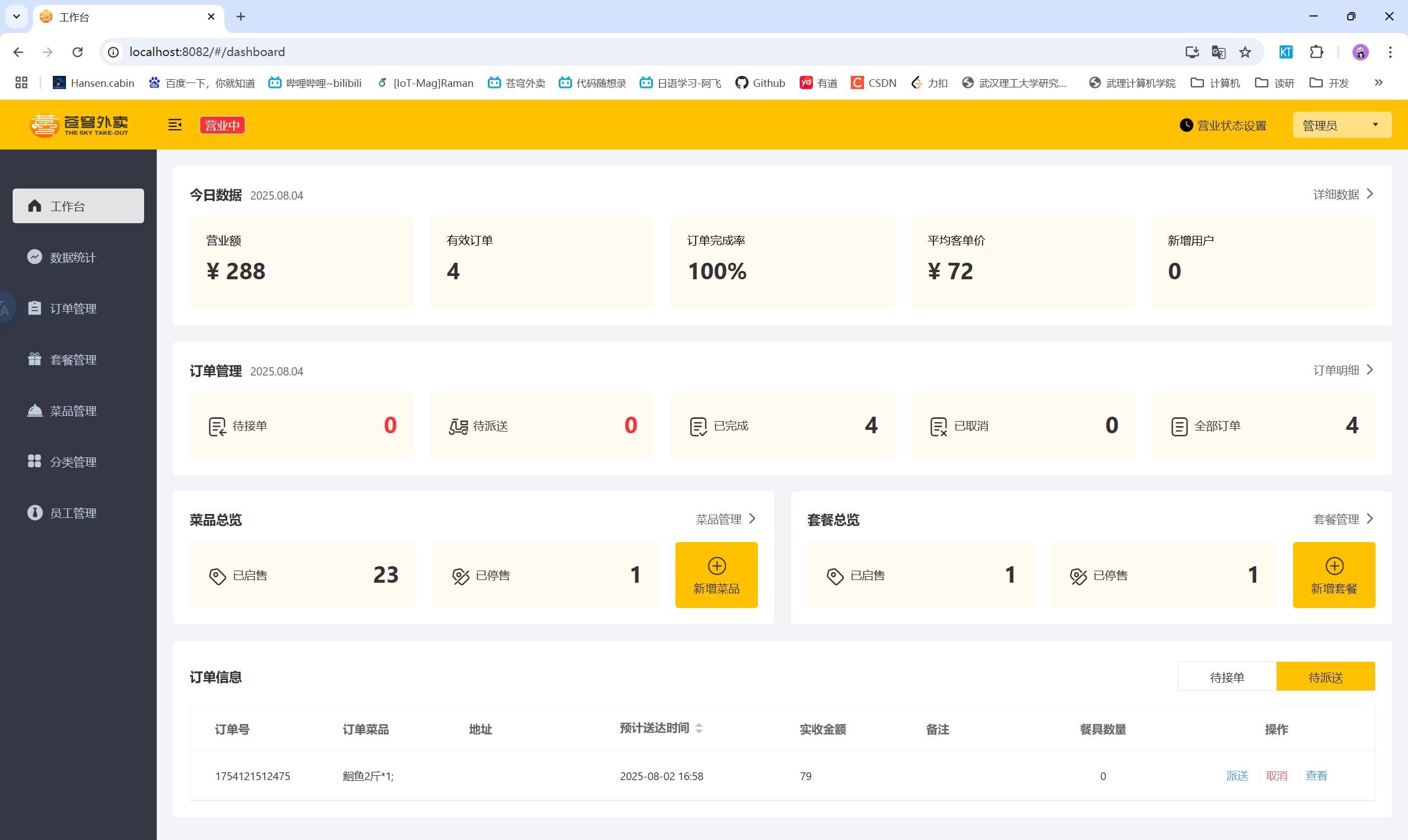
  • 产品原型
  • 工作台是系统运营的数据看板,并提供快捷操作入口,可以有效提高商家的工作效率。
  • 工作台展示的数据:
    • 今日数据
    • 订单管理
    • 菜品总览
    • 套餐总览
    • 订单信息
  • 名词解释:
    • 营业额:已完成订单的总金额
    • 有效订单:已完成订单的数量
    • 订单完成率:有效订单数 / 总订单数 * 100%
    • 平均客单价:营业额 / 有效订单数
    • 新增用户:新增用户的数量
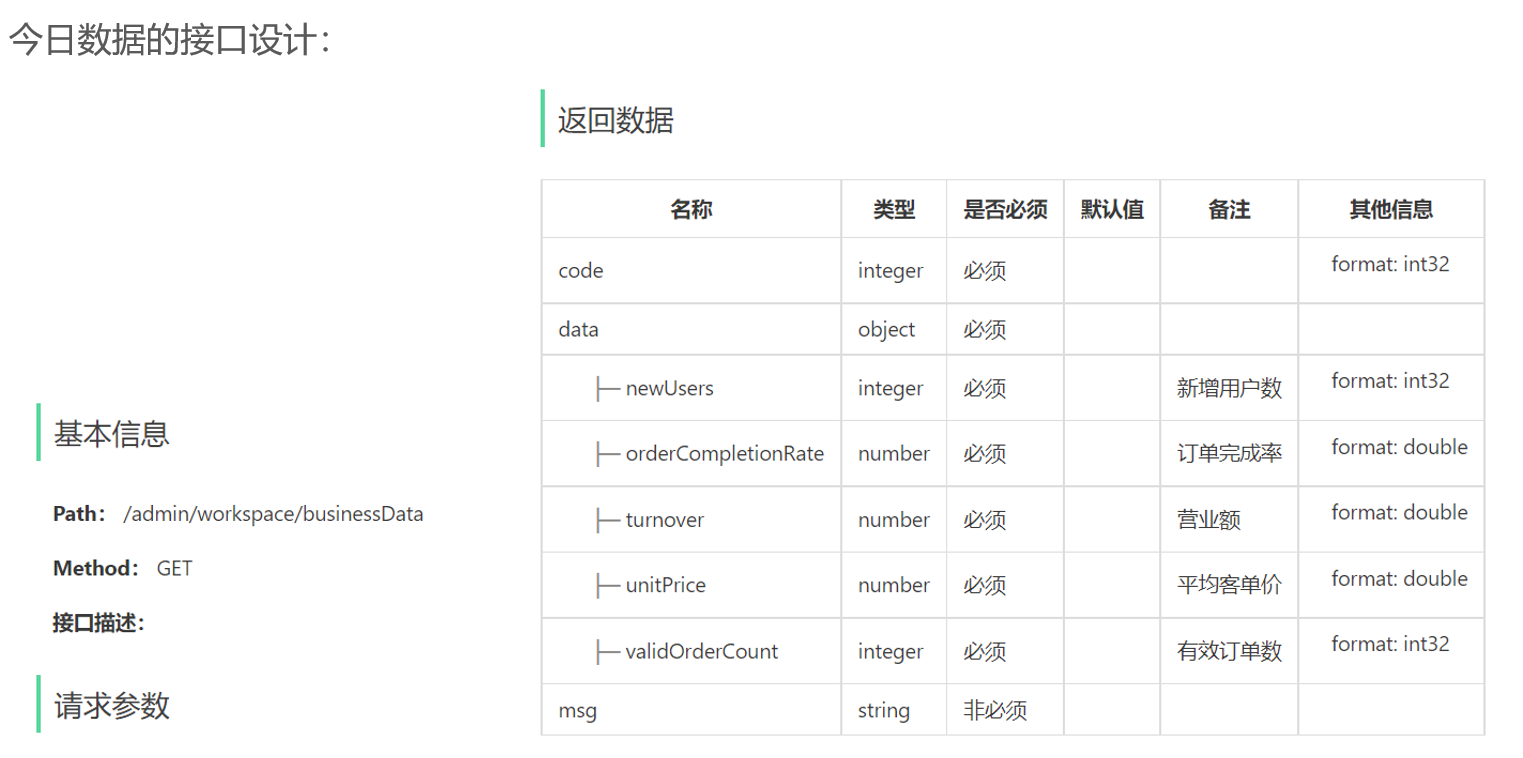
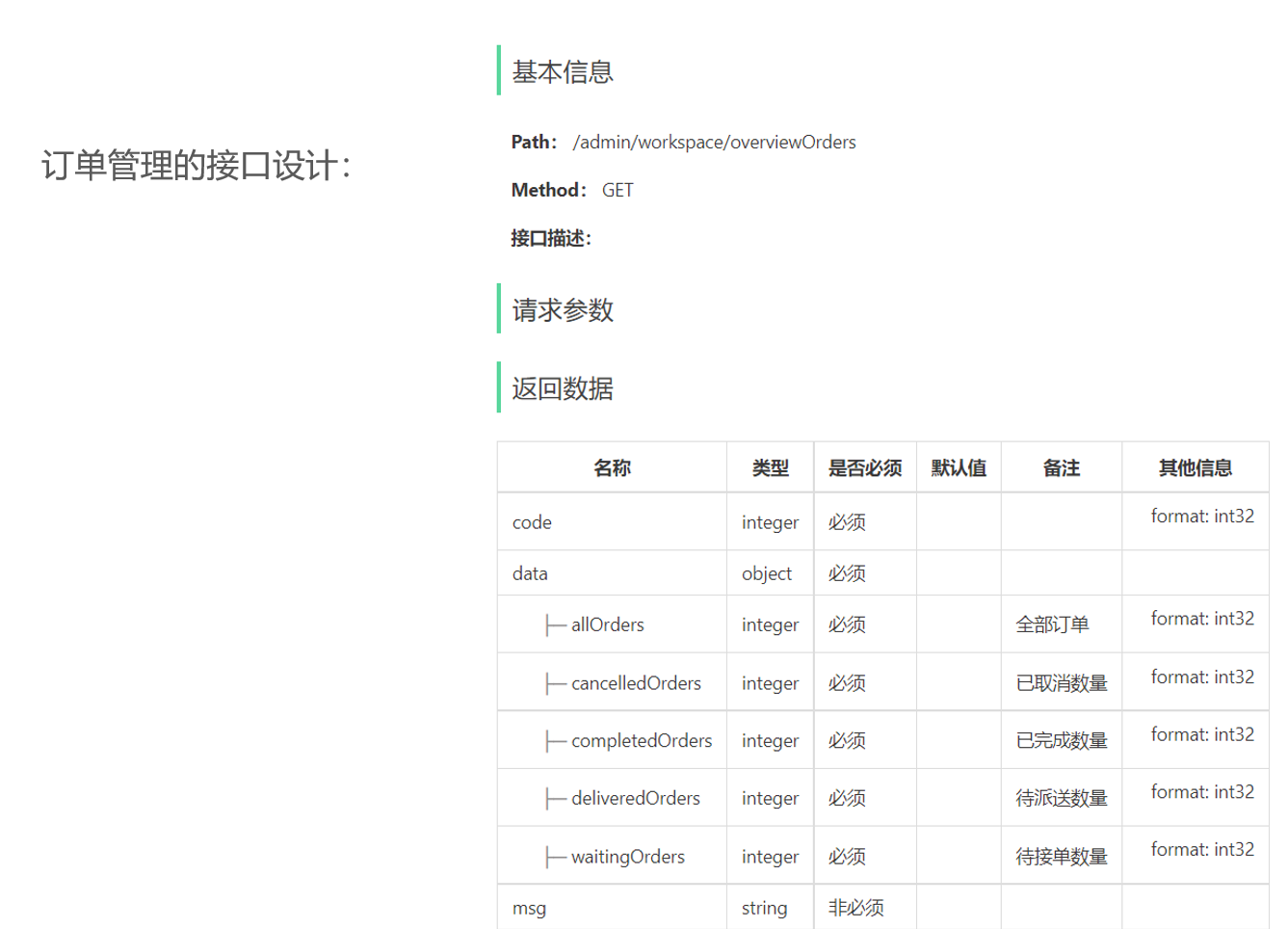
  • 接口设计:
    • 今日数据接口
    • 订单管理接口
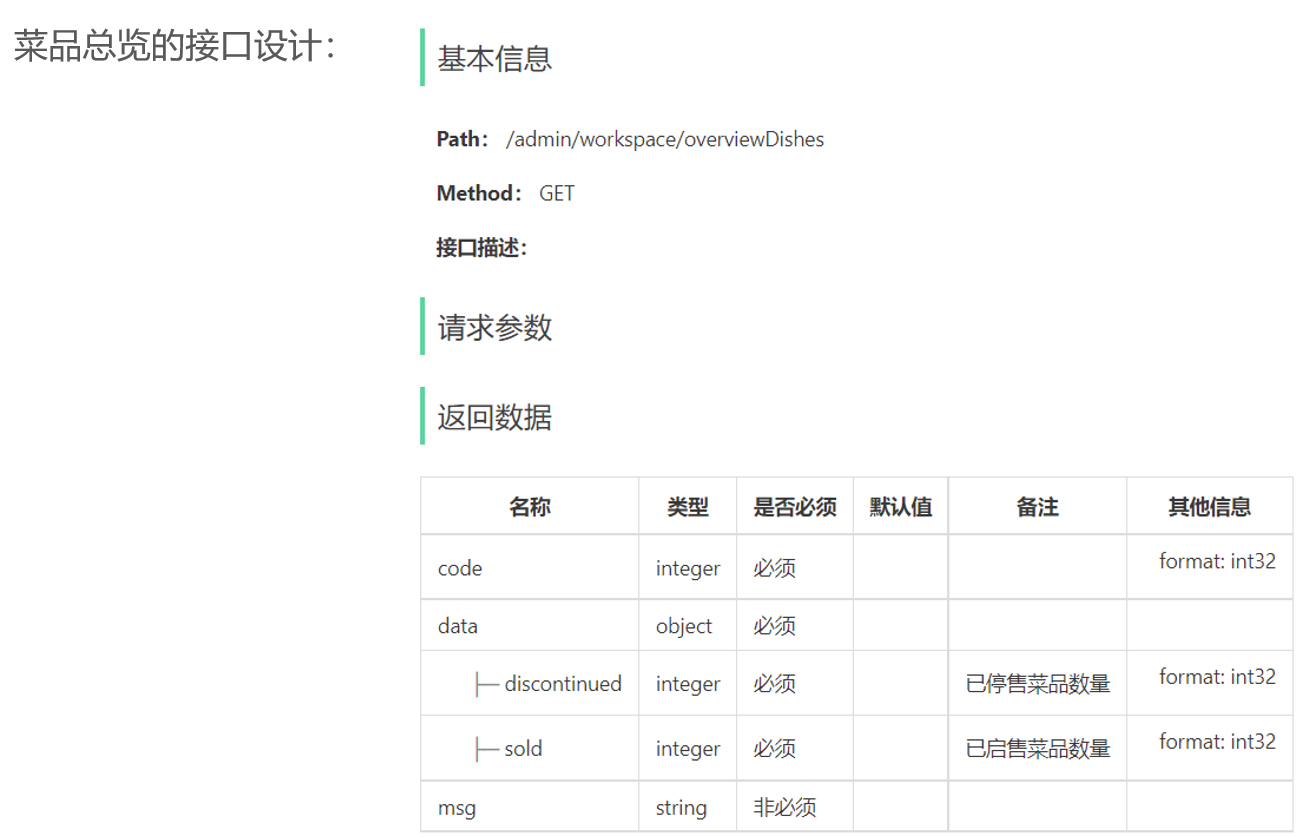
    • 菜品总览接口
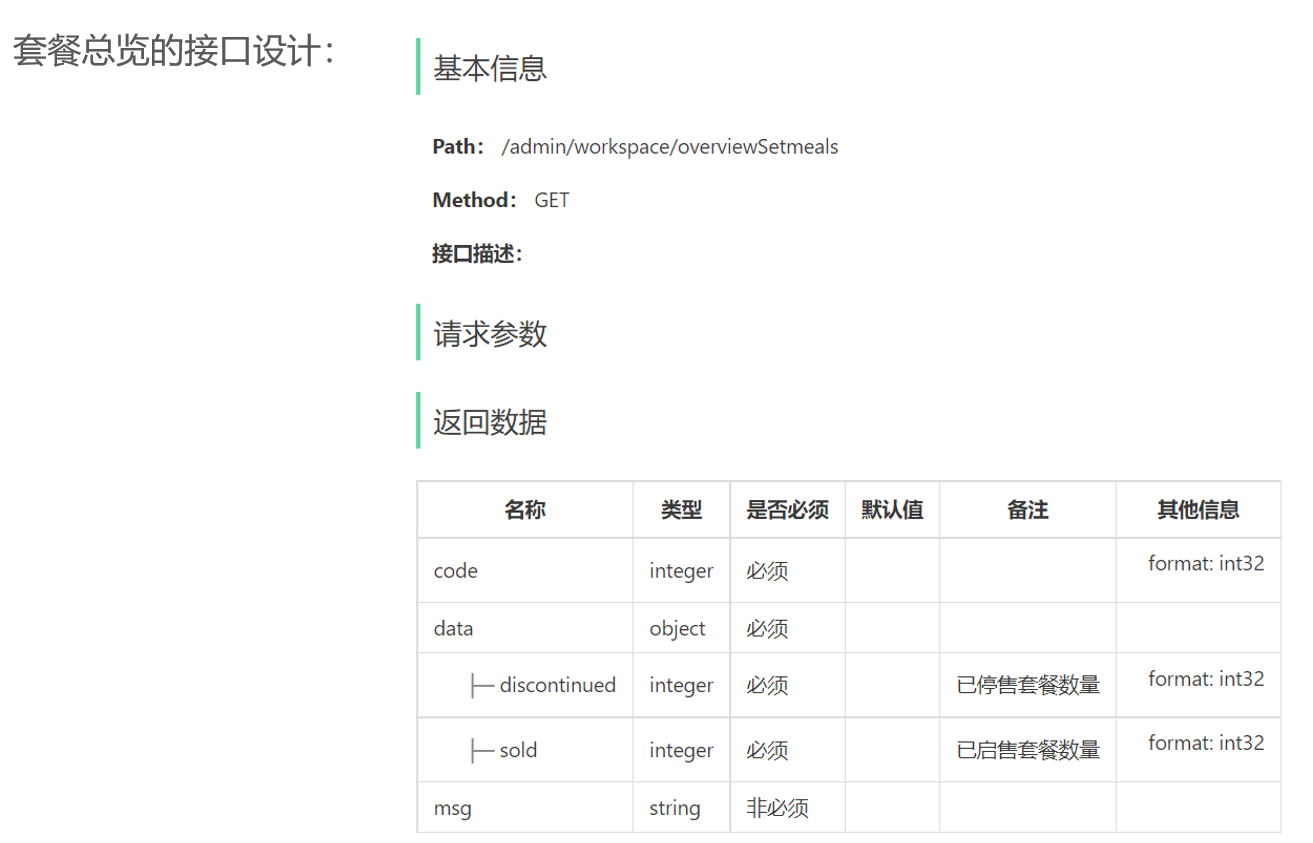
    • 套餐总览接口
    • 订单搜索(已完成)
    • 各个状态的订单数量统计(已完成)

6.2 工作台——代码实现

6.2.1 WorkSpaceController

1
2
3
4
5
6
7
8
9
10
11
12
13
14
15
16
17
18
19
20
21
22
23
24
25
26
27
28
29
30
31
32
33
34
35
36
37
38
39
40
41
42
43
44
45
46
47
48
49
50
51
52
53
54
55
56
57
58
/**
* 工作台
*/
@RestController
@RequestMapping("/admin/workspace")
@Slf4j
@Api(tags = "工作台相关接口")
public class WorkSpaceController {

@Autowired
private WorkspaceService workspaceService;

/**
* 工作台今日数据查询
* @return
*/
@GetMapping("/businessData")
@ApiOperation("工作台今日数据查询")
public Result<BusinessDataVO> businessData(){
//获得当天的开始时间
LocalDateTime begin = LocalDateTime.now().with(LocalTime.MIN);
//获得当天的结束时间
LocalDateTime end = LocalDateTime.now().with(LocalTime.MAX);

BusinessDataVO businessDataVO = workspaceService.getBusinessData(begin, end);
return Result.success(businessDataVO);
}

/**
* 查询订单管理数据
* @return
*/
@GetMapping("/overviewOrders")
@ApiOperation("查询订单管理数据")
public Result<OrderOverViewVO> orderOverView(){
return Result.success(workspaceService.getOrderOverView());
}

/**
* 查询菜品总览
* @return
*/
@GetMapping("/overviewDishes")
@ApiOperation("查询菜品总览")
public Result<DishOverViewVO> dishOverView(){
return Result.success(workspaceService.getDishOverView());
}

/**
* 查询套餐总览
* @return
*/
@GetMapping("/overviewSetmeals")
@ApiOperation("查询套餐总览")
public Result<SetmealOverViewVO> setmealOverView(){
return Result.success(workspaceService.getSetmealOverView());
}
}

6.2.2 WorkspaceService

1
2
3
4
5
6
7
8
9
10
11
12
13
14
15
16
17
18
19
20
21
22
23
24
25
26
27
28
29
public interface WorkspaceService {

/**
* 根据时间段统计营业数据
* @param begin
* @param end
* @return
*/
BusinessDataVO getBusinessData(LocalDateTime begin, LocalDateTime end);

/**
* 查询订单管理数据
* @return
*/
OrderOverViewVO getOrderOverView();

/**
* 查询菜品总览
* @return
*/
DishOverViewVO getDishOverView();

/**
* 查询套餐总览
* @return
*/
SetmealOverViewVO getSetmealOverView();

}

6.2.3 WorkspaceServiceImpl

1
2
3
4
5
6
7
8
9
10
11
12
13
14
15
16
17
18
19
20
21
22
23
24
25
26
27
28
29
30
31
32
33
34
35
36
37
38
39
40
41
42
43
44
45
46
47
48
49
50
51
52
53
54
55
56
57
58
59
60
61
62
63
64
65
66
67
68
69
70
71
72
73
74
75
76
77
78
79
80
81
82
83
84
85
86
87
88
89
90
91
92
93
94
95
96
97
98
99
100
101
102
103
104
105
106
107
108
109
110
111
112
113
114
115
116
117
118
119
120
121
122
123
124
125
126
127
128
129
130
131
132
133
134
135
136
137
138
139
140
141
142
@Service
@Slf4j
public class WorkspaceServiceImpl implements WorkspaceService {

@Autowired
private OrderMapper orderMapper;
@Autowired
private UserMapper userMapper;
@Autowired
private DishMapper dishMapper;
@Autowired
private SetmealMapper setmealMapper;

/**
* 根据时间段统计营业数据
* @param begin
* @param end
* @return
*/
public BusinessDataVO getBusinessData(LocalDateTime begin, LocalDateTime end) {
/**
* 营业额:当日已完成订单的总金额
* 有效订单:当日已完成订单的数量
* 订单完成率:有效订单数 / 总订单数
* 平均客单价:营业额 / 有效订单数
* 新增用户:当日新增用户的数量
*/

Map map = new HashMap();
map.put("begin",begin);
map.put("end",end);

//查询总订单数
Integer totalOrderCount = orderMapper.countByMap(map);

map.put("status", Orders.COMPLETED);
//营业额
Double turnover = orderMapper.sumByMap(map);
turnover = turnover == null? 0.0 : turnover;

//有效订单数
Integer validOrderCount = orderMapper.countByMap(map);

Double unitPrice = 0.0;

Double orderCompletionRate = 0.0;
if(totalOrderCount != 0 && validOrderCount != 0){
//订单完成率
orderCompletionRate = validOrderCount.doubleValue() / totalOrderCount;
//平均客单价
unitPrice = turnover / validOrderCount;
}

//新增用户数
Integer newUsers = userMapper.countByMap(map);

return BusinessDataVO.builder()
.turnover(turnover)
.validOrderCount(validOrderCount)
.orderCompletionRate(orderCompletionRate)
.unitPrice(unitPrice)
.newUsers(newUsers)
.build();
}


/**
* 查询订单管理数据
*
* @return
*/
public OrderOverViewVO getOrderOverView() {
Map map = new HashMap();
map.put("begin", LocalDateTime.now().with(LocalTime.MIN));
map.put("status", Orders.TO_BE_CONFIRMED);

//待接单
Integer waitingOrders = orderMapper.countByMap(map);

//待派送
map.put("status", Orders.CONFIRMED);
Integer deliveredOrders = orderMapper.countByMap(map);

//已完成
map.put("status", Orders.COMPLETED);
Integer completedOrders = orderMapper.countByMap(map);

//已取消
map.put("status", Orders.CANCELLED);
Integer cancelledOrders = orderMapper.countByMap(map);

//全部订单
map.put("status", null);
Integer allOrders = orderMapper.countByMap(map);

return OrderOverViewVO.builder()
.waitingOrders(waitingOrders)
.deliveredOrders(deliveredOrders)
.completedOrders(completedOrders)
.cancelledOrders(cancelledOrders)
.allOrders(allOrders)
.build();
}

/**
* 查询菜品总览
*
* @return
*/
public DishOverViewVO getDishOverView() {
Map map = new HashMap();
map.put("status", StatusConstant.ENABLE);
Integer sold = dishMapper.countByMap(map);

map.put("status", StatusConstant.DISABLE);
Integer discontinued = dishMapper.countByMap(map);

return DishOverViewVO.builder()
.sold(sold)
.discontinued(discontinued)
.build();
}

/**
* 查询套餐总览
*
* @return
*/
public SetmealOverViewVO getSetmealOverView() {
Map map = new HashMap();
map.put("status", StatusConstant.ENABLE);
Integer sold = setmealMapper.countByMap(map);

map.put("status", StatusConstant.DISABLE);
Integer discontinued = setmealMapper.countByMap(map);

return SetmealOverViewVO.builder()
.sold(sold)
.discontinued(discontinued)
.build();
}
}

6.2.4 DishMapper

1
2
3
4
5
6
/**
* 根据条件统计菜品数量
* @param map
* @return
*/
Integer countByMap(Map map);

6.2.5 DishMapper.xml

1
2
3
4
5
6
7
8
9
10
11
<select id="countByMap" resultType="java.lang.Integer">
select count(id) from dish
<where>
<if test="status != null">
and status = #{status}
</if>
<if test="categoryId != null">
and category_id = #{categoryId}
</if>
</where>
</select>

6.2.6 SetmealMapper

1
2
3
4
5
6
/**
* 根据条件统计套餐数量
* @param map
* @return
*/
Integer countByMap(Map map);

6.2.7 SetmealMapper.xml

1
2
3
4
5
6
7
8
9
10
11
<select id="countByMap" resultType="java.lang.Integer">
select count(id) from setmeal
<where>
<if test="status != null">
and status = #{status}
</if>
<if test="categoryId != null">
and category_id = #{categoryId}
</if>
</where>
</select>

6.3 工作台

  • 工作台

七、Apache POI

7.1 Apache POI简介

  • Apache POI是一个开源的Java库,用于操作Microsoft Office格式的文件
  • 应用场景:
    • 银行网银系统导出交易明细
    • 各种业务系统导出Excel报表
    • 批量导入业务数据

7.2 Apache POI入门案例

  • Apache POI的maven坐标:
1
2
3
4
5
6
7
8
9
10
<dependency>
<groupId>org.apache.poi</groupId>
<artifactId>poi</artifactId>
<version>5.2.3</version>
</dependency>
<dependency></dependency>
<groupId>org.apache.poi</groupId>
<artifactId>poi-ooxml</artifactId>
<version>5.2.3</version>
</dependency>
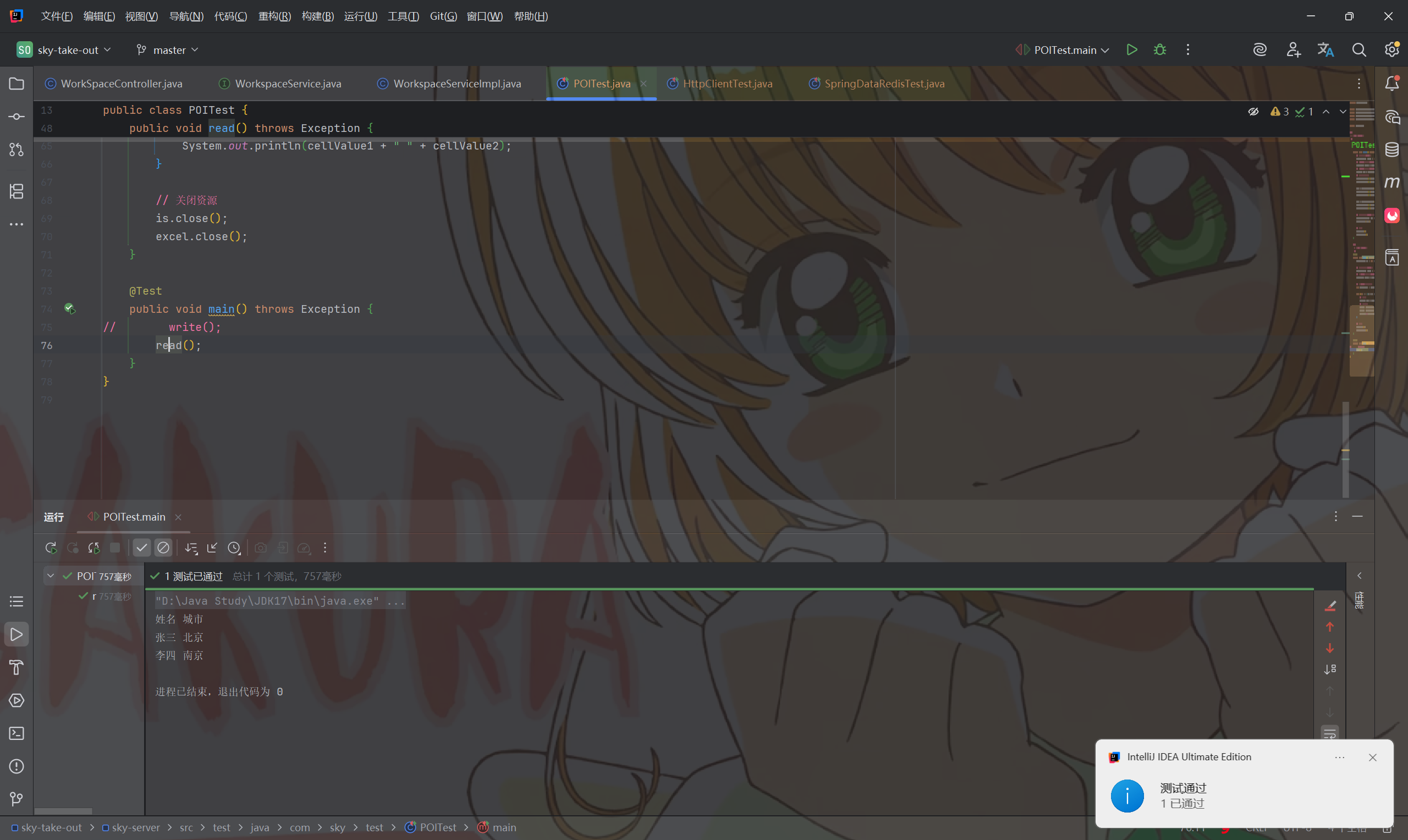
  • POITest
1
2
3
4
5
6
7
8
9
10
11
12
13
14
15
16
17
18
19
20
21
22
23
24
25
26
27
28
29
30
31
32
33
34
35
36
37
38
39
40
41
42
43
44
45
46
47
48
49
50
51
52
53
54
55
56
57
58
59
60
61
62
63
64
65
66
67
68
69
/**
* 使用POI操作excel文件
*/
public class POITest {

@Test
public void write() throws Exception {
// 在内存中创建一个Excel文件
XSSFWorkbook excel = new XSSFWorkbook();
// 在Excel文件中创建一个Sheet页
XSSFSheet sheet = excel.createSheet("info");
// 在Sheet中创建行对象,rownum编号从0开始
XSSFRow row = sheet.createRow(1);
// 创建单元格并写入文件内容
row.createCell(1).setCellValue("姓名");
row.createCell(2).setCellValue("城市");

row = sheet.createRow(2);
row.createCell(1).setCellValue("张三");
row.createCell(2).setCellValue("北京");

row = sheet.createRow(3);
row.createCell(1).setCellValue("李四");
row.createCell(2).setCellValue("南京");

// 通过输出流将内存中的excel文件写入到磁盘
FileOutputStream out = new FileOutputStream(new File("D:\\info.xlsx"));
excel.write(out);

// 关闭资源
out.close();
excel.close();
}

/**
* 使用POI读取excel文件
*/
@Test
public void read() throws Exception {
InputStream is = new FileInputStream(new File("D:\\info.xlsx"));

// 读取磁盘上已经存在的excel文件
XSSFWorkbook excel = new XSSFWorkbook(is);
// 读取excel文件中的第一个sheet页
XSSFSheet sheet = excel.getSheetAt(0);

// 获取sheet中的最后一行的行号
int lastRowNum = sheet.getLastRowNum();

for (int i = 1; i <= lastRowNum; i++) {
// 获得某一行
XSSFRow row = sheet.getRow(i);
// 获得单元格对象
String cellValue1 = row.getCell(1).getStringCellValue();
String cellValue2 = row.getCell(2).getStringCellValue();
System.out.println(cellValue1 + " " + cellValue2);
}

// 关闭资源
is.close();
excel.close();
}

@Test
public void main() throws Exception {
write();
// read();
}
}
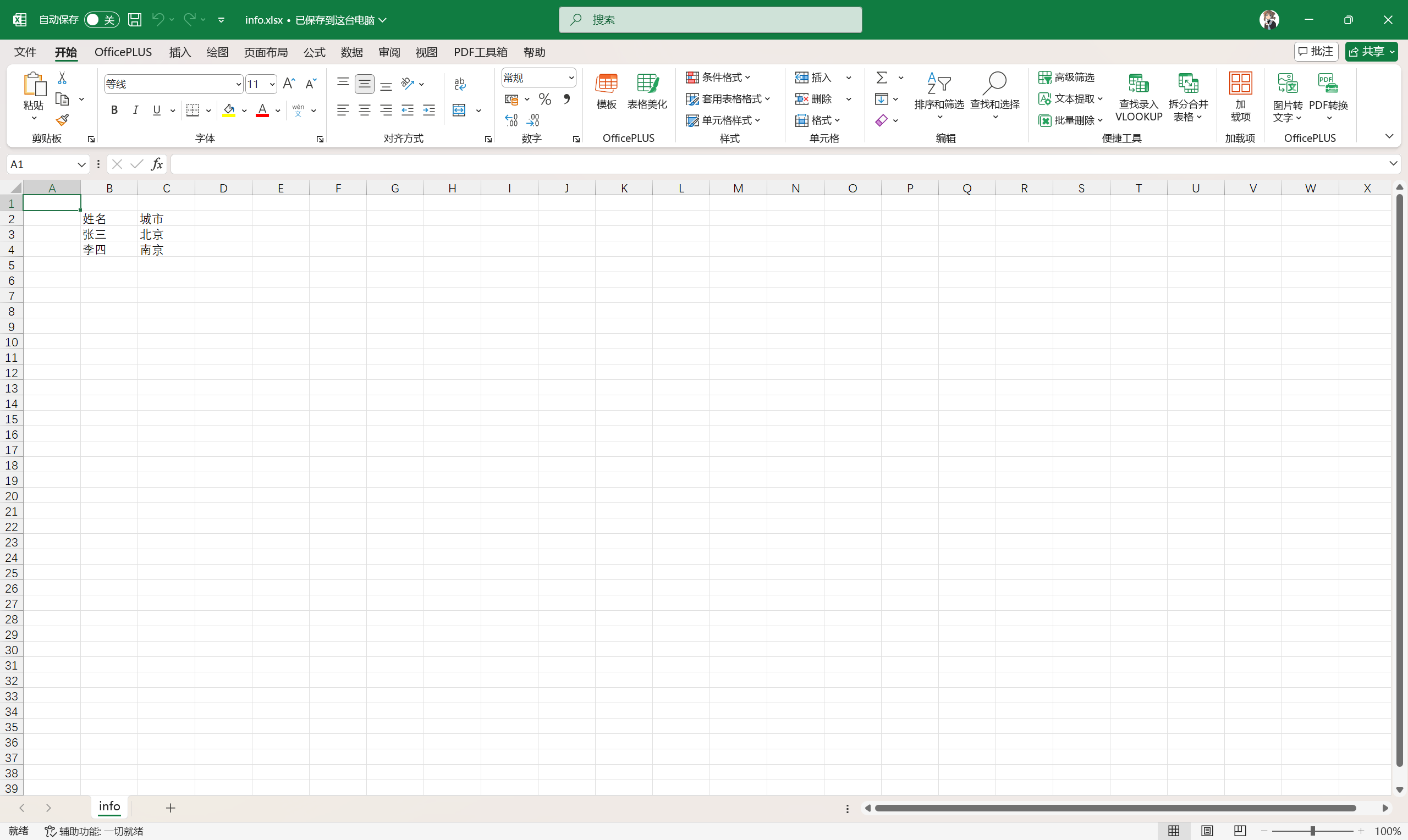
  • 运行效果

八、导出运行数据Excel报表

8.1 导出运行数据Excel报表——功能开发

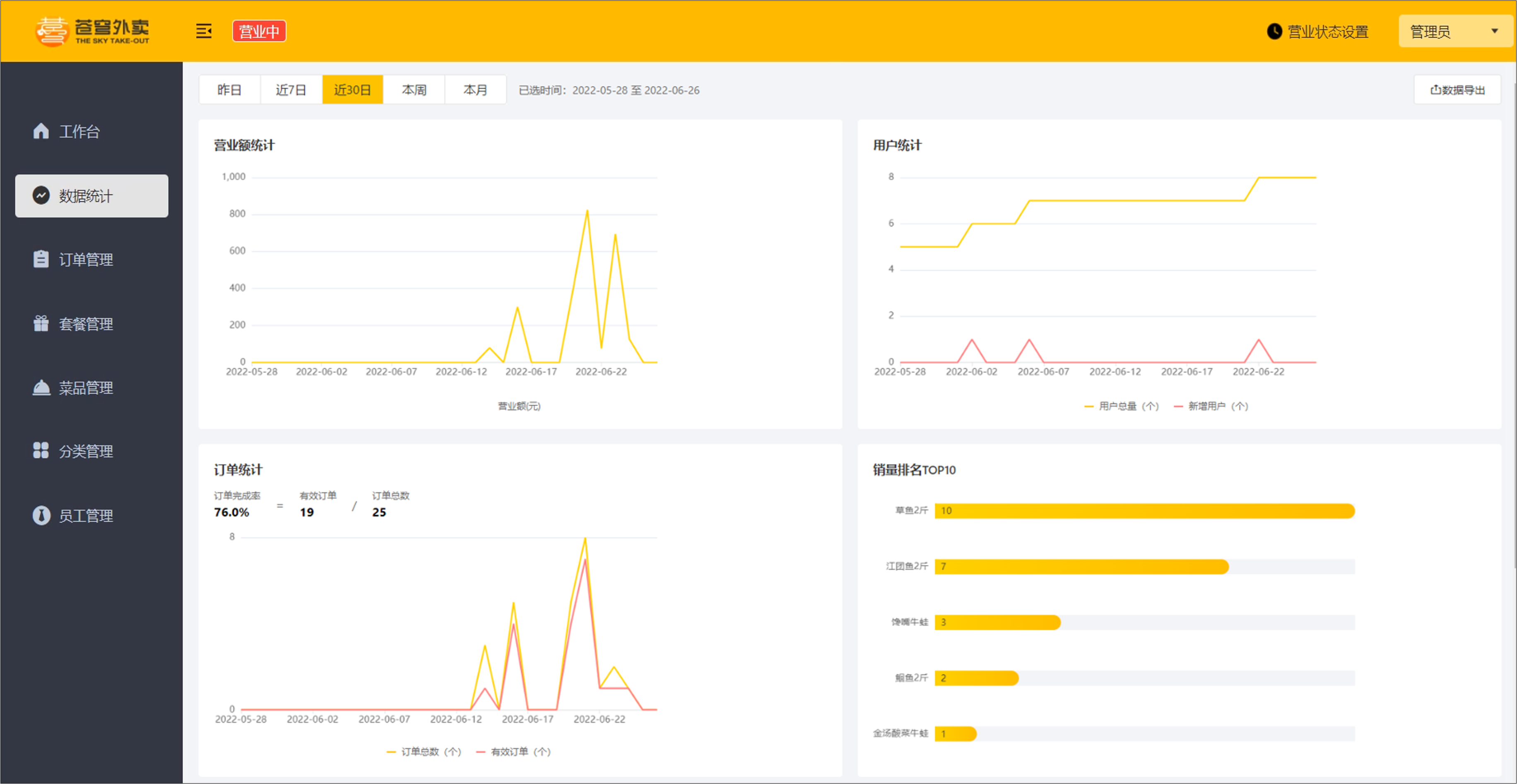
  • 产品原型

  • 业务规则
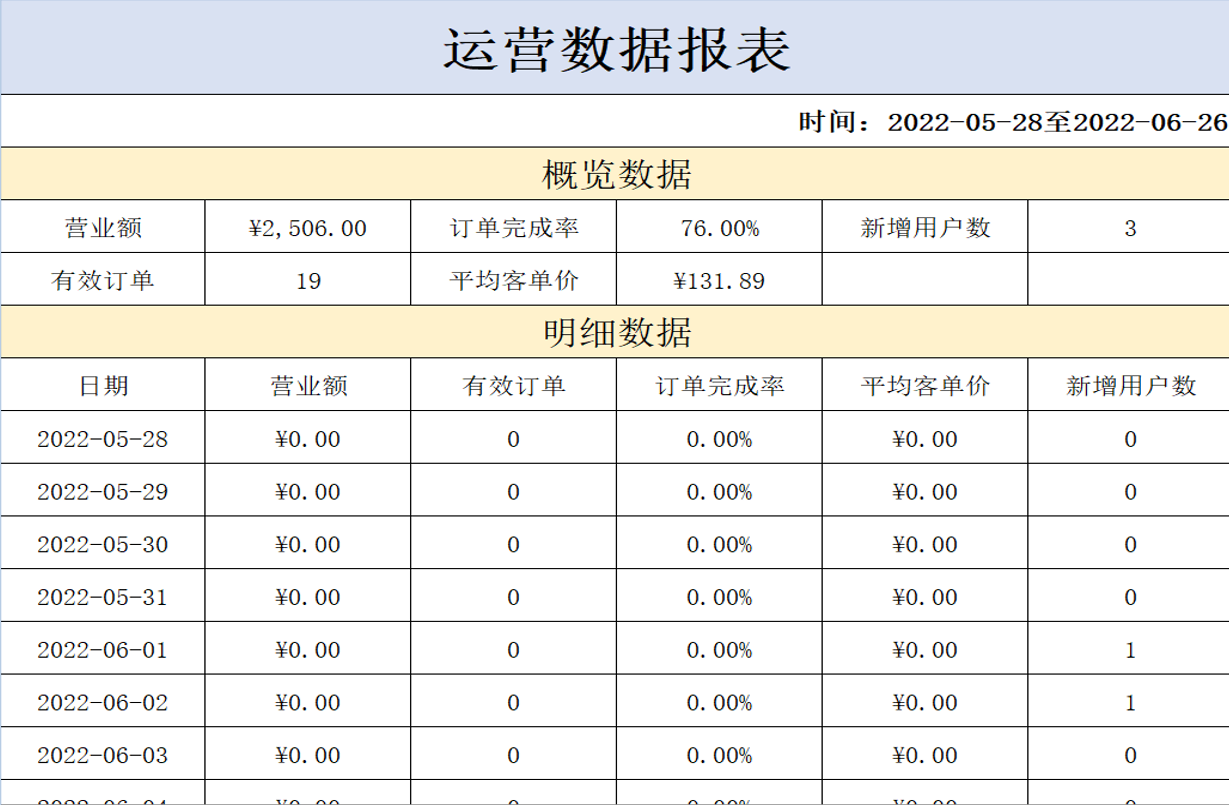
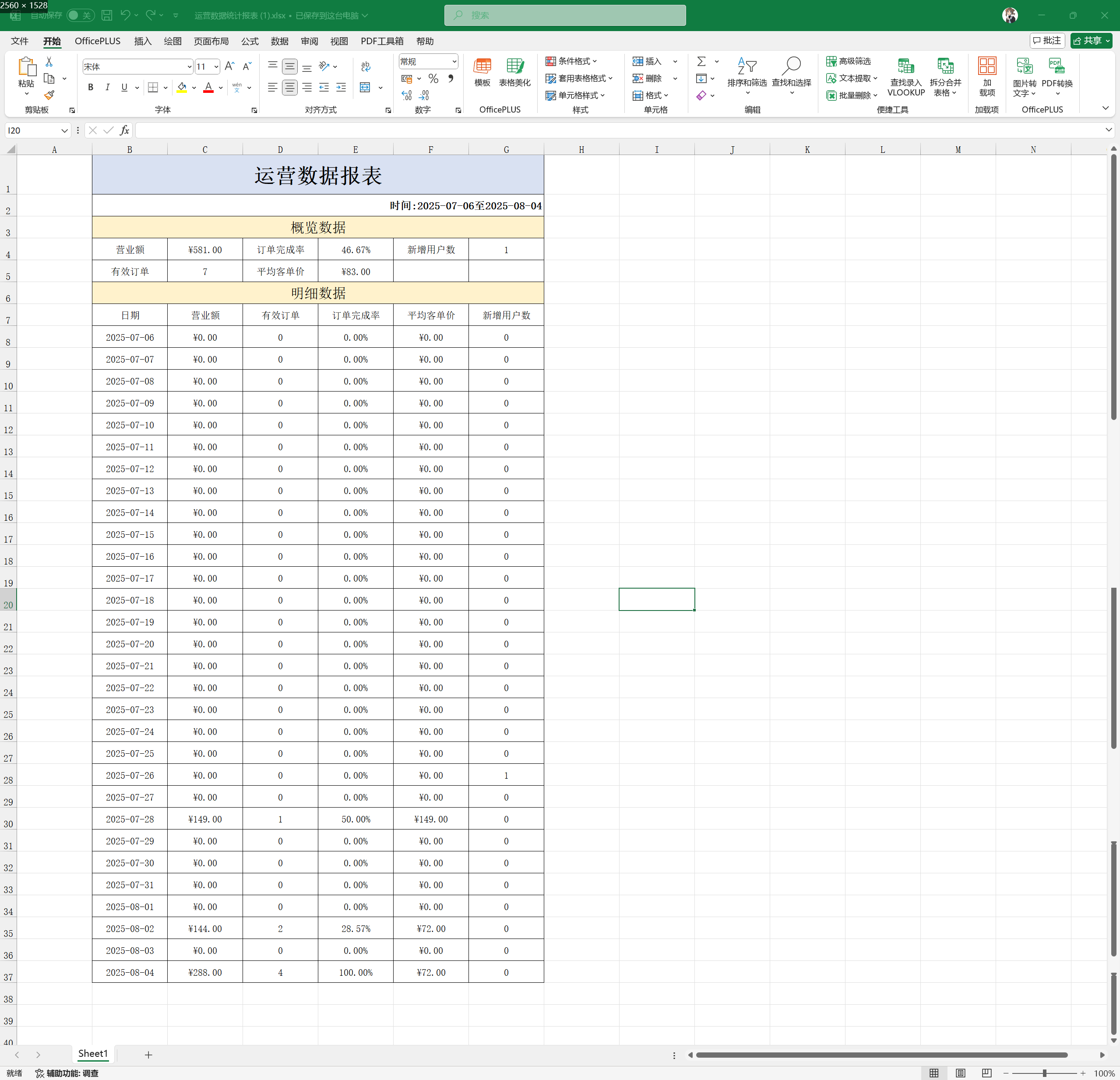
    • 导出Excel形式的报表文件
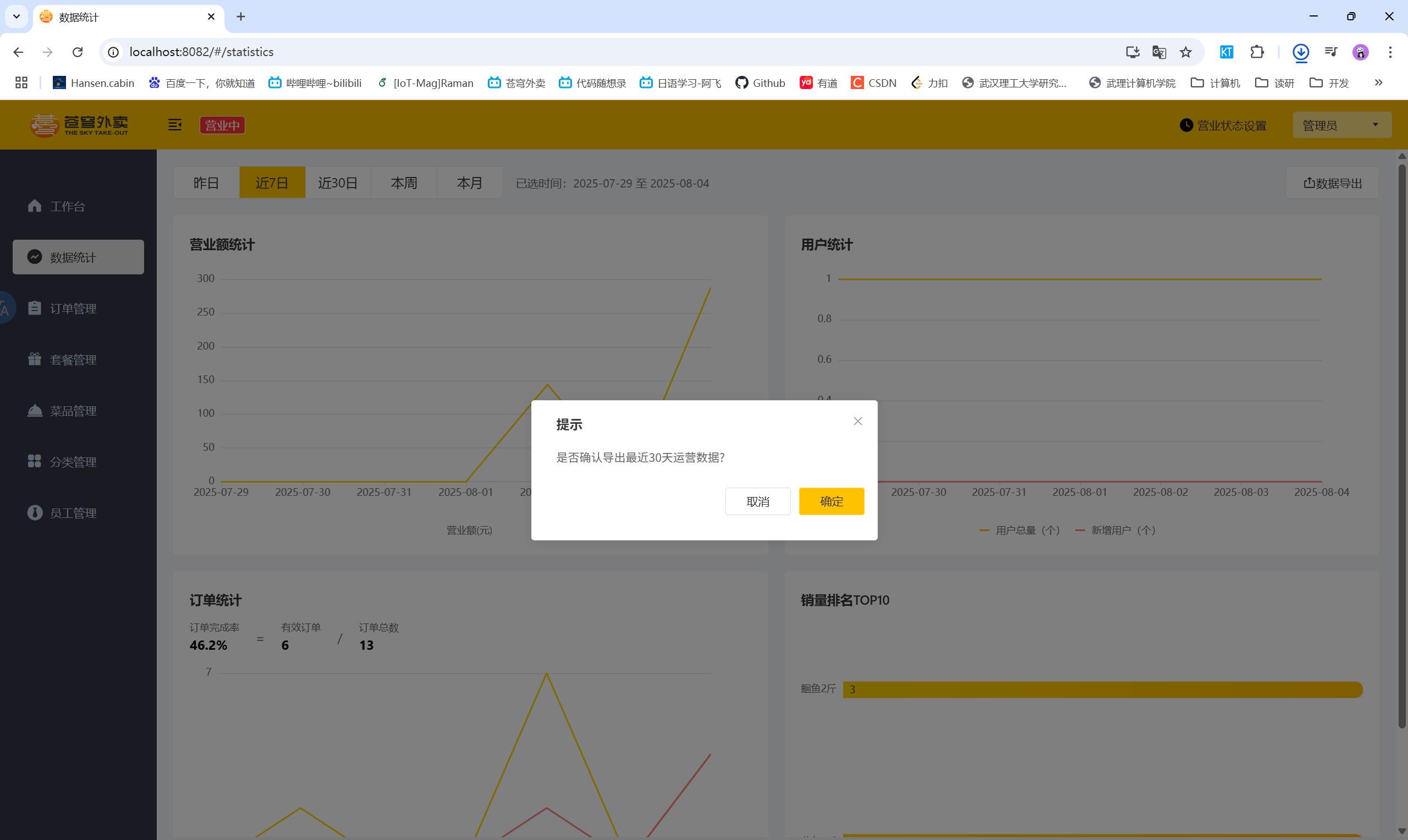
    • 导出最近30天的运营数据
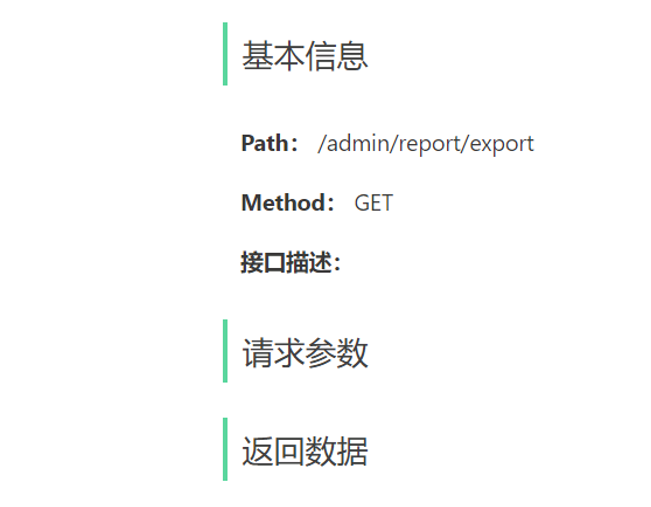
  • 接口设计
  • 实现步骤
    • 设计Excel模板文件
    • 查询近30天的运营数据
    • 将查询到的运营数据写入模板文件
    • 通过输出流将Excel文件下载到客户端浏览器

8.2 导出运行数据Excel报表——代码实现

8.2.1 ReportController

1
2
3
4
5
6
7
8
9
/**
* 导出运营数据报表
* @param response
*/
@GetMapping("/export")
@ApiOperation("导出运营数据报表")
public void export(HttpServletResponse response) {
reportService.exportBusinessData(response);
}

8.2.2 ReportService

1
2
3
4
5
/**
* 导出运营数据报表
* @param response
*/
void exportBusinessData(HttpServletResponse response);

8.2.3 ReportServiceImpl

1
2
3
4
5
6
7
8
9
10
11
12
13
14
15
16
17
18
19
20
21
22
23
24
25
26
27
28
29
30
31
32
33
34
35
36
37
38
39
40
41
42
43
44
45
46
47
48
49
50
51
52
53
54
55
56
57
58
59
60
61
/**
* 导出运营数据报表
* @param response
*/
public void exportBusinessData(HttpServletResponse response) {
// 1. 查询数据库获取营业数据
LocalDate dateBegin = LocalDate.now().minusDays(30);
LocalDate dateEnd = LocalDate.now().minusDays(1);

LocalDateTime begin = LocalDateTime.of(dateBegin, LocalTime.MIN);
LocalDateTime end = LocalDateTime.of(dateEnd, LocalTime.MAX);
BusinessDataVO businessDataVO = workspaceService.getBusinessData(begin, end);

// 2. 通过POI将数据写入到Excel文件中
InputStream is = this.getClass().getClassLoader().getResourceAsStream("template/运营数据报表模板.xlsx");
// 基于模板文件创建一个新的excel文件
try {
XSSFWorkbook excel = new XSSFWorkbook(is);
// 填充数据——时间
XSSFSheet sheet = excel.getSheet("Sheet1");
sheet.getRow(1).getCell(1).setCellValue("时间:" + dateBegin + "至" + dateEnd);

// 获得第四行
XSSFRow row = sheet.getRow(3);
row.getCell(2).setCellValue(businessDataVO.getTurnover());
row.getCell(4).setCellValue(businessDataVO.getOrderCompletionRate());
row.getCell(6).setCellValue(businessDataVO.getNewUsers());

// 获得第五行
row = sheet.getRow(4);
row.getCell(2).setCellValue(businessDataVO.getValidOrderCount());
row.getCell(4).setCellValue(businessDataVO.getUnitPrice());

// 填充明细数据
for (int i = 0; i < 30; i++) {
LocalDate date = dateBegin.plusDays(i);
// 查询某一天的营业数据
BusinessDataVO businessData = workspaceService.getBusinessData(LocalDateTime.of(date, LocalTime.MIN), LocalDateTime.of(date, LocalTime.MAX));
// 获得某一行
row = sheet.getRow(7 + i);
row.getCell(1).setCellValue(date.toString());
row.getCell(2).setCellValue(businessData.getTurnover());
row.getCell(3).setCellValue(businessData.getValidOrderCount());
row.getCell(4).setCellValue(businessData.getOrderCompletionRate());
row.getCell(5).setCellValue(businessData.getUnitPrice());
row.getCell(6).setCellValue(businessData.getNewUsers());

}

// 3. 通过输出流将Excel文件下载到客户端浏览器
ServletOutputStream out = response.getOutputStream();
excel.write(out);

// 关闭资源
out.close();
excel.close();
} catch (IOException e) {
throw new RuntimeException(e);
}

}

8.3 导出运行数据Excel报表——功能测试

  • 导出运行数据Excel报表