苍穹外卖开发日志Day04——公共字段填充与菜品管理

  • 公共字段填充
  • 菜品管理包含以下功能:
    • 新增菜品
    • 菜品分页查询
    • 删除菜品
    • 修改菜品
    • 菜品起售停售

2025.06.05

一、公共字段自动填充

1.1 问题分析与实现思路

  • 问题分析
    • 业务表中存在公共字段
      • create_time
      • create_user
      • update_time
      • update_user
  • 实现思路
    • 自定义注解AutoFill,用于标识需要进行公共字段自动填充的方法
    • 自定义切面类AutoFillAspect,统一拦截标注了@AutoFill注解的方法,通过反射为公共字段赋值
    • 在Mapper的方法上加入@AutoFill注解
    • 技术点:枚举、注解、AOP、反射

1.2 代码实现

  • AutoFill注解
1
2
3
4
5
6
7
8
9
10
/**
* 自定义注解,用于标识某个方法需要进行公共字段填充
*/
@Target(ElementType.METHOD)
@Retention(RetentionPolicy.RUNTIME)
public @interface AutoFill {

// 数据库操作类型: UPDATE INSERT
OperationType value();
}
  • AutoFillAspect切面类
1
2
3
4
5
6
7
8
9
10
11
12
13
14
15
16
17
18
19
20
21
22
23
24
25
26
27
28
29
30
31
32
33
34
35
36
37
38
39
40
41
42
43
44
45
46
47
48
49
50
51
52
53
54
55
56
57
58
59
60
/**
*切面类,实现公共字段填充操作
*/
@Aspect
@Component
@Slf4j
public class AutoFillAspect {

/**
* 切入点
*/
@Pointcut("execution(* com.sky..*.*(..)) && @annotation(com.sky.annotation.AutoFill)")
public void AutoFillPointCut() {}

/**
* 前置通知,在通知中进行公共字段的赋值
* @param joinPoint
*/
@Before("AutoFillPointCut()")
public void AutoFill(JoinPoint joinPoint) throws NoSuchMethodException, InvocationTargetException, IllegalAccessException {
log.info("开始进行公共字段填充...");

// 获取到当前被拦截的方法上的数据库操作
MethodSignature signature = (MethodSignature) joinPoint.getSignature(); // 方法签名对象
AutoFill autoFill = signature.getMethod().getAnnotation(AutoFill.class); // 获取方法上的注解对象
OperationType operationType = autoFill.value(); // 获取数据库操作类型

// 获取到当前被拦截方法的参数--实体对象
Object[] args = joinPoint.getArgs();
if (args == null) {
return;
}

Object entity = args[0];

// 准备赋值的数据
LocalDateTime now = LocalDateTime.now();
Long currentId = BaseContext.getCurrentId();

// 根据当前不同的操作类型,为对应的属性通过反射来赋值
if (operationType == OperationType.INSERT) {
Method setCreateTime = entity.getClass().getDeclaredMethod(AutoFillConstant.SET_CREATE_TIME, LocalDateTime.class);
Method setCreateUser = entity.getClass().getDeclaredMethod(AutoFillConstant.SET_CREATE_USER, Long.class);
Method setUpdateTime = entity.getClass().getDeclaredMethod(AutoFillConstant.SET_UPDATE_TIME, LocalDateTime.class);
Method setUpdateUser = entity.getClass().getDeclaredMethod(AutoFillConstant.SET_UPDATE_USER, Long.class);

// 通过反射赋值
setCreateTime.invoke(entity,now);
setCreateUser.invoke(entity,currentId);
setUpdateTime.invoke(entity,now);
setUpdateUser.invoke(entity,currentId);
}else if(operationType == OperationType.UPDATE){
Method setUpdateTime = entity.getClass().getDeclaredMethod(AutoFillConstant.SET_UPDATE_TIME, LocalDateTime.class);
Method setUpdateUser = entity.getClass().getDeclaredMethod(AutoFillConstant.SET_UPDATE_USER, Long.class);

setUpdateTime.invoke(entity,now);
setUpdateUser.invoke(entity,currentId);
}
}
}

1.3 功能测试

  • 以修改员工为例
  • 修改前:
  • 修改后:

二、新增菜品

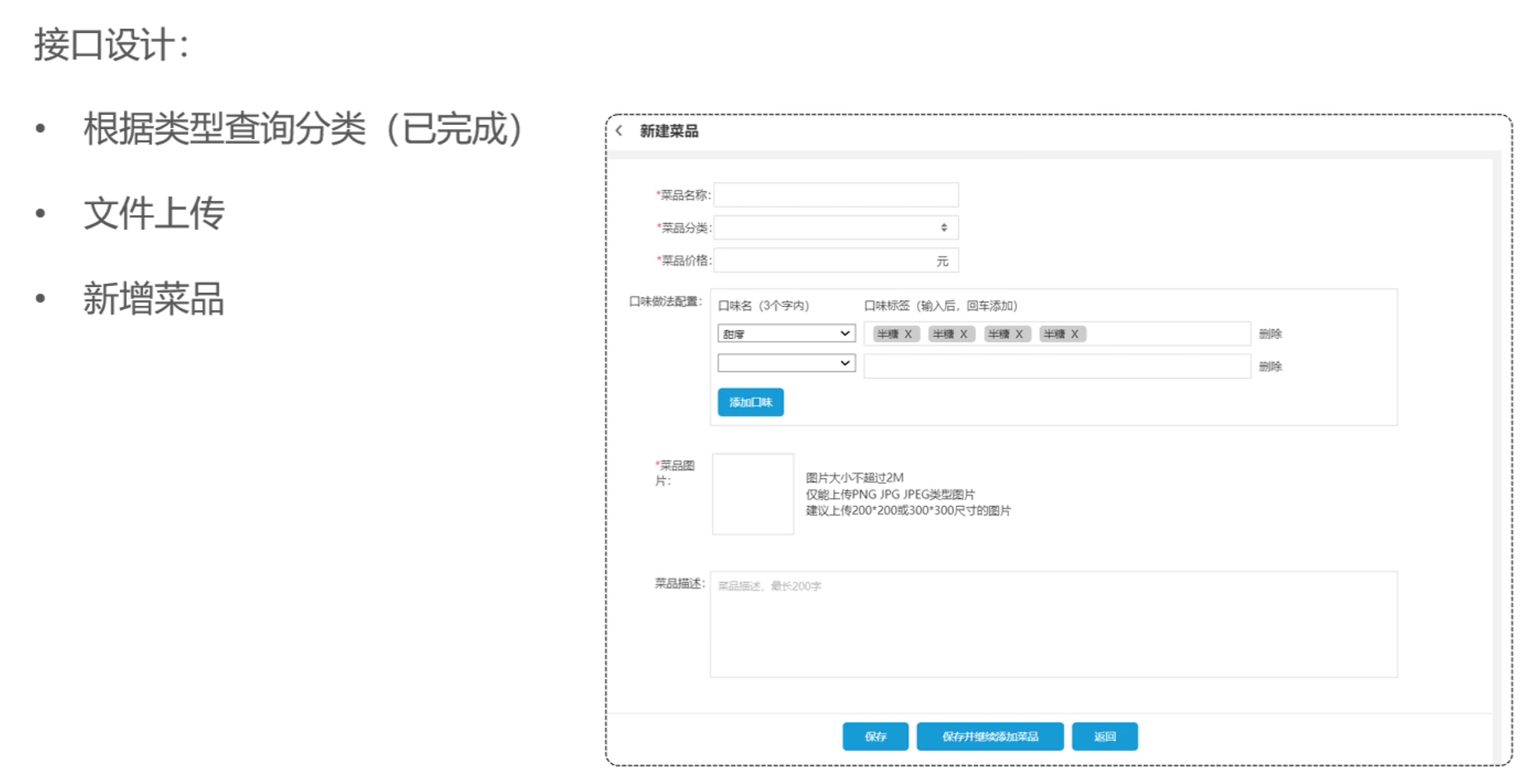
2.1 新增菜品——功能开发

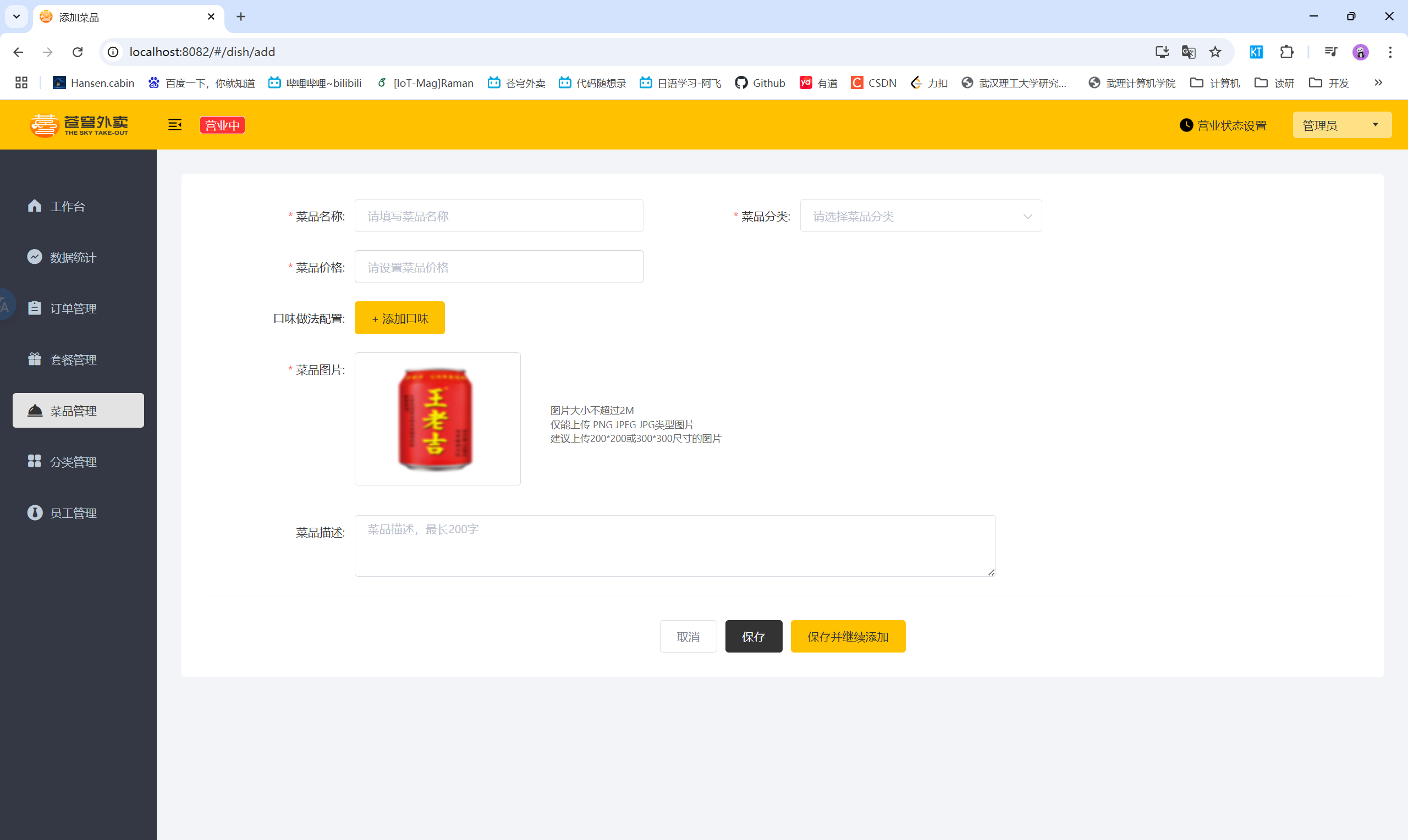
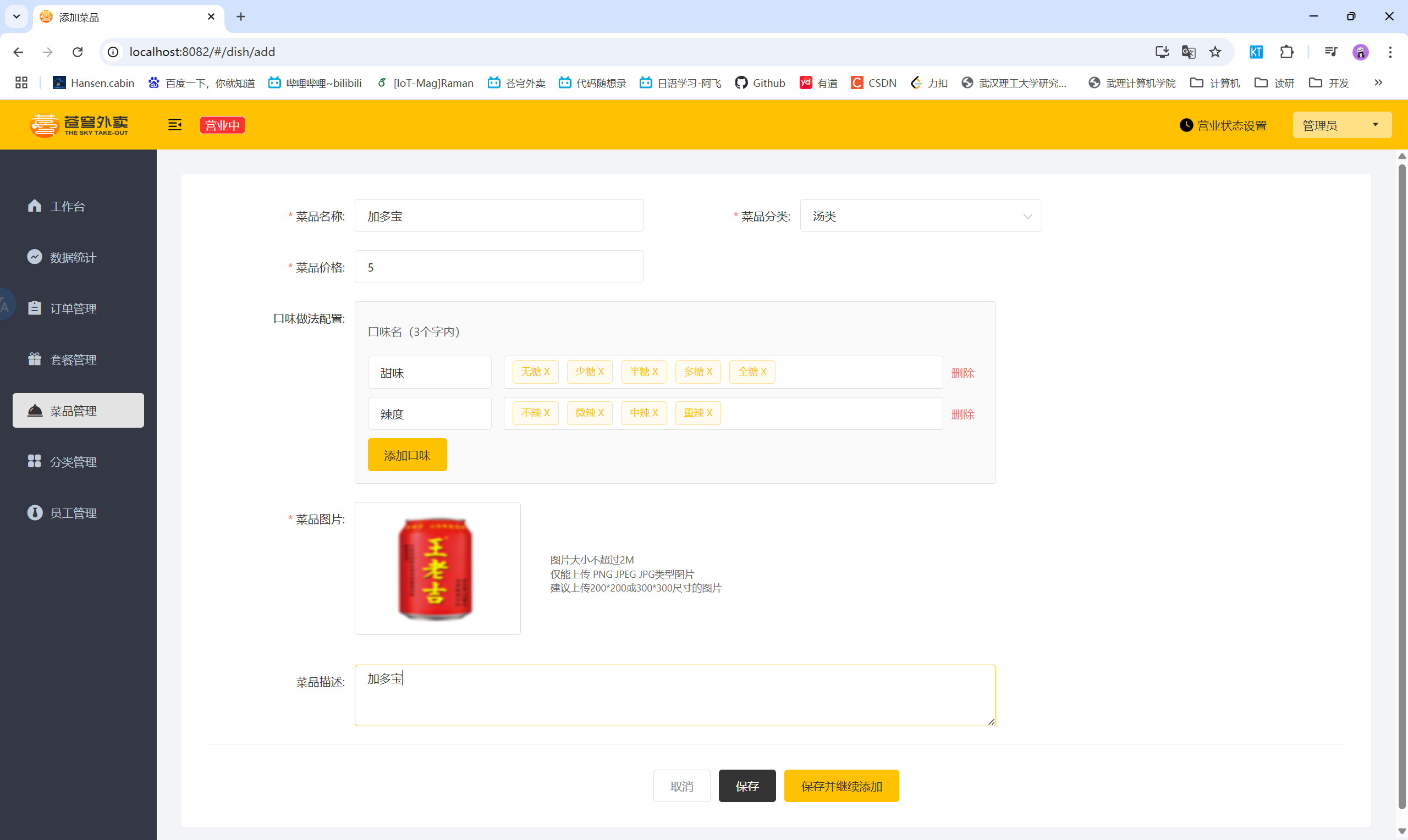
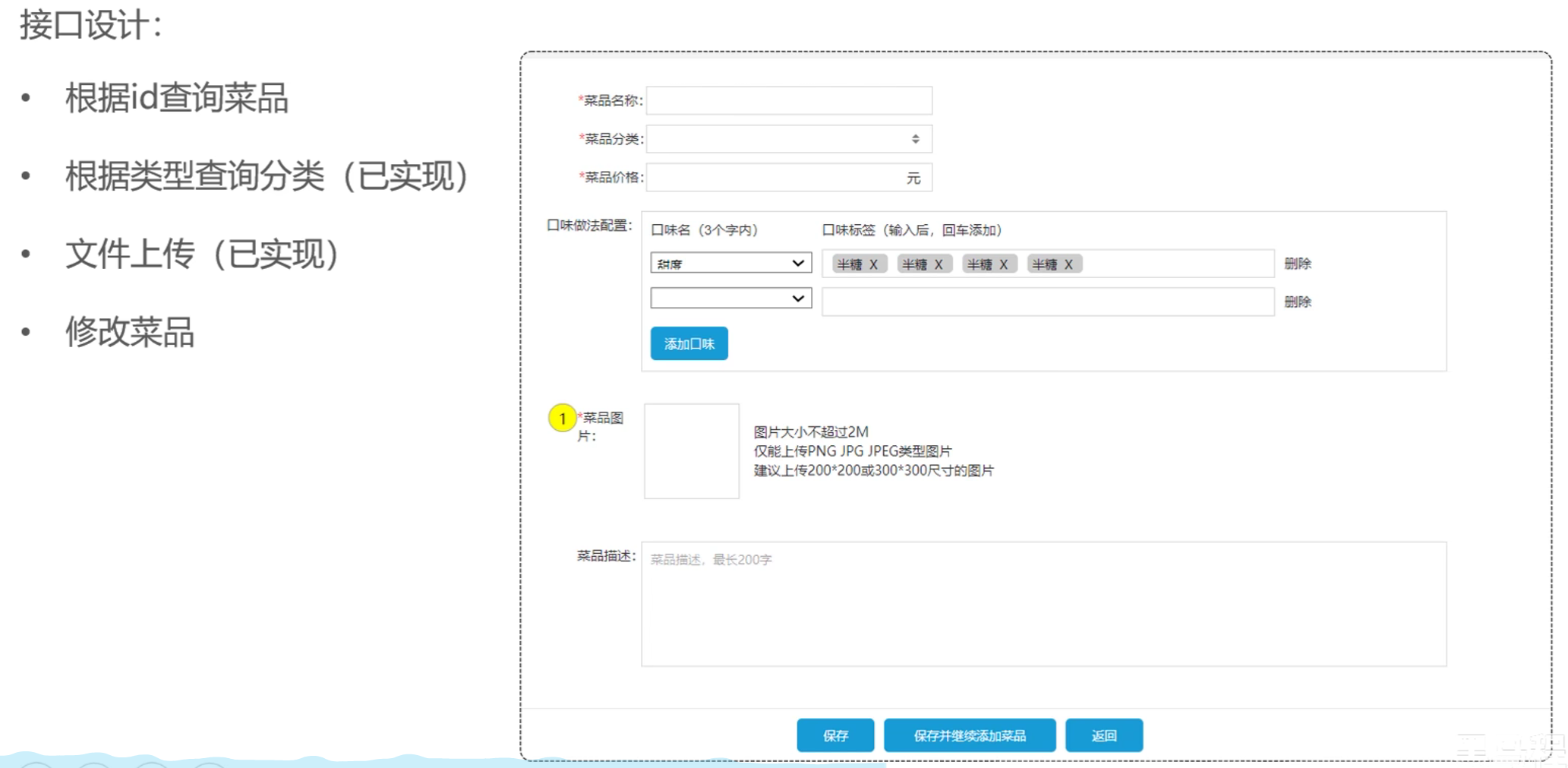
  • 产品原型
  • 业务规则
    • 菜品名称必须唯一
    • 菜品必须属于某个分类下,不能单独存在
    • 新增菜品时可以根据情况选择菜品口味
    • 每个菜品必须对应一张图片
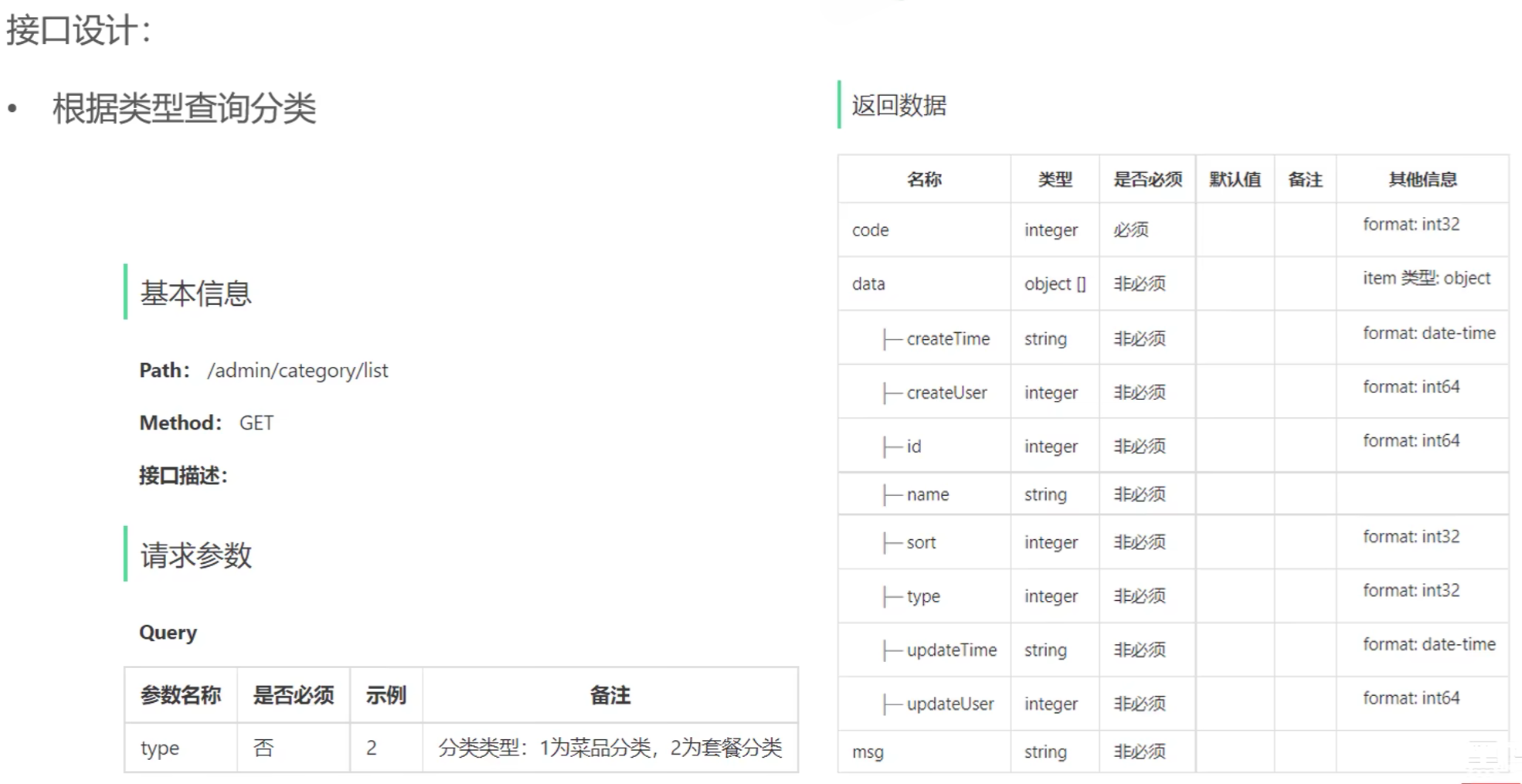
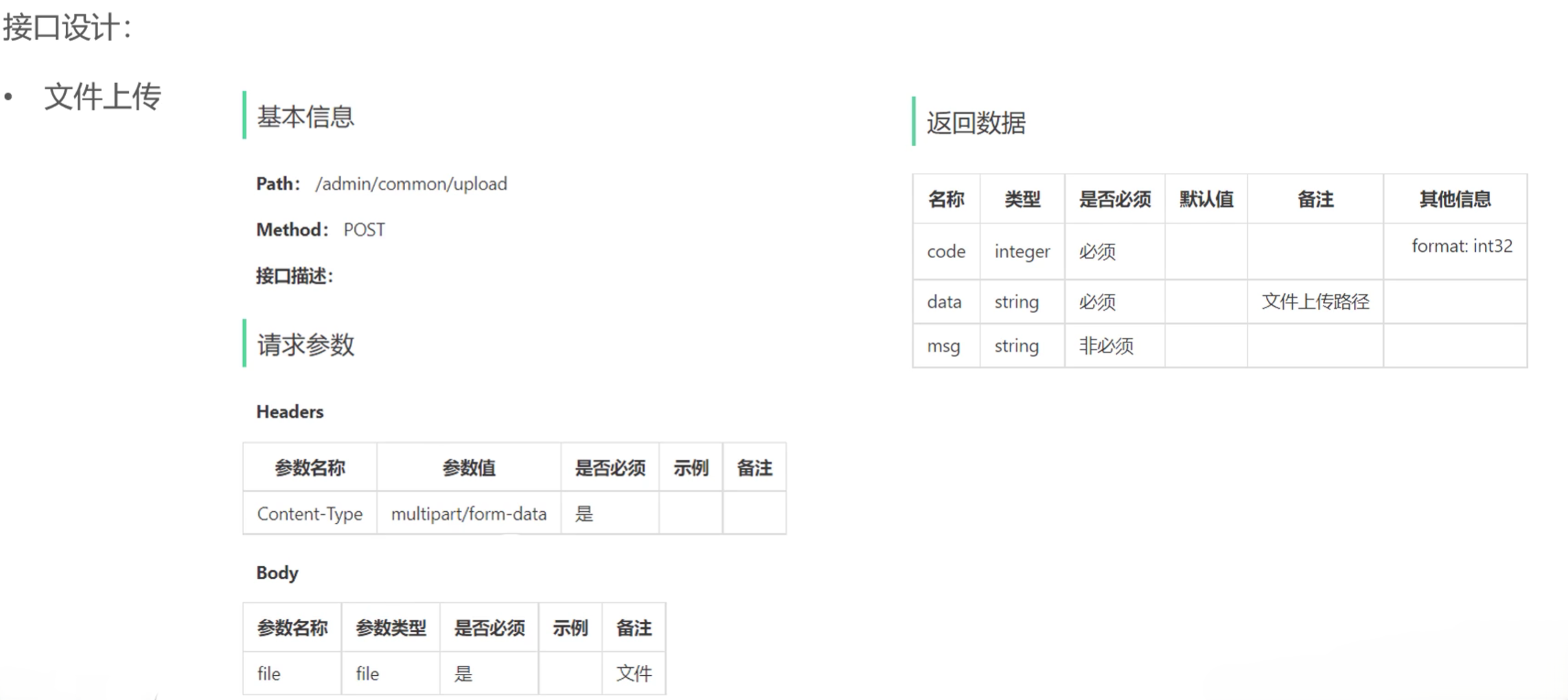
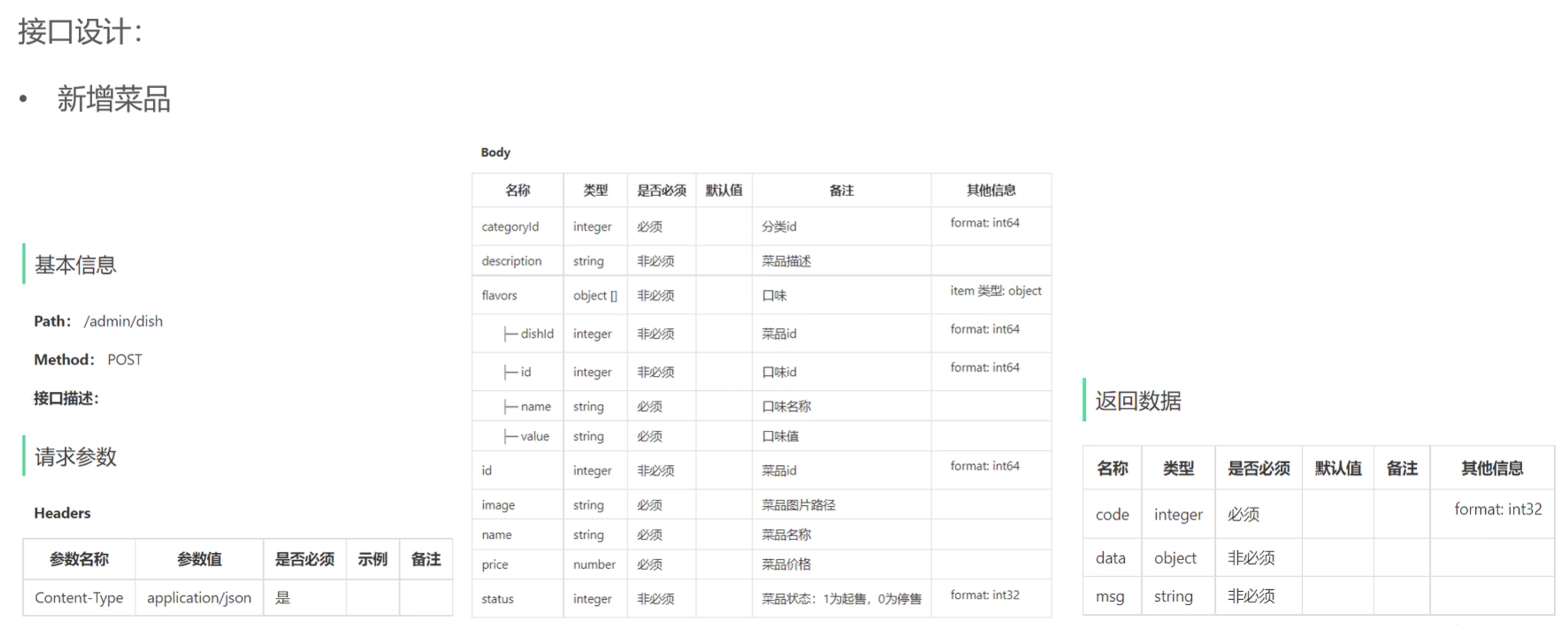
  • 接口设计


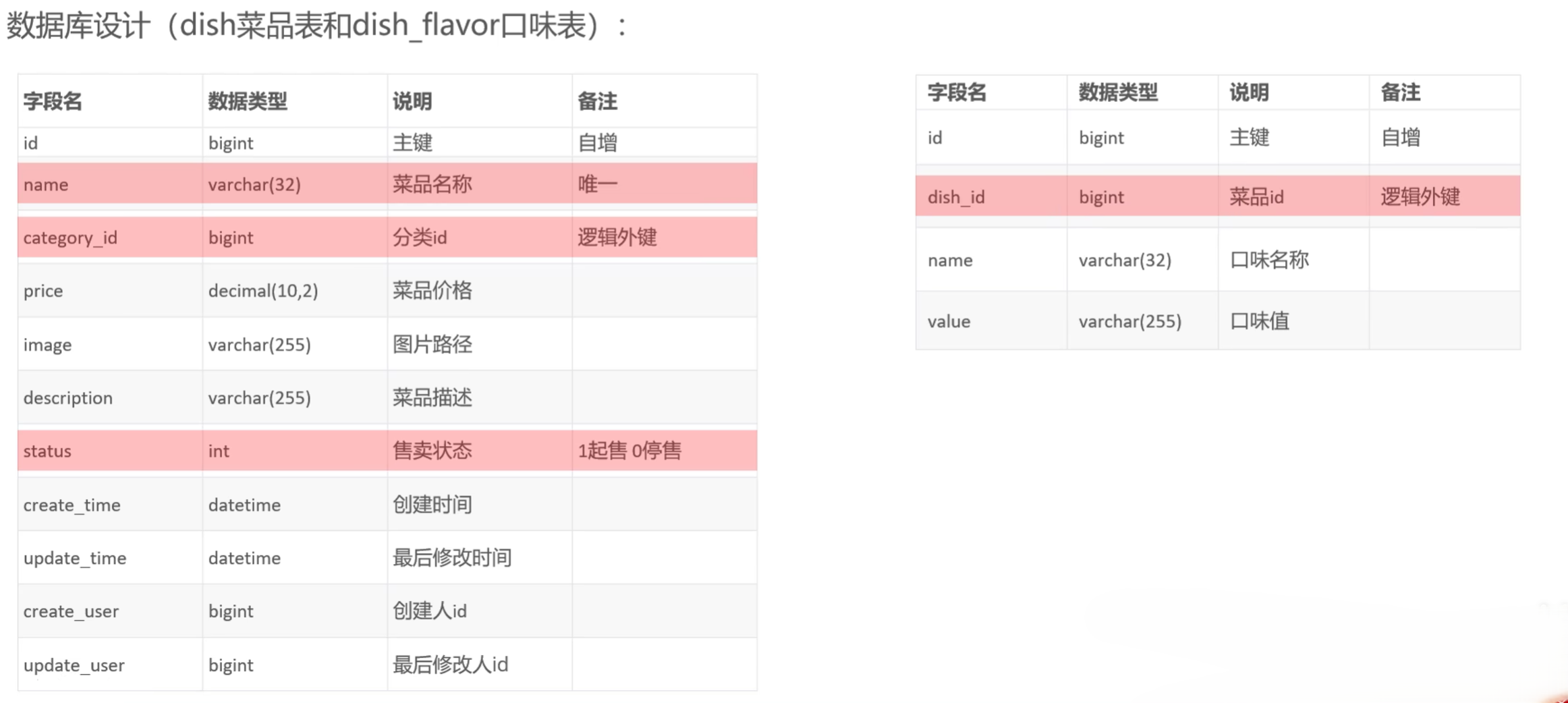
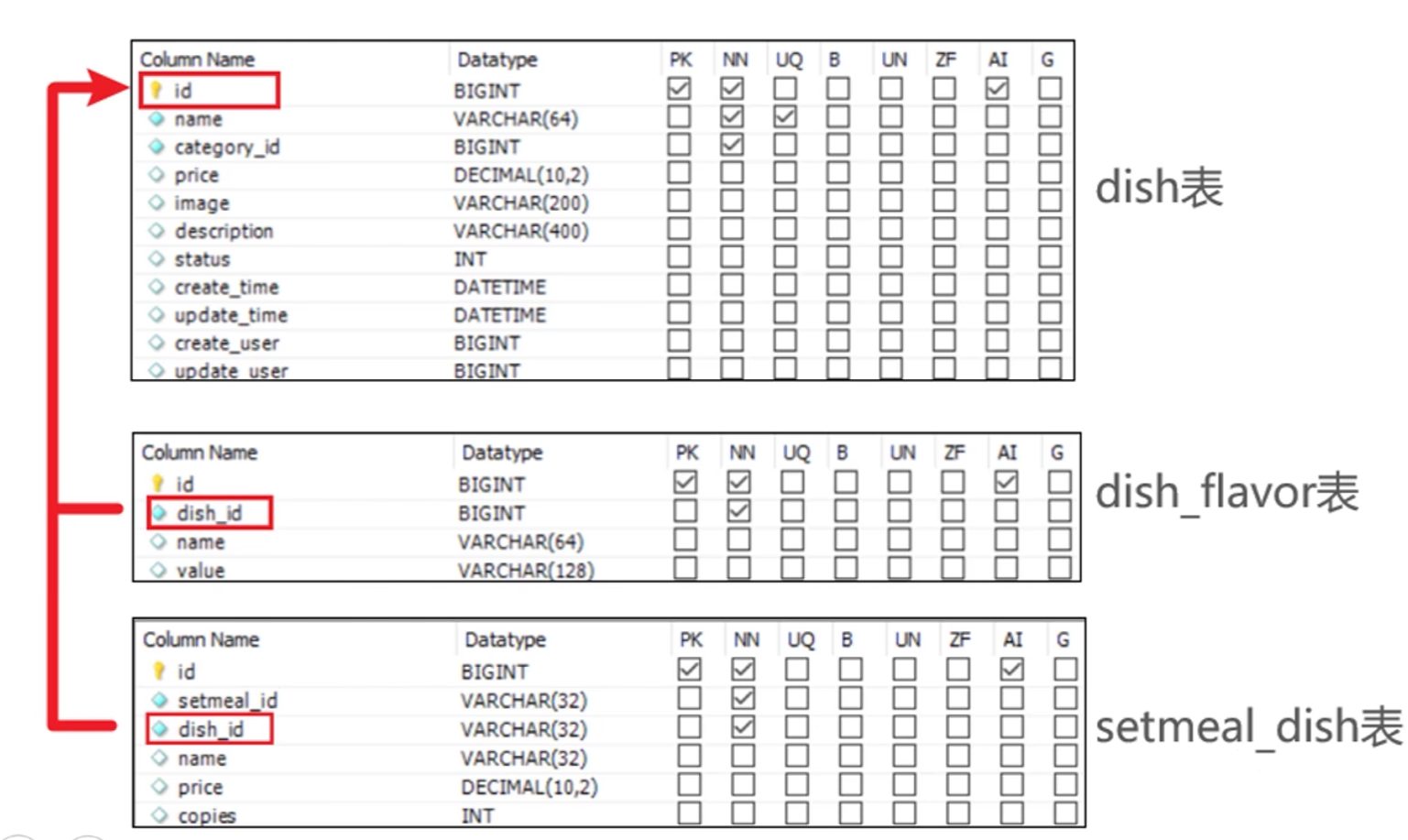
  • 数据库设计
  • 注意点
    • 在添加口味时需要使用主键返回获取对应菜品的ID
    • 在Service层需要添加@Transactional用于事务控制,保证菜品和口味的添加要么同时成功,要么同时失败
    • Mapper层的方法需要添加@AutoFill注解,用于公共字段的自动填充

2.2 文件上传——代码实现

2.2.1 CommonController

1
2
3
4
5
6
7
8
9
10
11
12
13
14
15
16
17
18
19
20
21
22
23
24
25
26
27
28
29
30
31
32
33
34
35
36
37
38
39
40
/**
* 通用接口
*/
@RestController
@RequestMapping("/admin/common")
@Api(tags = "通用接口")
@Slf4j
public class CommonController {

@Autowired
private AliOssUtil aliOssUtil;

/**
* 文件上传
* @return
*/
@PostMapping("/upload")
@ApiOperation("文件上传")
public Result<String> upload(MultipartFile file) {
log.info("文件上传:{}",file);

try {
// 原始文件名
String originalFilename = file.getOriginalFilename();
// 截取原始文件名的后缀
String extension = originalFilename.substring(originalFilename.lastIndexOf("."));
// 构造新文件名
String objectName = UUID.randomUUID().toString() + extension;

// 文件的请求路径
String filePath = aliOssUtil.upload(file.getBytes(), objectName);
return Result.success(filePath);
} catch (IOException e) {
log.error("文件上传失败:{}",e);
}


return Result.error(MessageConstant.UPLOAD_FAILED);
}
}

2.2.2 AliOssUtil

1
2
3
4
5
6
7
8
9
10
11
12
13
14
15
16
17
18
19
20
21
22
23
24
25
26
27
28
29
30
31
32
33
34
35
36
37
38
39
40
41
42
43
44
45
46
47
48
49
50
51
52
53
54
55
56
@Data
@AllArgsConstructor
@Slf4j
public class AliOssUtil {

private String endpoint;
private String accessKeyId;
private String accessKeySecret;
private String bucketName;

/**
* 文件上传
* @param bytes
* @param objectName
* @return
*/
public String upload(byte[] bytes, String objectName) {

// 创建OSSClient实例。
OSS ossClient = new OSSClientBuilder().build(endpoint, accessKeyId, accessKeySecret);

try {
// 创建PutObject请求。
ossClient.putObject(bucketName, objectName, new ByteArrayInputStream(bytes));
} catch (OSSException oe) {
System.out.println("Caught an OSSException, which means your request made it to OSS, "
+ "but was rejected with an error response for some reason.");
System.out.println("Error Message:" + oe.getErrorMessage());
System.out.println("Error Code:" + oe.getErrorCode());
System.out.println("Request ID:" + oe.getRequestId());
System.out.println("Host ID:" + oe.getHostId());
} catch (ClientException ce) {
System.out.println("Caught an ClientException, which means the client encountered "
+ "a serious internal problem while trying to communicate with OSS, "
+ "such as not being able to access the network.");
System.out.println("Error Message:" + ce.getMessage());
} finally {
if (ossClient != null) {
ossClient.shutdown();
}
}

//文件访问路径规则 https://BucketName.Endpoint/ObjectName
StringBuilder stringBuilder = new StringBuilder("https://");
stringBuilder
.append(bucketName)
.append(".")
.append(endpoint)
.append("/")
.append(objectName);

log.info("文件上传到:{}", stringBuilder.toString());

return stringBuilder.toString();
}
}

2.2.3 AliOssConfig

1
2
3
4
5
6
7
8
9
10
11
12
13
14
15
16
17
/**
* 配置类,用来创建AliOSS对象
*/
@Configuration
@Slf4j
public class OSSConfiguration {

@Bean
@ConditionalOnMissingBean
public AliOssUtil aliOssUtil(AliOssProperties aliOssProperties) {
log.info("开始创建阿里云文件上传工具类对象:{}", aliOssProperties);
return new AliOssUtil(aliOssProperties.getEndpoint(),
aliOssProperties.getAccessKeyId(),
aliOssProperties.getAccessKeySecret(),
aliOssProperties.getBucketName());
}
}

2.3 新增菜品

2.3.1 DishDTO

1
2
3
4
5
6
7
8
9
10
11
12
13
14
15
16
17
18
19
20
@Data
public class DishDTO implements Serializable {

private Long id;
//菜品名称
private String name;
//菜品分类id
private Long categoryId;
//菜品价格
private BigDecimal price;
//图片
private String image;
//描述信息
private String description;
//0 停售 1 起售
private Integer status;
//口味
private List<DishFlavor> flavors = new ArrayList<>();

}

2.3.2 DishController

1
2
3
4
5
6
7
8
9
10
11
12
13
14
15
16
17
18
19
20
21
@Slf4j
@RestController
@RequestMapping("/admin/dish")
@Api(tags = "菜品相关接口")
public class DishController {

@Autowired
private DishService dishService;
/**
* 新增菜品
* @param dishDTO
* @return
*/
@PostMapping()
@ApiOperation("新增菜品")
public Result save(@RequestBody DishDTO dishDTO){
log.info("新增菜品:{}",dishDTO);
dishService.saveWithFlavor(dishDTO);
return Result.success();
}
}

2.3.3 DishServiceImpl

1
2
3
4
5
6
7
8
9
10
11
12
13
14
15
16
17
18
19
20
21
22
23
24
25
26
27
28
29
30
31
32
33
@Service
@Slf4j
public class DishServiceImpl implements DishService {

@Autowired
private DishMapper dishMapper;
@Autowired
private DishFlavorMapper dishFlavorMapper;

/**
* 新增菜品和口味
* @param dishDTO
*/
@Override
@Transactional
public void saveWithFlavor(DishDTO dishDTO) {
Dish dish = new Dish();
BeanUtils.copyProperties(dishDTO, dish);

// 向菜品表插入一条数据
dishMapper.insert(dish);

// 向口味表插入n条数据
Long dishId = dish.getId();
List<DishFlavor> flavors = dishDTO.getFlavors();
if (flavors != null && flavors.size() > 0) {
flavors.forEach(flavor -> {
flavor.setDishId(dishId);
});
dishFlavorMapper.insertBatch(flavors);
}
}
}

2.3.4 DishMapper

1
2
3
4
5
6
7
8
9
10
11
12
13
14
15
16
17
18
@Mapper
public interface DishMapper {

/**
* 根据分类id查询菜品数量
* @param categoryId
* @return
*/
@Select("select count(id) from dish where category_id = #{categoryId}")
Integer countByCategoryId(Long categoryId);

/**
* 插入菜品
* @param dish
*/
@AutoFill(value = OperationType.INSERT)
void insert(Dish dish);
}

2.3.5 DishMapper.xml

1
2
3
4
5
6
7
8
9
10
11
12
<?xml version="1.0" encoding="UTF-8" ?>
<!DOCTYPE mapper PUBLIC "-//mybatis.org//DTD Mapper 3.0//EN"
"http://mybatis.org/dtd/mybatis-3-mapper.dtd" >
<mapper namespace="com.sky.mapper.DishMapper">


<insert id="insert" useGeneratedKeys="true" keyProperty="id">
insert into dish (name, category_id, price, image, description, create_time, update_time, create_user, update_user, status)
VALUES
(#{name},#{categoryId},#{price},#{image},#{description},#{createTime},#{updateTime},#{createUser},#{updateUser},#{status})
</insert>
</mapper>

2.3.6 DishFlavorMapper

1
2
3
4
5
6
7
8
9
@Mapper
public interface DishFlavorMapper {

/**
* 批量插入口味
* @param flavors
*/
void insertBatch(List<DishFlavor> flavors);
}

2.3.7 DishFlavorMapper.xml

1
2
3
4
5
6
7
8
9
10
11
12
13
<?xml version="1.0" encoding="UTF-8" ?>
<!DOCTYPE mapper PUBLIC "-//mybatis.org//DTD Mapper 3.0//EN"
"http://mybatis.org/dtd/mybatis-3-mapper.dtd" >
<mapper namespace="com.sky.mapper.DishFlavorMapper">

<insert id="insertBatch">
insert into dish_flavor (dish_id, name, value)
VALUES
<foreach collection="flavors" item="df" separator=",">
(#{df.dishId},#{df.name},#{df.value})
</foreach>
</insert>
</mapper>

2.4 新增菜品——功能测试

  • 文件上传
  • 前后端联调测试:

三、菜品分页查询

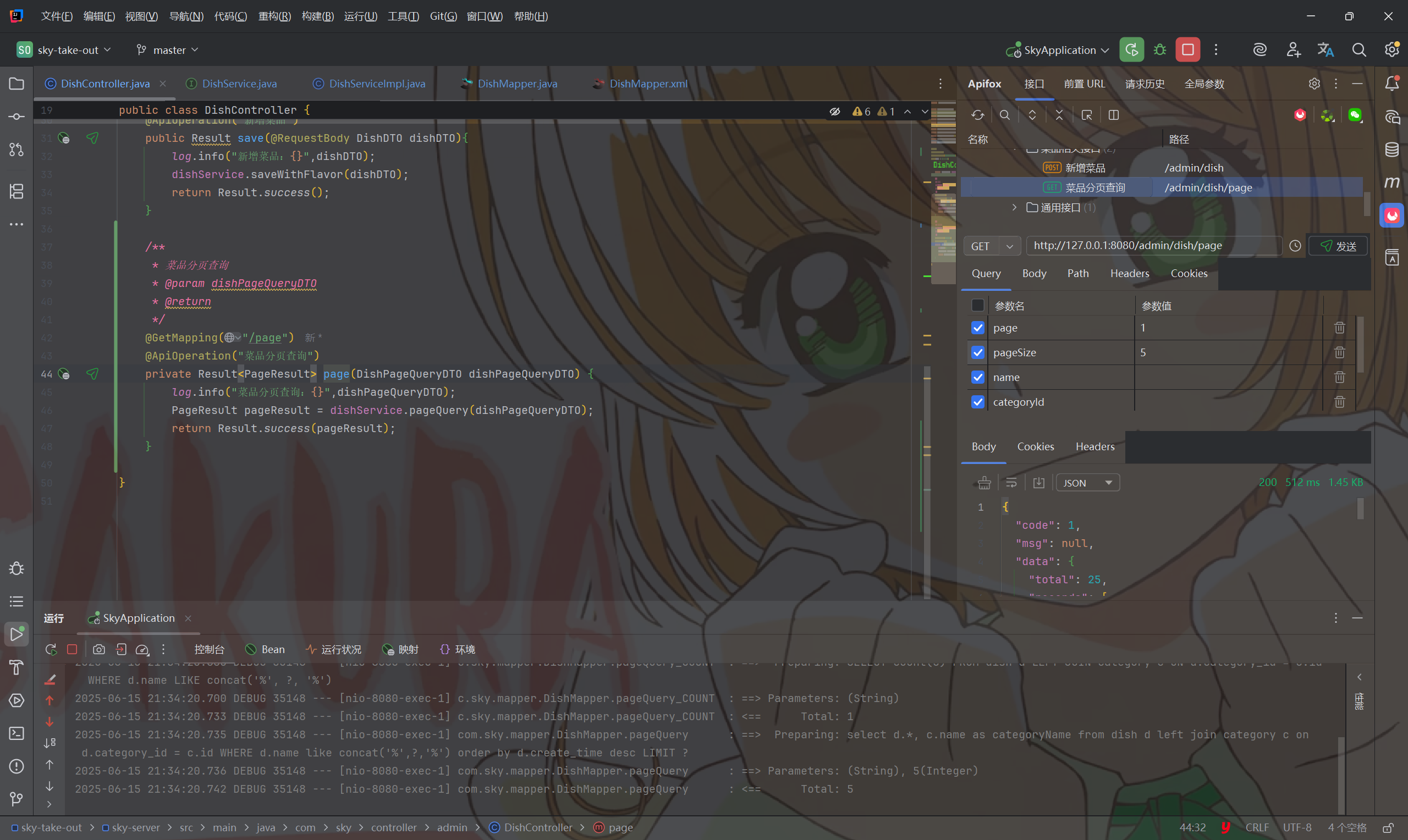
3.1 菜品分页查询——功能开发

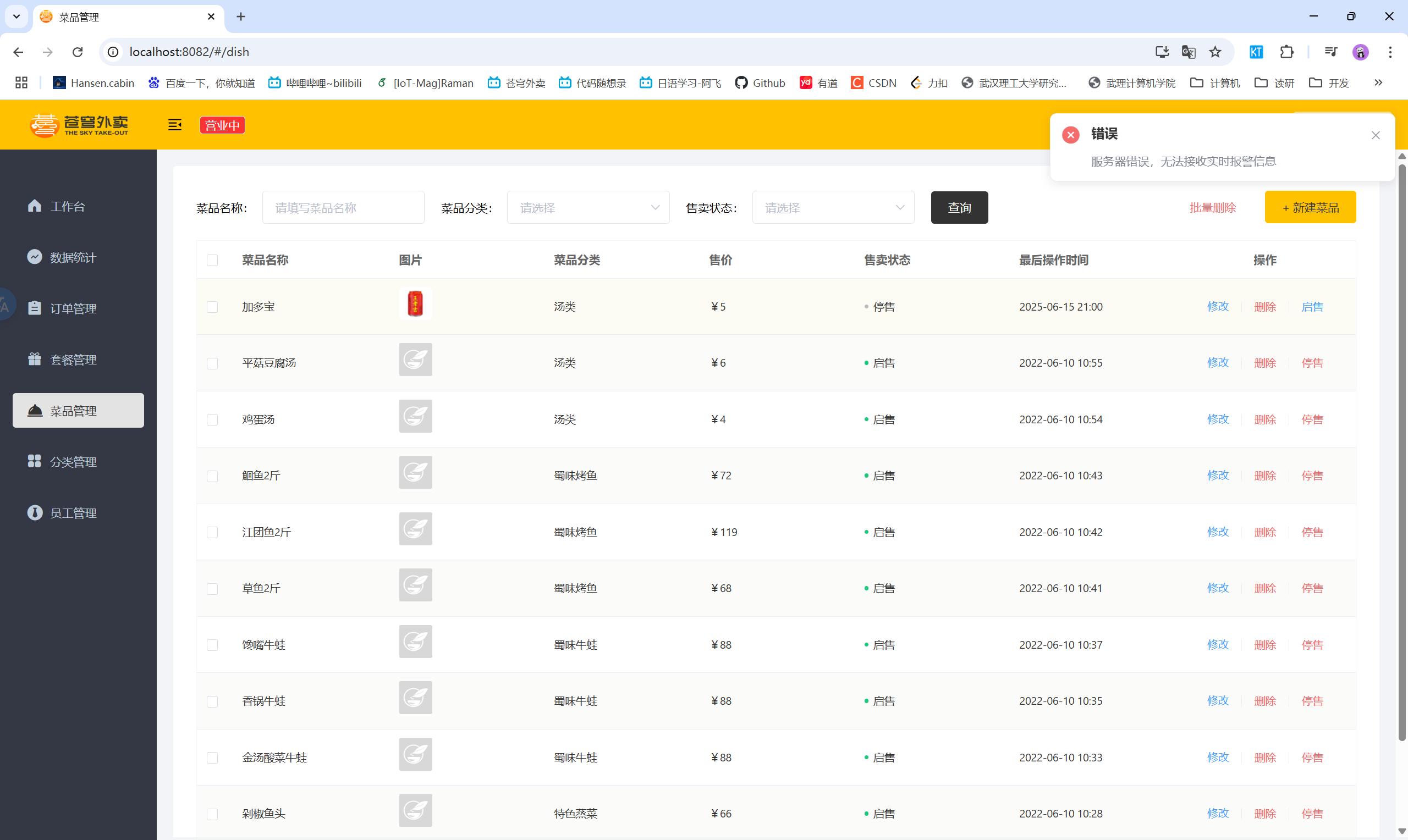
  • 产品原型
  • 业务规则
    • 根据页码展示菜品信息
    • 每页展示10条数据
    • 分页查询时可以根据需要输入菜品名称、菜品分类、菜品状态进行查询
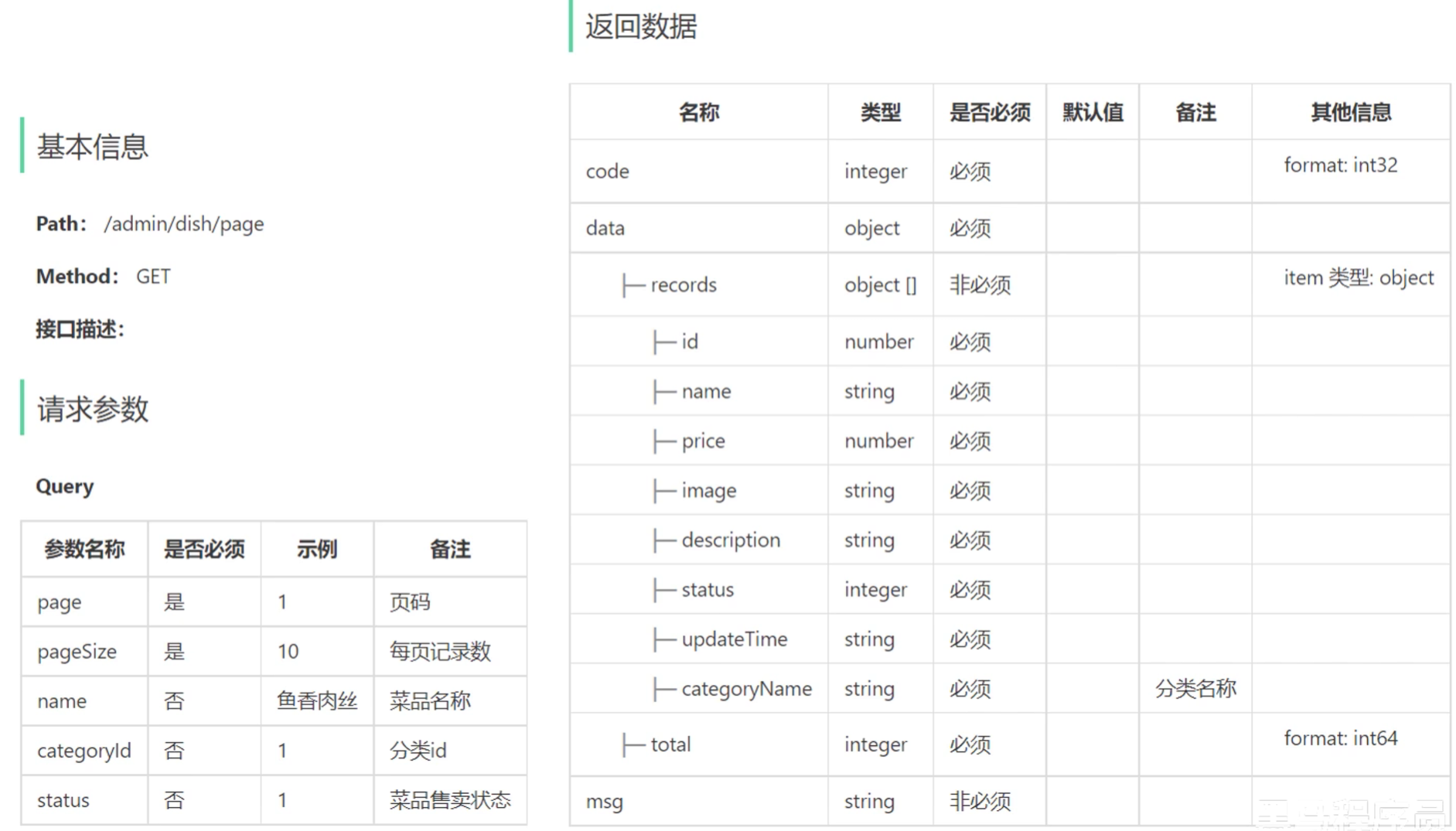
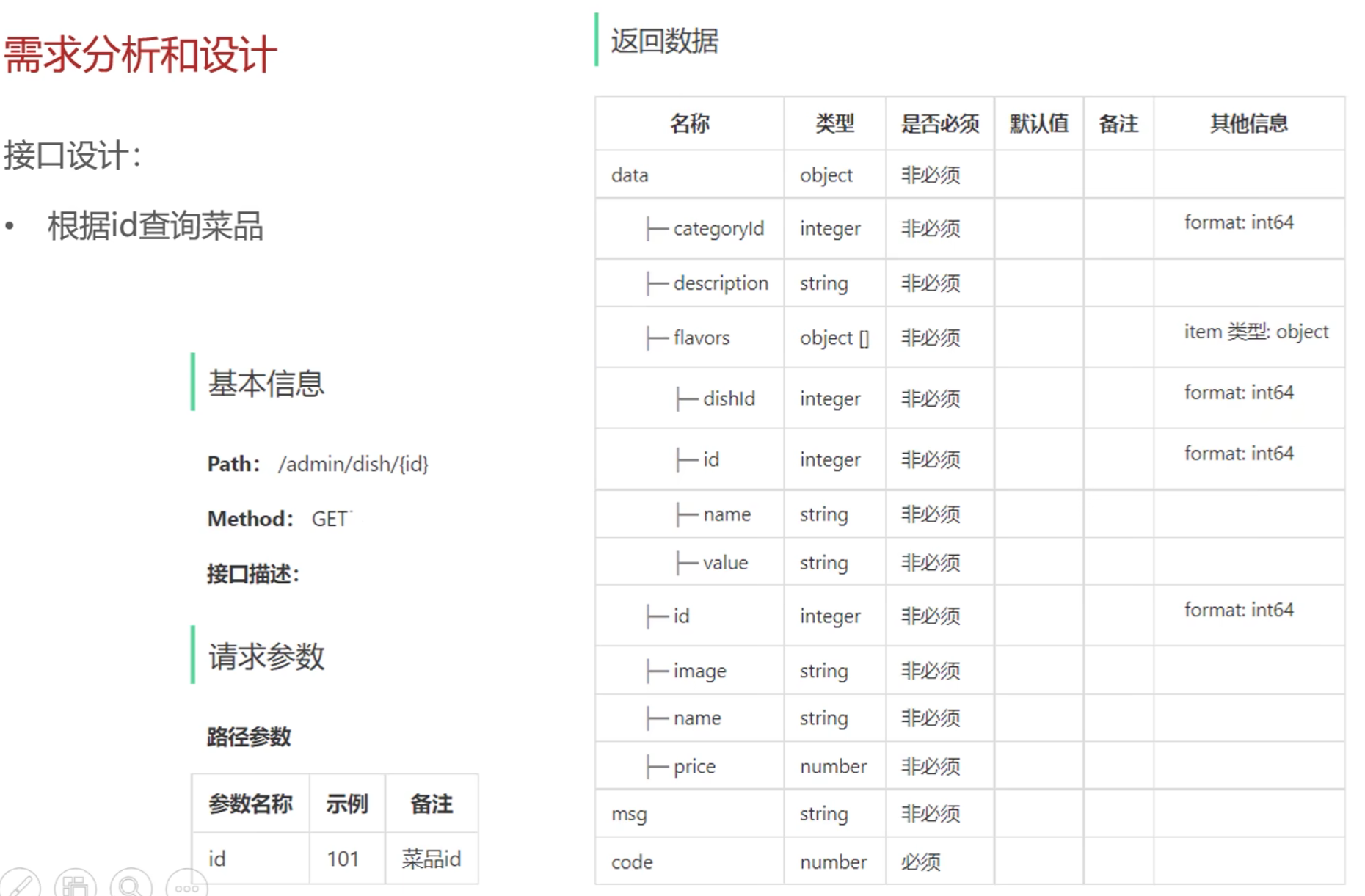
  • 接口设计
  • 注意点
    • 使用VO作为返回值,VO中包含了菜品口味信息

3.2 菜品分页查询——代码实现

3.2.1 DishPageQueryDTO

1
2
3
4
5
6
7
8
9
10
11
12
13
14
15
16
@Data
public class DishPageQueryDTO implements Serializable {

private int page;

private int pageSize;

private String name;

//分类id
private Integer categoryId;

//状态 0表示禁用 1表示启用
private Integer status;

}

3.2.2 DishVO

1
2
3
4
5
6
7
8
9
10
11
12
13
14
15
16
17
18
19
20
21
22
23
24
25
26
27
28
@Data
@Builder
@NoArgsConstructor
@AllArgsConstructor
public class DishVO implements Serializable {

private Long id;
//菜品名称
private String name;
//菜品分类id
private Long categoryId;
//菜品价格
private BigDecimal price;
//图片
private String image;
//描述信息
private String description;
//0 停售 1 起售
private Integer status;
//更新时间
private LocalDateTime updateTime;
//分类名称
private String categoryName;
//菜品关联的口味
private List<DishFlavor> flavors = new ArrayList<>();

//private Integer copies;
}

3.2.3 DishController

1
2
3
4
5
6
7
8
9
10
11
12
/**
* 菜品分页查询
* @param dishPageQueryDTO
* @return
*/
@GetMapping("/page")
@ApiOperation("菜品分页查询")
private Result<PageResult> page(DishPageQueryDTO dishPageQueryDTO) {
log.info("菜品分页查询:{}",dishPageQueryDTO);
PageResult pageResult = dishService.pageQuery(dishPageQueryDTO);
return Result.success(pageResult);
}

3.2.4 DishServiceImpl

1
2
3
4
5
6
7
8
9
10
11
/**
* 菜品分页查询
* @param dishPageQueryDTO
* @return
*/
@Override
public PageResult pageQuery(DishPageQueryDTO dishPageQueryDTO) {
PageHelper.startPage(dishPageQueryDTO.getPage(),dishPageQueryDTO.getPageSize());
Page<DishVO> page = dishMapper.pageQuery(dishPageQueryDTO);
return new PageResult(page.getTotal(),page.getResult());
}

3.2.5 DishMapper

1
2
3
4
5
6
/**
* 菜品分页查询
* @param dishPageQueryDTO
* @return
*/
Page<DishVO> pageQuery(DishPageQueryDTO dishPageQueryDTO);

3.2.6 DishMapper.xml

1
2
3
4
5
6
7
8
9
10
11
12
13
14
15
<select id="pageQuery" resultType="com.sky.vo.DishVO">
select d.*, c.name as categoryName from dish d left join category c on d.category_id = c.id
<where>
<if test="name != null">
and d.name like concat('%',#{name},'%')
</if>
<if test="categoryId != null">
and d.category_id = #{categoryId}
</if>
<if test="status != null">
and d.status = #{status}
</if>
</where>
order by d.create_time desc
</select>

3.3 菜品分页查询——功能测试

  • 功能测试:
  • 前后端联调测试:

四、删除菜品

4.1 删除菜品——功能开发

  • 产品原型
  • 业务规则
    • 可以一次删除一个菜品,也可以批量删除菜品
    • 起售中的菜品不能删除
    • 被套餐关联的菜品不能删除
    • 删除菜品后,关联的口味数据也需要删除
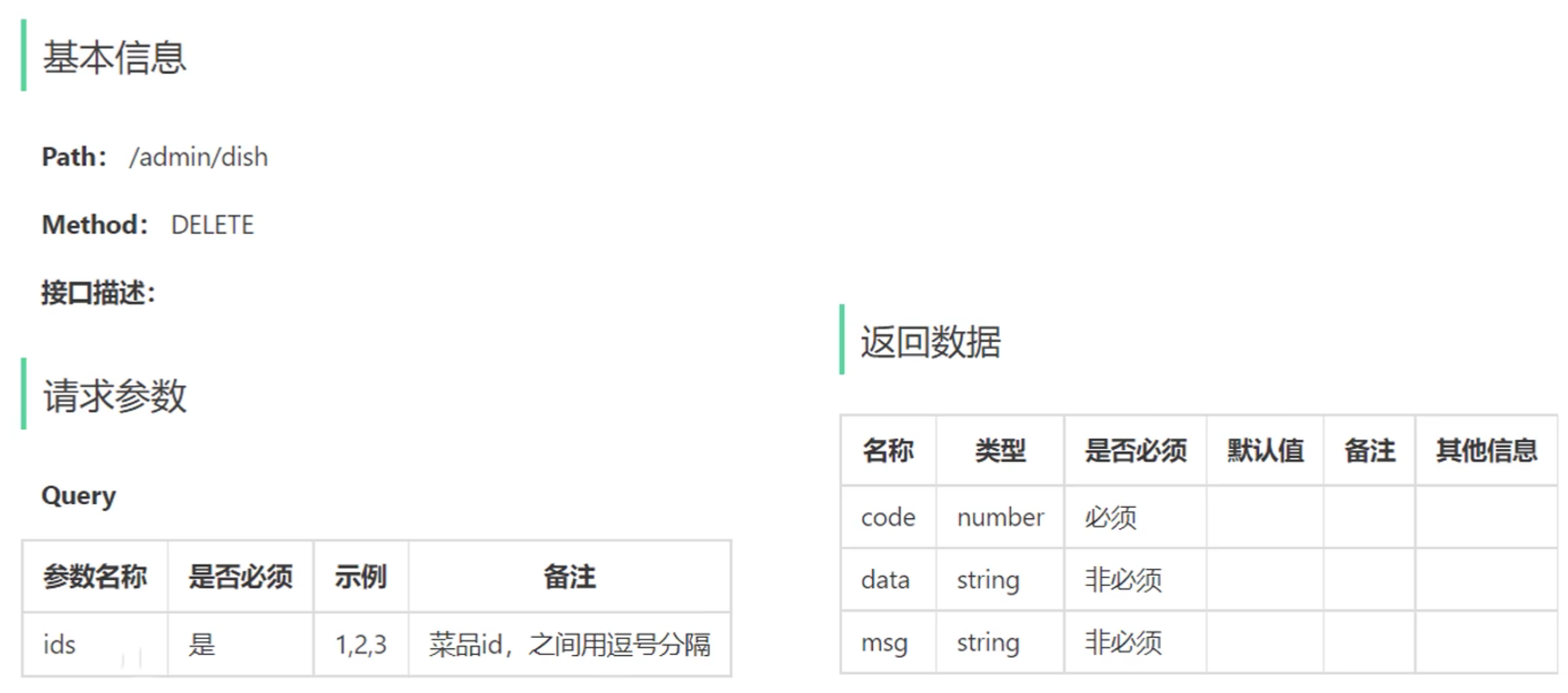
  • 接口设计
  • 数据库设计
  • 注意点
    • 在删除菜品前需要先判断菜品是否起售,如果起售则不能删除
    • 在删除菜品前需要先判断菜品是否被套餐关联,如果被套餐关联则不能删除

4.2 删除菜品——代码实现

4.2.1 DishController

1
2
3
4
5
6
7
8
9
10
11
12
/**
* 删除菜品
* @param ids
* @return
*/
@DeleteMapping
@ApiOperation("删除菜品")
public Result delete(@RequestParam List<Long> ids) {
log.info("删除菜品:{}",ids);
dishService.deleteById(ids);
return Result.success();
}

4.2.2 DishServiceImpl

1
2
3
4
5
6
7
8
9
10
11
12
13
14
15
16
17
18
19
20
21
22
23
24
25
26
27
28
29
30
31
/**
* 删除菜品
* @param ids
*/
@Override
@Transactional
public void deleteById(List<Long> ids) {
// 判断当前菜品是否在起售中
for (Long id : ids) {
Dish dish = dishMapper.getById(id);
if (dish.getStatus() == StatusConstant.ENABLE) {
// 不能删除
throw new DeletionNotAllowedException(MessageConstant.DISH_ON_SALE);
}
}

// 判断当前菜品是否被套餐关联了
List<Long> setmealIds = setmealDishMapper.getSetmealDishIdsByDishIds(ids);
if (setmealIds != null && setmealIds.size() > 0) {
// 不能删除
throw new DeletionNotAllowedException(MessageConstant.DISH_BE_RELATED_BY_SETMEAL);
}

// 删除菜品数据
for (Long id : ids) {
dishMapper.deleteById(id);
// 删除菜品关联的口味数据
dishFlavorMapper.deleteByDishId(id);
}

}

4.2.3 DishMapper

1
2
3
4
5
6
7
8
9
10
11
12
13
/**
* 根据id查询菜品
* @param id
*/
@Select("select * from dish where id = #{id}")
Dish getById(Long id);

/**
* 根据id删除菜品
* @param id
*/
@Delete("delete from dish where id = #{id}")
void deleteById(Long id);

4.2.4 DishMapper.xml

1
2
3
4
5
6
7
8
9
10
11
12
13
14
15
<select id="pageQuery" resultType="com.sky.vo.DishVO">
select d.*, c.name as categoryName from dish d left join category c on d.category_id = c.id
<where>
<if test="name != null">
and d.name like concat('%',#{name},'%')
</if>
<if test="categoryId != null">
and d.category_id = #{categoryId}
</if>
<if test="status != null">
and d.status = #{status}
</if>
</where>
order by d.create_time desc
</select>

4.2.5 DishFlavorMapper

1
2
3
4
5
6
/**
* 根据dishId删除口味
* @param dishId
*/
@Delete("delete from dish_flavor where dish_id = #{dishId}")
void deleteByDishId(Long dishId);

4.2.6 SetmealDishMapper

1
2
3
4
5
6
7
8
9
10
@Mapper
public interface SetmealDishMapper {

/**
* 根据菜品id查询对应套餐id
* @param dishIds
* @return
*/
List<Long> getSetmealDishIdsByDishIds(List<Long> dishIds);
}

4.2.7 SetmealDishMapper.xml

1
2
3
4
5
6
7
8
9
10
11
12
13
<?xml version="1.0" encoding="UTF-8" ?>
<!DOCTYPE mapper PUBLIC "-//mybatis.org//DTD Mapper 3.0//EN"
"http://mybatis.org/dtd/mybatis-3-mapper.dtd" >
<mapper namespace="com.sky.mapper.SetmealDishMapper">


<select id="getSetmealDishIdsByDishIds" resultType="java.lang.Long">
select setmeal_id from setmeal_dish where dish_id in
<foreach collection="dishIds" item="dishId" separator="," open="(" close=")">
#{dishId}
</foreach>
</select>
</mapper>

4.3 删除菜品——功能测试

  • 功能测试:
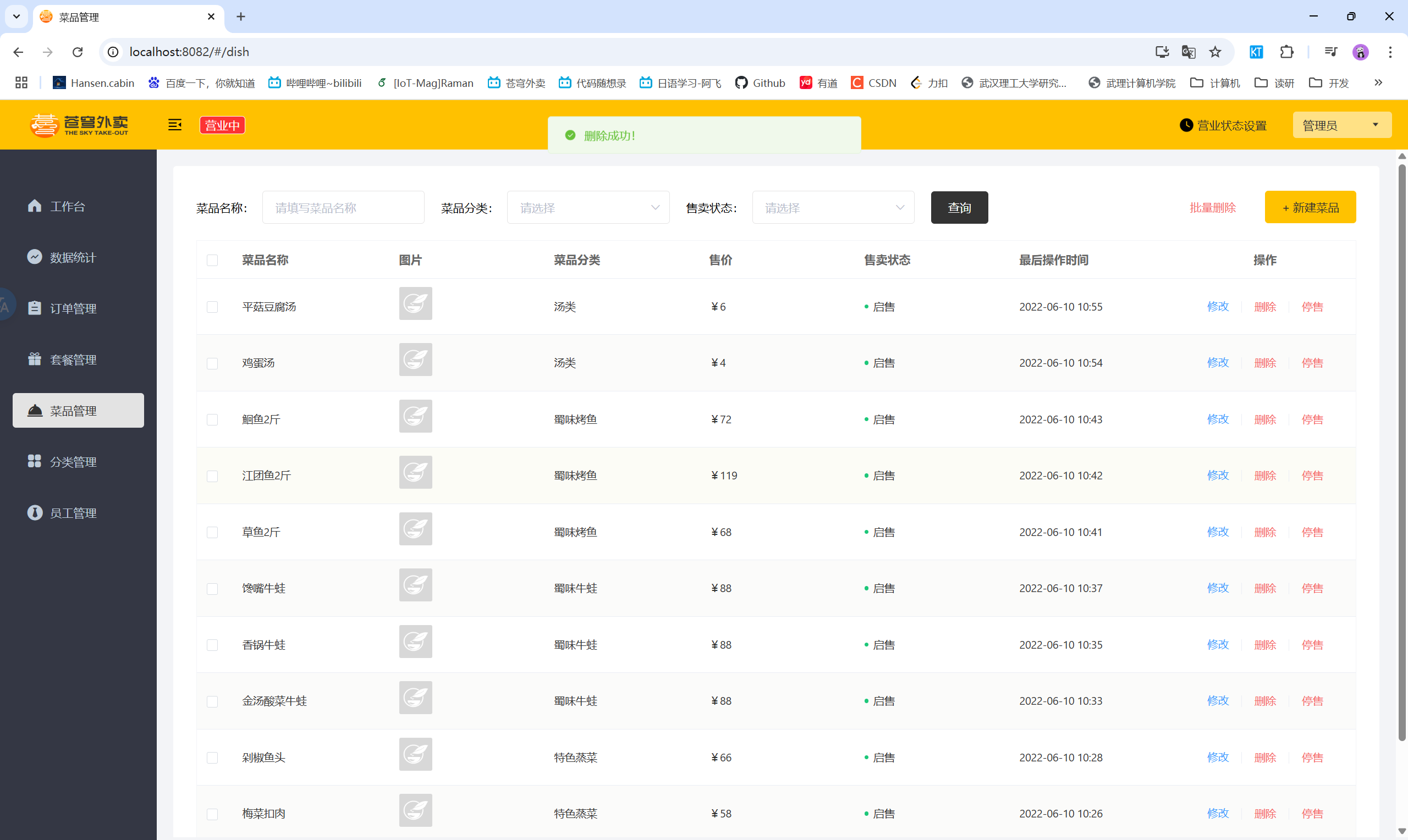
    删除成功
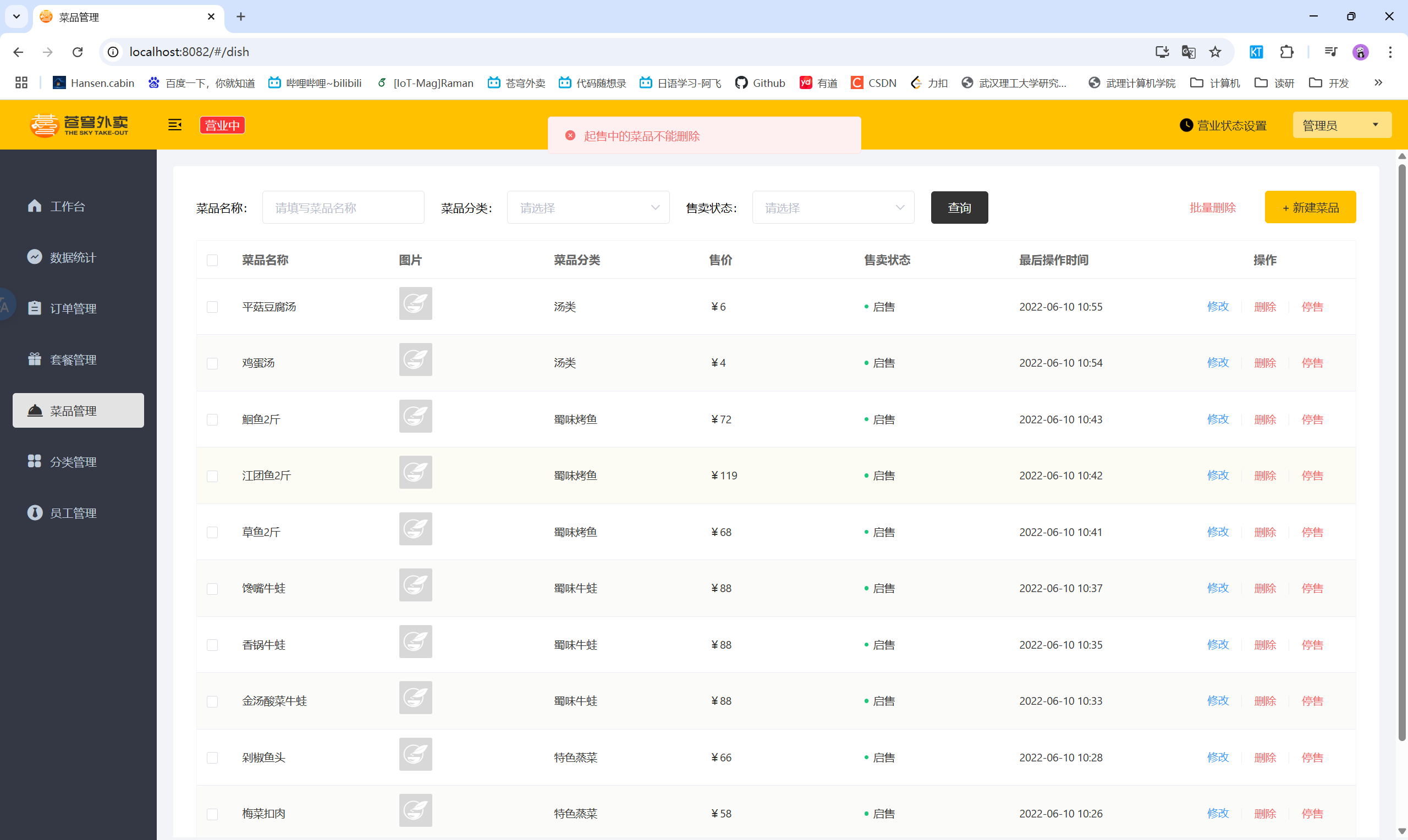
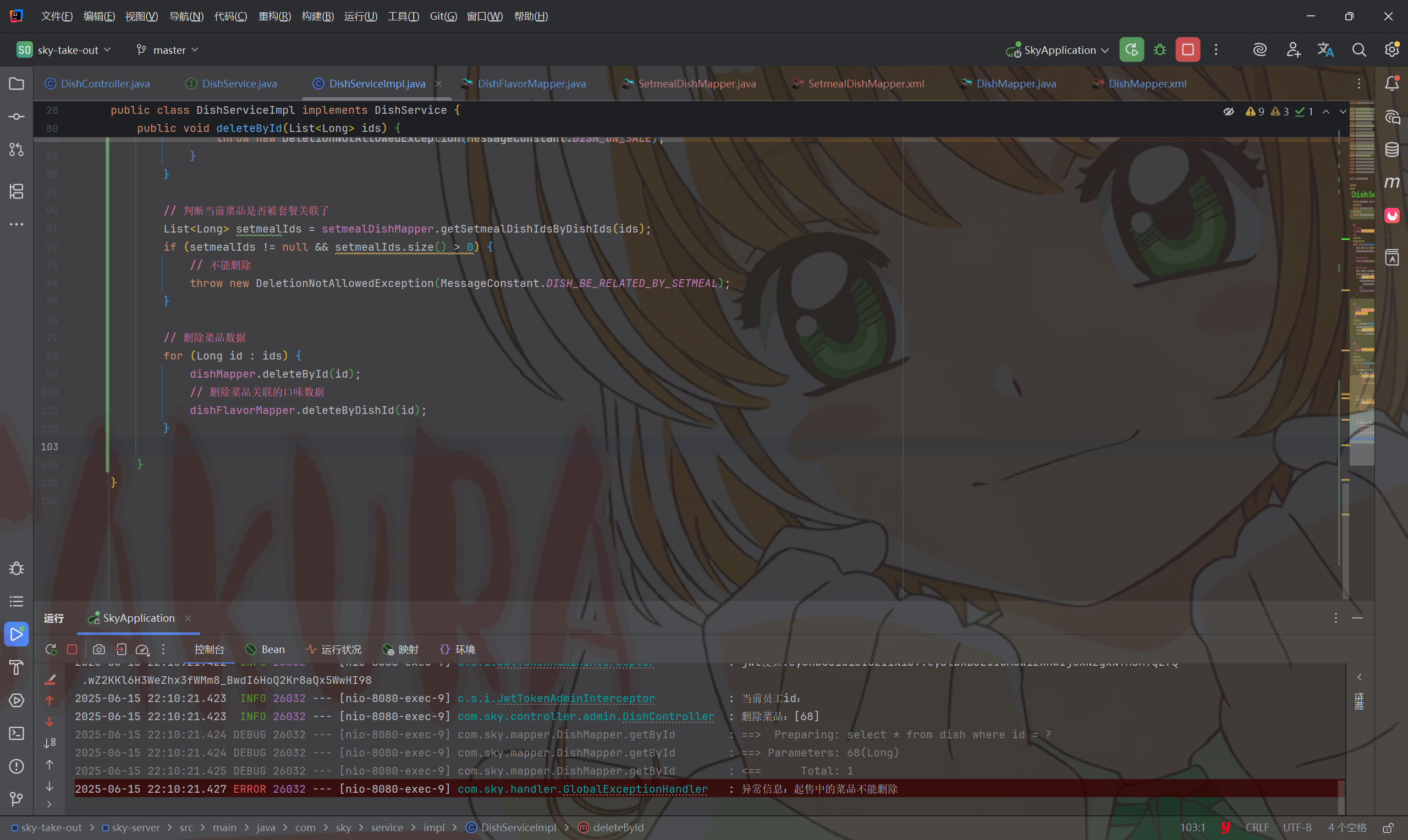
    删除失败1
    删除失败2

4.4 删除菜品——代码优化

  • 由于在Service层中遍历删除会产生多条sql语句,性能较差,所以优化为一条sql语句

4.4.1 DishServiceImpl

1
2
3
4
5
6
7
8
9
10
11
12
13
14
15
16
17
18
19
20
21
22
23
24
25
26
27
28
29
30
31
32
33
34
35
/**
* 删除菜品
* @param ids
*/
@Override
@Transactional
public void deleteById(List<Long> ids) {
// 判断当前菜品是否在起售中
for (Long id : ids) {
Dish dish = dishMapper.getById(id);
if (dish.getStatus() == StatusConstant.ENABLE) {
// 不能删除
throw new DeletionNotAllowedException(MessageConstant.DISH_ON_SALE);
}
}

// 判断当前菜品是否被套餐关联了
List<Long> setmealIds = setmealDishMapper.getSetmealDishIdsByDishIds(ids);
if (setmealIds != null && setmealIds.size() > 0) {
// 不能删除
throw new DeletionNotAllowedException(MessageConstant.DISH_BE_RELATED_BY_SETMEAL);
}

// 删除菜品数据
/*for (Long id : ids) {
dishMapper.deleteById(id);
// 删除菜品关联的口味数据
dishFlavorMapper.deleteByDishId(id);
}*/

// 根据菜品id批量删除菜品数据
dishMapper.deleteByIds(ids);
// 根据菜品id删除关联的口味数据
dishFlavorMapper.deleteByDishIds(ids);
}

4.4.2 DishMapper

1
2
3
4
5
/**
* 根据菜品id集合批量删除菜品
* @param ids
*/
void deleteByIds(List<Long> ids);

4.4.3 DishMapper.xml

1
2
3
4
5
6
<delete id="deleteByIds">
delete from dish where id in
<foreach collection="ids" item="id" open="(" close=")" separator=",">
#{id}
</foreach>
</delete>

4.4.4 DishFlavorMapper

1
2
3
4
5
/**
* 根据菜品id集合删除口味
* @param dishIds
*/
void deleteByDishIds(List<Long> dishIds);

4.4.5 DishFlavorMapper.xml

1
2
3
4
5
6
<delete id="deleteByDishIds">
delete from dish_flavor where dish_id in
<foreach collection="dishIds" item="dishId" separator="," open="(" close=")">
#{dishId}
</foreach>
</delete>

五、修改菜品

5.1 修改菜品——功能开发

  • 产品原型
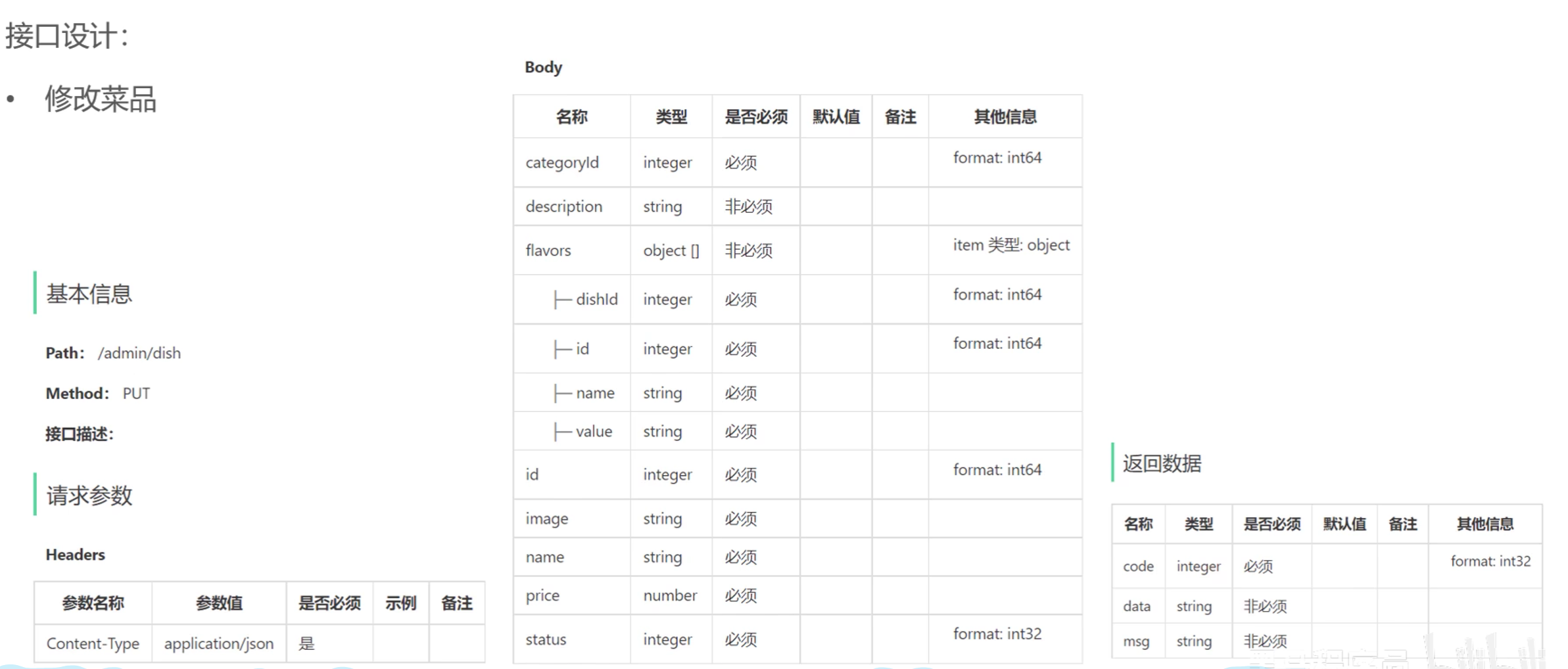
  • 接口设计


  • 注意点
    • 在修改口味时,可以先将原来的口味全部删除再重新添加

5.2 修改菜品——代码实现

5.2.1 DishController

1
2
3
4
5
6
7
8
9
10
11
12
13
14
15
16
17
18
19
20
21
22
23
/**
* 根据id查询菜品信息
*/
@GetMapping("/{id}")
@ApiOperation("查询菜品")
public Result<DishVO> getById(@PathVariable Long id) {
log.info("根据id查询菜品:{}",id);
DishVO dishVO = dishService.getByIdWithFlavor(id);
return Result.success(dishVO);
}

/**
* 修改菜品
* @param dishDTO
* @return
*/
@PutMapping
@ApiOperation("修改菜品")
public Result update(@RequestBody DishDTO dishDTO) {
log.info("修改菜品:{}",dishDTO);
dishService.updateWithFlavor(dishDTO);
return Result.success();
}

5.2.2 DishServiceImpl

1
2
3
4
5
6
7
8
9
10
11
12
13
14
15
16
17
18
19
20
21
22
23
24
25
26
27
28
29
30
31
32
33
34
35
36
37
38
39
40
41
42
43
44
/**
* 根据id查询菜品
* @return
*/
@Override
@Transactional
public DishVO getByIdWithFlavor(Long id) {
// 根据id查询菜品数据
Dish dish = dishMapper.getById(id);

// 根据id查询口味数据
List<DishFlavor> dishFlavors = dishFlavorMapper.getByDishId(id);

// 封装
DishVO dishVO = new DishVO();
BeanUtils.copyProperties(dish, dishVO);
dishVO.setFlavors(dishFlavors);

return dishVO;
}

/**
* 修改菜品基本信息和口味
* @param dishDTO
*/
@Override
public void updateWithFlavor(DishDTO dishDTO) {
// 修改菜品基本信息
Dish dish = new Dish();
BeanUtils.copyProperties(dishDTO, dish);
dishMapper.update(dish);

// 删除原有的口味数据
dishFlavorMapper.deleteByDishId(dishDTO.getId());

// 重新插入新的口味数据
List<DishFlavor> flavors = dishDTO.getFlavors();
if (flavors != null && flavors.size() > 0) {
flavors.forEach(flavor -> {
flavor.setDishId(dishDTO.getId());
});
dishFlavorMapper.insertBatch(flavors);
}
}

5.2.3 DishMapper

1
2
3
4
5
6
/**
* 修改菜品基本信息
* @param dish
*/
@AutoFill(value = OperationType.UPDATE)
void update(Dish dish);

5.2.4 DishMapper.xml

1
2
3
4
5
6
7
8
9
10
11
12
13
14
<update id="update">
update dish
<set>
<if test="name != null">name = #{name},</if>
<if test="categoryId != null">category_id = #{categoryId},</if>
<if test="price != null">price = #{price},</if>
<if test="image != null">image = #{image},</if>
<if test="description != null">description = #{description},</if>
<if test="status != null">status = #{status},</if>
<if test="updateTime != null">update_time = #{updateTime},</if>
<if test="updateUser != null">update_user = #{updateUser},</if>
</set>
where id = #{id}
</update>

5.3 修改菜品——功能测试

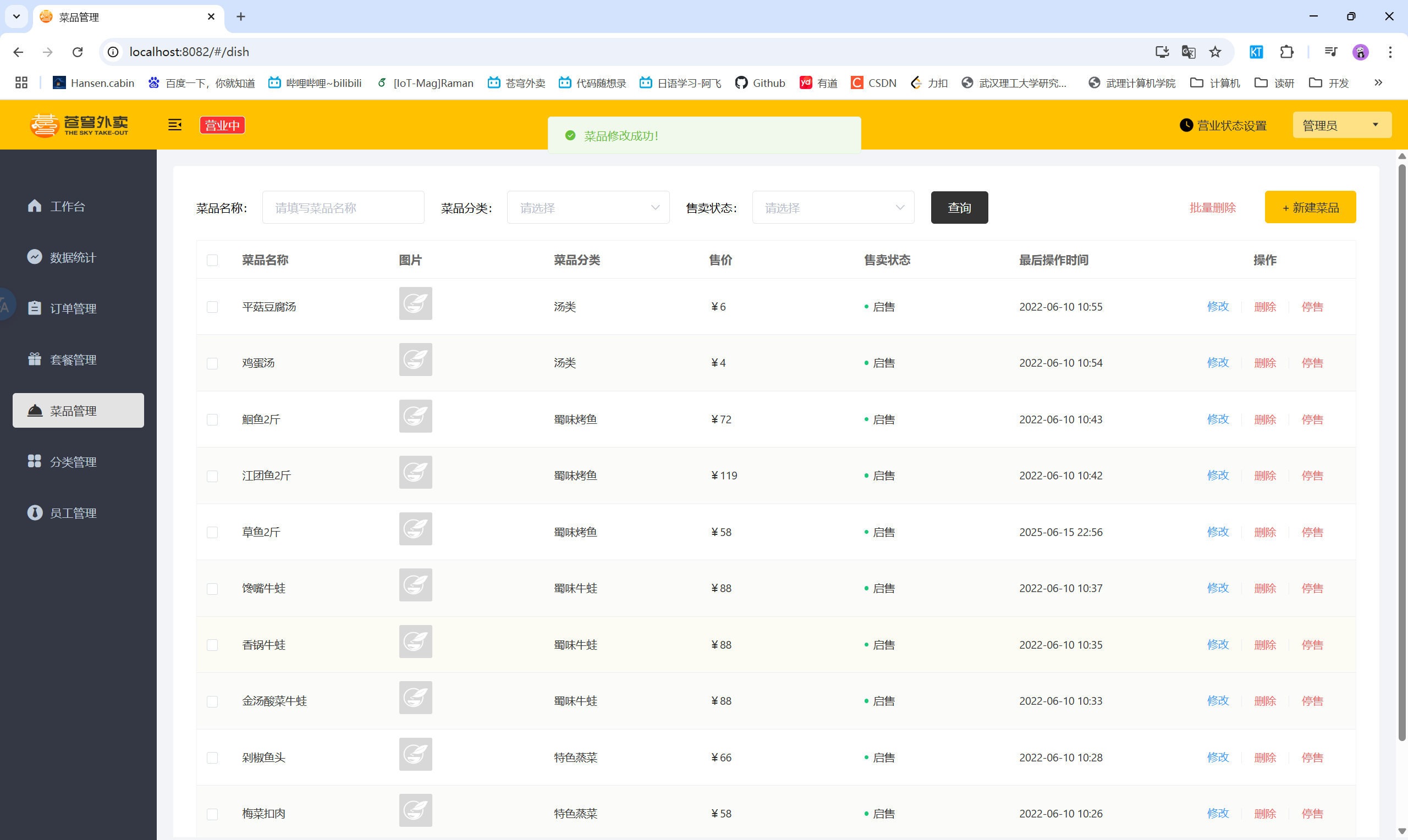
  • 前后端联调测试

六、菜品起售停售

6.1 菜品起售停售——功能开发

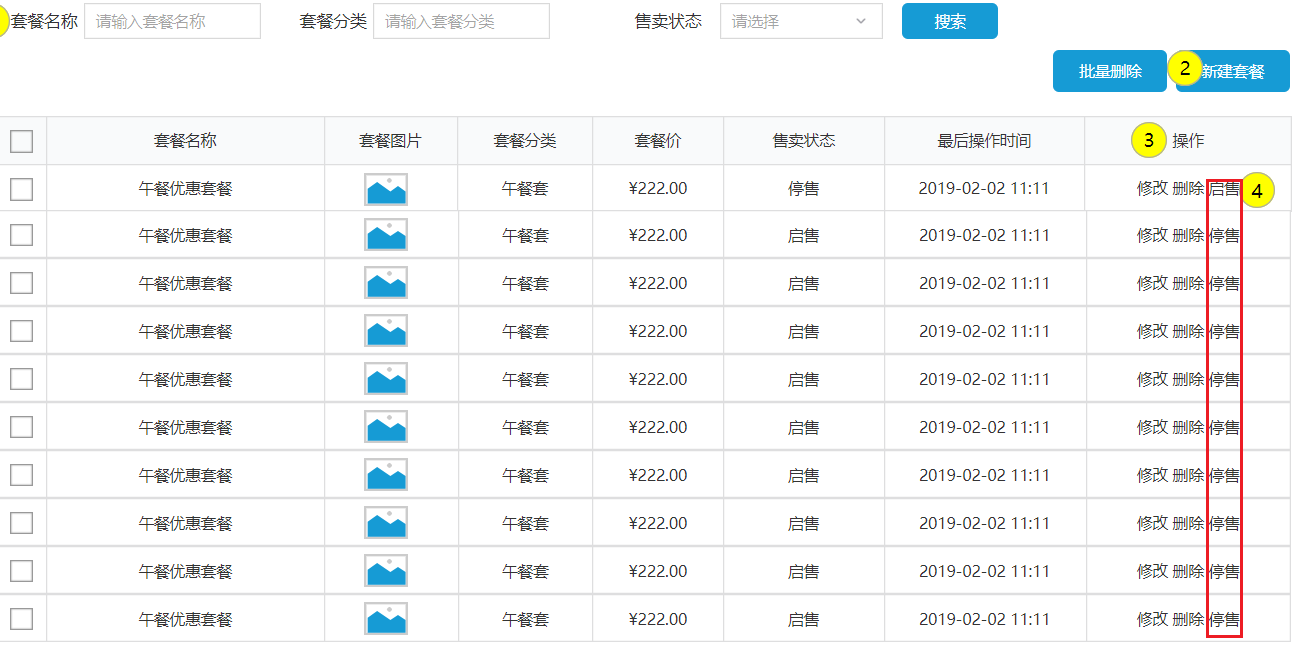
  • 产品原型
  • 业务规则:
    • 可以对状态为起售的套餐进行停售操作,可以对状态为停售的套餐进行起售操作
    • 起售的套餐可以展示在用户端,停售的套餐不能展示在用户端
    • 起售套餐时,如果套餐内包含停售的菜品,则不能起售
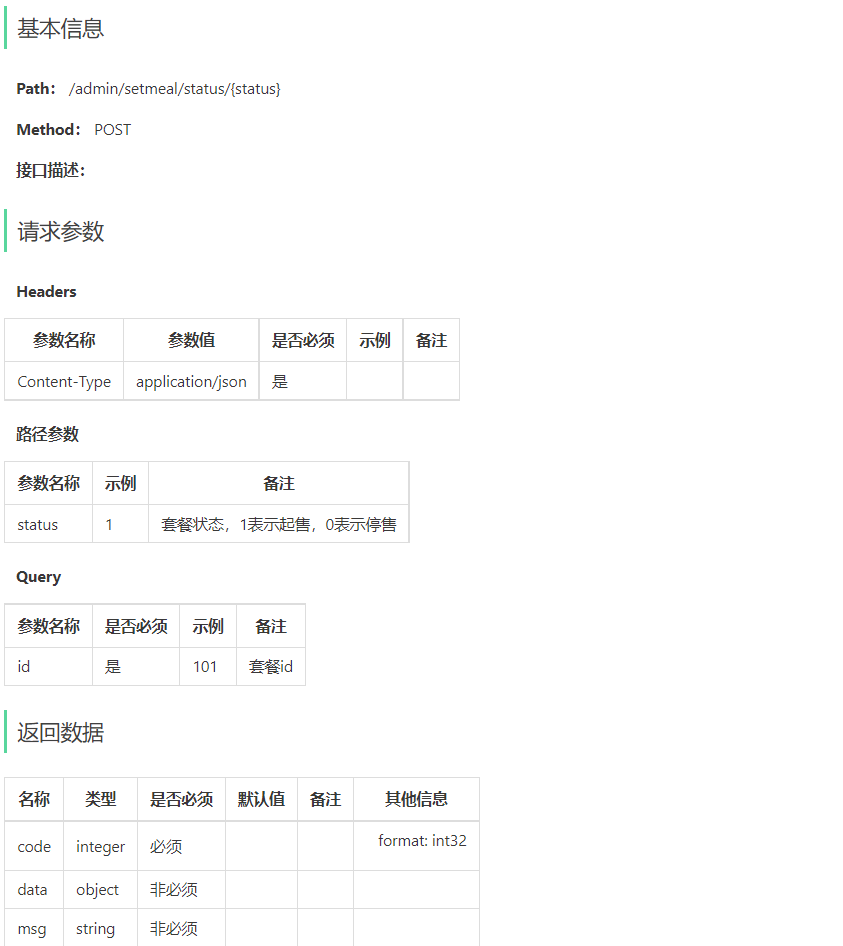
  • 接口设计:

6.2 菜品起售停售——代码实现

3.1 DishController

1
2
3
4
5
6
7
8
9
10
11
12
/**
* 菜品起售停售
* @param status
* @param id
* @return
*/
@PostMapping("/status/{status}")
@ApiOperation("菜品起售停售")
public Result<String> startOrStop(@PathVariable Integer status, Long id){
dishService.startOrStop(status,id);
return Result.success();
}

3.2 DishService

1
2
3
4
5
6
/**
* 菜品起售停售
* @param status
* @param id
*/
void startOrStop(Integer status, Long id);

3.3 DishServiceImpl

1
2
3
4
5
6
7
8
9
10
11
12
13
14
15
16
17
18
19
20
21
22
23
24
25
26
27
28
29
30
31
/**
* 菜品起售停售
*
* @param status
* @param id
*/
@Transactional
public void startOrStop(Integer status, Long id) {
Dish dish = Dish.builder()
.id(id)
.status(status)
.build();
dishMapper.update(dish);

if (status == StatusConstant.DISABLE) {
// 如果是停售操作,还需要将包含当前菜品的套餐也停售
List<Long> dishIds = new ArrayList<>();
dishIds.add(id);
// select setmeal_id from setmeal_dish where dish_id in (?,?,?)
List<Long> setmealIds = setmealDishMapper.getSetmealIdsByDishIds(dishIds);
if (setmealIds != null && setmealIds.size() > 0) {
for (Long setmealId : setmealIds) {
Setmeal setmeal = Setmeal.builder()
.id(setmealId)
.status(StatusConstant.DISABLE)
.build();
setmealMapper.update(setmeal);
}
}
}
}

3.4 SetmealMapper

1
2
3
4
5
6
7
/**
* 根据id修改套餐
*
* @param setmeal
*/
@AutoFill(OperationType.UPDATE)
void update(Setmeal setmeal);

3.5 SetmealMapper.xml

1
2
3
4
5
6
7
8
9
10
11
12
13
14
15
16
17
18
19
20
21
22
23
24
25
26
27
28
29
30
31
32
33
34
35
36
37
<?xml version="1.0" encoding="UTF-8" ?>
<!DOCTYPE mapper PUBLIC "-//mybatis.org//DTD Mapper 3.0//EN"
"http://mybatis.org/dtd/mybatis-3-mapper.dtd" >
<mapper namespace="com.sky.mapper.SetmealMapper">

<update id="update" parameterType="Setmeal">
update setmeal
<set>
<if test="name != null">
name = #{name},
</if>
<if test="categoryId != null">
category_id = #{categoryId},
</if>
<if test="price != null">
price = #{price},
</if>
<if test="status != null">
status = #{status},
</if>
<if test="description != null">
description = #{description},
</if>
<if test="image != null">
image = #{image},
</if>
<if test="updateTime != null">
update_time = #{updateTime},
</if>
<if test="updateUser != null">
update_user = #{updateUser}
</if>
</set>
where id = #{id}
</update>

</mapper>

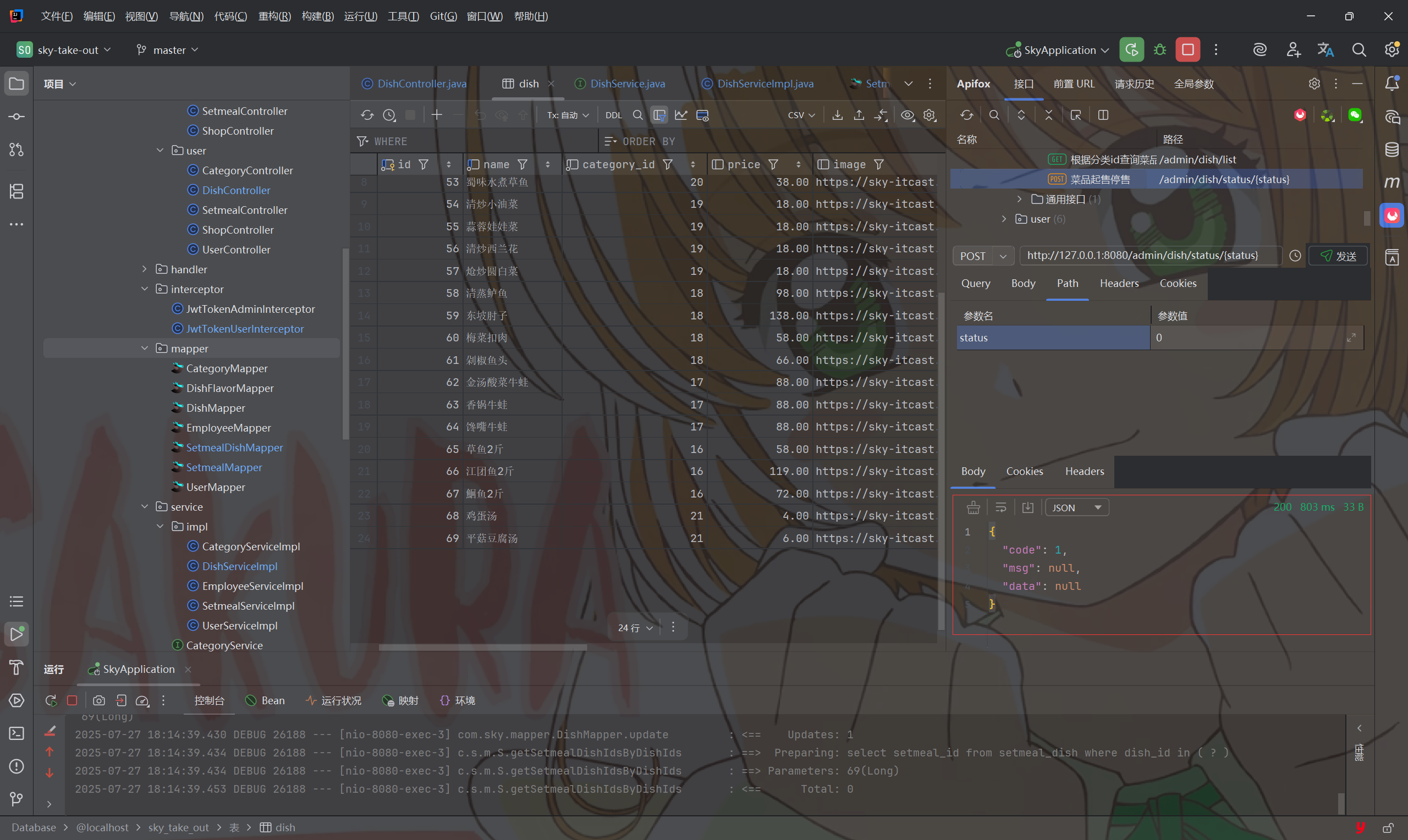
6.3 菜品起售停售——功能测试

  • 前后端联调测试