一、Math
1.1 Math介绍
Math类包含用于执行基本数学运算的方法,如初等指数、对数、平方根和三角函数。
Math私有化构造方法,所有方法都是静态的。
Math类所在包为java.lang包,因此在使用的时候不需要进行导包。并且Math类被final修饰了,因此该类是不能被继承的。
1.2 Math常用方法
1.2.1 abs():获取参数绝对值
- public static int abs(int a): 获取参数绝对值
示例:
1
2
3
4
5
6
7
| public static void main(String[] args){
int a = -11;
b = Math.abs(a);
System.out.println(b);
}
|
1.2.2 ceil():向上取整
- public static double ceil(double a): 向上取整
示例:
1
2
3
4
5
6
7
| public static void main(String[] args){
System.out.println(Math.ceil(13.2));
System.out.println(Math.ceil(-13.2));
}
|
1.2.3 floor(double a):向下取整
- public static double floor(double a): 向下取整
示例:
1
2
3
4
5
6
7
| public static void main(String[] args){
System.out.println(Math.ceil(13.2));
System.out.println(Math.ceil(-13.2));
}
|
1.2.4 round():四舍五入
- public static int round(float a): 四舍五入
示例:
1
2
3
4
5
6
7
| public static void main(String[] args){
System.out.println(Math.floor(13.2));
System.out.println(Math.floor(-13.2));
}
|
1.2.5 max():获取两个值中的最大值
- public static int max(int a,int b): 获取两个int中的较大值
示例:
1
2
3
4
5
| public static void main(String[] args){
System.out.println(Math.max(12,16));
}
|
1.2.6 pow():幂计算
- public static double pow(double a,double b): 返回a的b次幂
- public static double sqrt(double a): 返回a的平方根
- public static double cbrt(double a): 返回a的立方根
示例:
1
2
3
4
5
| public static void main(String[] args){
System.out.println(Math.pow(2,3));
}
|
1.2.7 random():随机数
- public static double random(): 返回值为double的随机数,范围为[0.0,1.0)
示例:
1
2
3
4
5
| public static void main(String[] args){
System.out.println(Math.random());
}
|
二、System
2.1 System介绍
System也是一个工具类,提供了一些与系统相关的方法。
System类所在包为java.lang包,因此在使用的时候不需要进行导包。并且System类被final修饰了,因此该类是不能被继承的。
2.2 System常用方法
2.2.1 exit():终止当前运行的Java虚拟机
- public static void exit(int status): 终止当前运行的Java虚拟机
- status: 状态码
- 0:表示当前虚拟机是正常停止
- 非0:表示当前虚拟机异常停止
示例:
1
2
3
4
5
6
| public static void main(String[] args){
System.exit(0);
System.out.println("Hello World!");
}
|
2.2.2 currentTimeMillis():返回当前系统的时间毫秒值形式
- public static long currentTimeMillis(): 返回当前系统的时间距离时间原点的毫秒值
- 计算机中的时间原点:1970年1月1日00:00:00(我国处于东八区,所以在我们的操作系统中使用的时间原点为1970年1月1日08:00:00)
示例:
1
2
3
4
5
6
7
8
9
10
11
12
13
14
15
16
17
| public static void main(String[] args){
long start = System.currentTimeMillis();
for (int i = 1; i <= 10000; i++){
boolean flag = isPrime();
if(flag){
System.out.println(i);
}
}
long end = System.currentTimeMillis();
System.out.println(start - end);
}
|
2.2.3 arraycopy():数组拷贝
- public static void arraycopy(数据源数组,起始索引,目的地数组,起始索引,拷贝个数)
- 注意:
- 如果数据源数组和目的地数组都是基本数据类型,那么两者的类型必须保持一致,否则会报错
- 在拷贝数组时需要考虑数组的长度,如果超出范围也会报错
- 如果数据源数组和目的地数组都是引用数据类型,那么子类类型可以赋值给父类类型
示例:
1
2
3
4
5
6
7
8
9
10
11
12
| public static void main(String[] args){
int[] arr1 = {1, 2, 3, 4, 5, 6, 7, 8, 9, 10};
int[] arr2 = new int[10];
System.arraycopy(arr1, 3, arr2, 4, 5);
for (int i = 0; i < arr2.length; i++){
System.out.print(arr2[i] + " ");
}
}
|
注:System.out逻辑:
- System:类名,out:静态变量
- System.out:获取打印的对象
- println():方法
- 参数:表示打印的内容
- 核心逻辑:当我们打印一个对象时,底层会调用对象的toString方法,把对象变成字符,然后再打印在控制台上
三、Runtime
3.1 Runtime介绍
Runtime表示当前虚拟机的运行环境
3.2 Runtime常用方法
3.2.1 getRuntime():当前系统的运行环境对象
- public static Runtime getRuntime(): 当前系统的运行环境对象
示例:
1
2
3
4
5
6
7
| public static void main(String[] args){
Runtime r1 = Runtime.getRuntime();
Runtime r2 = Runtime.getRuntime();
System.out.println(r1 == r2);
}
|
3.2.2 exit():停止虚拟机
- public void exit(int status): 停止虚拟机
- Runtime.getRuntime.exit()实际上是System.exit()的底层源码
示例:
1
2
3
4
5
6
| public static void main(String[] args){
Runtime.getRuntime().exit(0);
System.out.println("Hello World");
}
|
3.2.3 availableProcessors():获得CPU线程数
- public int availableProcessors(): 获得CPU线程数
示例:
1
2
3
4
5
| public static void main(String[] args){
System.out.println(Runtime.getRuntime().availableProcessors());
}
|
3.2.4 maxMemory():JVM能从系统中获取总内存大小
- public long maxMemory(): JVM能从系统中获取总内存大小(单位:byte)
示例:
1
2
3
4
5
| public static void main(String[] args){
System.out.println(Runtime.getRuntime().maxMemory() / 1024 / 1024);
}
|
3.2.5 totalMemory():JVM已经从系统中获取总内存大小
- public long totalMemory(): JVM已经从系统中获取总内存大小(单位:byte)
1
2
3
4
5
| public static void main(String[] args){
System.out.println(Runtime.getRuntime().totalMemory() / 1024 / 1024);
}
|
3.2.6 freeMemory():JVM剩余内存大小
- public long freeMemory(): JVM剩余内存大小(单位:byte)
1
2
3
4
5
| public static void main(String[] args){
System.out.println(Runtime.getRuntime().freeMemory() / 1024 / 1024);
}
|
3.2.7 exec():运行cmd命令
- public Process exec(String command): 运行cmd命令
1
2
3
4
5
| public static void main(String[] args) throws IOException {
Runtime.getRuntime().exec("notepad");
}
|
四、Object,Objects
4.1 Object介绍
Object是Java中的顶级父类,所有类都直接或间接的继承于Object类。
Object类中的方法可以被所有子类访问。
4.2 Object常用方法
4.2.1 Object构造方法
Object中只有一个空参构造方法
4.2.2 toString():返回对象的字符串表示
- public String toString(): 返回对象的字符串表示
- toString默认取得的是地址值,如果想让其得到参数值,就需要再子类中进行重写
示例:
1
2
3
4
5
6
7
| public static void main(String[] args){
Object obj = new Object();
String str1 = obj.toString();
System.out.println(str1);
}
|
4.2.3 equals():比较两个对象是否相等
- public boolean equals(Object obj): 比较两个对象是否相等
- equal默认比较的是地址值,如果相比较两个对象的的属性值,就需要进行重写
示例:
1
2
3
4
5
6
7
8
9
10
11
12
13
14
15
16
| public static void main(String[] args){
Student s1 = new Student("zhangsan", 23);
Student s2 = new Student("zhangsan", 23);
boolean result = s1.equals(s2);
System.out.println(result);
}
public boolean equals(Object o) {
if (o == null || getClass() != o.getClass()) return false;
Student student = (Student) o;
return age == student.age && Objects.equals(name, student.name);
}
|
4.2.4 clone():对象克隆
- protected Object clone(int a): 对象克隆
- 把A对象的属性值完全拷贝给B对象,也叫对象拷贝,对象复制
- clone是protected,只能被本包中的类和其他包中的子类使用
- Cloneable:如果一个接口里面没有抽象方法,表示当前接口是一个标记性接口
- 现在Cloneable表示一旦实现了,那么当前类的对象就可以被克隆
- clone也需要在子类中进行重写
示例:
1
2
3
4
5
6
7
8
9
10
11
12
13
14
15
16
17
18
19
20
21
22
23
24
25
26
27
28
29
30
31
32
33
34
35
36
37
38
39
40
41
42
43
44
45
46
47
48
49
50
51
52
53
54
55
56
57
58
59
60
61
62
|
public class Student implements Cloneable{
private String name;
private int age;
public Student() {
}
public Student(String name, int age) {
this.name = name;
this.age = age;
}
public String getName() {
return name;
}
public void setName(String name) {
this.name = name;
}
public int getAge() {
return age;
}
public void setAge(int age) {
this.age = age;
}
@Override
public boolean equals(Object o) {
if (o == null || getClass() != o.getClass()) return false;
Student student = (Student) o;
return age == student.age && Objects.equals(name, student.name);
}
@Override
public String toString() {
return "Student{" +
"name='" + name + '\'' +
", age=" + age +
'}';
}
@Override
protected Object clone() throws CloneNotSupportedException {
return super.clone();
}
}
public static void main(String[] args) throws CloneNotSupportedException {
Student s1 = new Student("张三", 23);
Object o1 = (Student)s1.clone();
System.out.println(s1);
System.out.println(o1);
}
|
对象克隆方式:
- 浅克隆、浅拷贝
- 对于基本数据类型,会直接拷贝变量记录的数据值
- 对于引用数据类型,会直接拷贝变量记录的地址值,这会使得在修改克隆得到的变量时,原变量的值也会改变
- 深克隆、深拷贝
- 对于基本数据类型,会直接拷贝变量记录的数据值
- 字符串还是会复用
- 对于引用数据类型,它会重新创建一个对象,记录新对象的地址值
- 深克隆需要使用第三方工具
- Object中的clone是浅克隆
4.3 Objects介绍
Objetcs是一个工具类,提供了一些方法去完成一些功能
4.4 Objects常用方法
4.4.1 equals():先做非空判断,比较两个对象
- public static boolean equals(Object a,Object b): 先做非空判断,比较两个对象
示例:
1
2
3
4
5
6
7
8
9
10
11
12
13
| public static void main(String[] args){
Student s1 = null;
Student s2 = new Student("zhangsan", 23);
boolean result = Objects.equals(s1, s2);
System.out.println(result);
}
|
4.4.2 isNull():判断对象是否为null,是则返回true
- public static boolean isNull(Object obj):判断对象是否为null,是则返回true
示例:
1
2
3
4
5
6
7
8
9
10
11
12
| public static void main(String[] args){
Student s1 = null;
Student s2 = new Student("zhangsan", 23);
boolean result1 = Objects.isNull(s1);
boolean result2 = Objects.isNull(s2);
System.out.println(result1);
System.out.println(result2);
}
|
4.4.3 nonNull():判断对象是否为null,跟isNull结果相反
- public static boolean nonNull(Object obj):判断对象是否为null,跟isNull结果相反
示例:
1
2
3
4
5
6
7
8
9
10
11
12
| public static void main(String[] args){
Student s1 = null;
Student s2 = new Student("zhangsan", 23);
boolean result1 = Objects.isNull(s1);
boolean result2 = Objects.isNull(s2);
System.out.println(result1);
System.out.println(result2);
}
|
五、BigInteger
5.1 BigInteger介绍
Java中默认是int类型,int类型有取值范围:-2147483648 ~ 2147483647。如果数字过大,我们可以使用long类型,但是如果long类型也表示不下,我们就需要用到BigInteger,可以理解为:大的整数。
BigInteger理论上最大到42亿的21亿次方。
BigInteger所在包是在java.math包下,因此在使用的时候就需要进行导包。
5.2 BigIntger构造方法
5.2.1 BigInteger(int num, Random rnd):获取随机大的整数,范围[0~2的num次方]
- public BigInteger(int num, Random rnd):获取随机大的整数,范围[0~2的num次方]
示例:
1
2
3
4
5
6
7
8
9
10
11
12
13
| import java.math.BigInteger;
import java.util.Random;
public class Main {
public static void main(String[] args) {
Random r = new Random();
BigInteger b1 = new BigInteger(4, r);
System.out.println(b1);
}
}
|
5.2.2 BigInteger(String val):获取指定大的整数
- public BigInteger(String val):获取指定大的整数
- 字符串中必须是整数,否则会报错
示例:
1
2
3
4
5
6
7
8
9
10
11
| import java.math.BigInteger;
import java.util.Random;
public class Main {
public static void main(String[] args) {
BigInteger b2 = new BigInteger("9999999999999999999999");
System.out.println(b2);
}
}
|
5.2.3 BigInteger(String val, int radix):获取指定进制大的整数
- public BigInteger(String val, int radix):获取指定进制大的整数
- 字符串中的数字必须是整数
- 字符串中的数字必须要跟进制吻合
示例:
1
2
3
4
5
6
7
8
9
10
11
| import java.math.BigInteger;
import java.util.Random;
public class Main {
public static void main(String[] args) {
BigInteger b3 = new BigInteger("100", 2);
System.out.println(b3);
}
}
|
5.2.4 BigInteger(long val):静态方法获取BigInteger的对象
- public staticBigInteger(long val):静态方法获取BigInteger的对象,内部有优化
- 对象一旦创建,内部记录的值不能发生改变
- 能表示的范围比较小,在long的取值范围之内,如果超出long的范围就不行了
- 在内部对常用的数字:-16~16进行了优化:提前把-16~16先创建好BigInteger的对象,如果多次获取不会重新创建新的
示例:
1
2
3
4
5
6
7
8
9
10
11
12
13
14
15
16
17
18
19
20
21
22
23
| import java.math.BigInteger;
import java.util.Random;
public class Main {
public static void main(String[] args) {
BigInteger b4 = BigInteger.valueOf(16);
BigInteger b5 = BigInteger.valueOf(16);
System.out.println(b4 == b5);
BigInteger b6 = BigInteger.valueOf(1);
BigInteger b7 = BigInteger.valueOf(2);
BigInteger result = b6.add(b7);
System.out.println(result);
System.out.println(result == b6);
System.out.println(result == b7);
}
}
|
5.3 BigInteger常用方法
5.3.1 add():加法
- public BigInteger add(BigInteger val): 加法
1
2
3
4
5
6
7
8
9
10
11
12
13
14
| import java.math.BigInteger;
import java.util.Random;
public class Main {
public static void main(String[] args) {
BigInteger b1 = BigInteger.valueOf(10);
BigInteger b2 = BigInteger.valueOf(5);
BigInteger b3 = bd1.add(b2);
System.out.println(b3);
}
}
|
5.3.2 subtract():减法
- public BigInteger subtract(BigInteger val): 减法
1
2
3
4
5
6
7
8
9
10
11
12
13
14
| import java.math.BigInteger;
import java.util.Random;
public class Main {
public static void main(String[] args) {
BigInteger b1 = BigInteger.valueOf(10);
BigInteger b2 = BigInteger.valueOf(5);
BigInteger b3 = b1.subtract(b2);
System.out.println(b3);
}
}
|
5.3.3 multiply():乘法
- public BigInteger multiply(BigInteger val): 乘法
1
2
3
4
5
6
7
8
9
10
11
12
13
14
| import java.math.BigInteger;
import java.util.Random;
public class Main {
public static void main(String[] args) {
BigInteger b1 = BigInteger.valueOf(10);
BigInteger b2 = BigInteger.valueOf(5);
BigInteger b3 = bd1.multiply(b2);
System.out.println(b3);
}
}
|
5.3.4 divide():除法
- public BigInteger divide(BigInteger val): 除法
1
2
3
4
5
6
7
8
9
10
11
12
13
14
| import java.math.BigInteger;
import java.util.Random;
public class Main {
public static void main(String[] args) {
BigInteger b1 = BigInteger.valueOf(10);
BigInteger b2 = BigInteger.valueOf(5);
BigInteger b3 = bd1.divide(b2);
System.out.println(b3);
}
}
|
5.3.5 divideAndRemainder():除法,获取商和余数
- public BigInteger[] divideAndRemainder(BigInteger val): 除法,获取商和余数
1
2
3
4
5
6
7
8
9
10
11
12
13
14
15
16
| import java.math.BigInteger;
import java.util.Random;
public class Main {
public static void main(String[] args) {
BigInteger b1 = BigInteger.valueOf(10);
BigInteger b2 = BigInteger.valueOf(5);
BigInteger[] arr = b1.divideAndRemainder(b2);
System.out.println(arr[0]);
System.out.println(arr[1]);
}
}
|
5.3.6 equals():比较是否相同
- public boolean equals(Object x): 比较是否相同
1
2
3
4
5
6
7
8
9
10
11
12
13
14
| import java.math.BigInteger;
import java.util.Random;
public class Main {
public static void main(String[] args) {
BigInteger b1 = BigInteger.valueOf(10);
BigInteger b2 = BigInteger.valueOf(5);
boolean result = b1.equals(b2);
System.out.println(result);
}
}
|
5.3.7 pow():次幂
- public BigInteger pow(int exponent): 次幂
1
2
3
4
5
6
7
8
9
10
11
12
13
14
| import java.math.BigInteger;
import java.util.Random;
public class Main {
public static void main(String[] args) {
BigInteger b1 = BigInteger.valueOf(10);
BigInteger b2 = BigInteger.valueOf(5);
BigInteger b3 = bd1.pow(2);
System.out.println(b3);
}
}
|
5.3.8 max/min():返回最大值/最小值
- public BigInteger max/min(BigInteger val): 返回最大值/最小值
1
2
3
4
5
6
7
8
9
10
11
12
13
14
| import java.math.BigInteger;
import java.util.Random;
public class Main {
public static void main(String[] args) {
BigInteger b1 = BigInteger.valueOf(10);
BigInteger b2 = BigInteger.valueOf(5);
BigInteger b3 = bd1.max(b2);
System.out.println(b3);
}
}
|
5.3.9 intValue():转为int类型整数,超出范围数据有误
- public int intValue(BigInteger val): 转为int类型整数,超出范围数据有误
1
2
3
4
5
6
7
8
9
10
11
12
13
14
15
| import java.math.BigInteger;
import java.util.Random;
public class Main {
public static void main(String[] args) {
BigInteger b1 = BigInteger.valueOf(10);
BigInteger b2 = BigInteger.valueOf(5);
BigInteger b3 = BigInteger.valueOf(200);
double v = b3.doubleValue();
System.out.println(v);
}
}
|
5.4 BigInteger底层存储方式
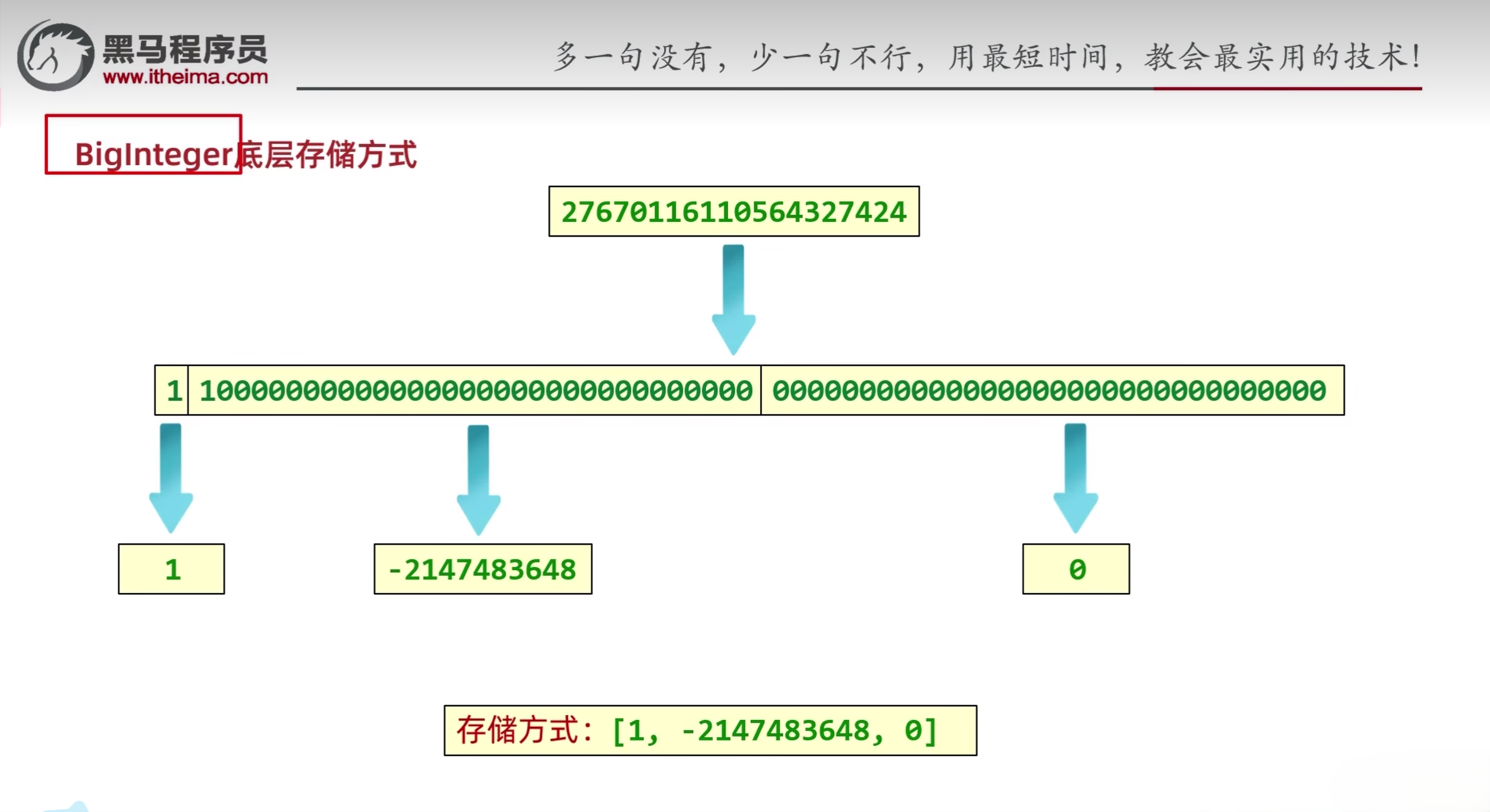
- 对于计算机而言,其实是没有数据类型的概念的,都是0和1
- BigInterger内部的两个参数:
- final int signum:用于记录正负号
- final int[] mag:是一个数组,BigInteger会将数据转化为二进制并按照十进制的方式分段存储到该数组中
六、BigDecimal
6.1 BigDecimal介绍
BigDecimal用于小数的精确计算,用来表示很大的小数
6.2 BigDecimal构造方法
BigDeimal构造方法与BigInteger类似
细节:
- 如果要表示的数字不大,没有超出double的取值范围,建议使用静态方法
- 如果要表示的数字比较大,超出了double的取值范围,建议使用构造方法
- 如果valueof传递的是0~10之间的整数,包含0和10,那么方法会返回已经创建好的对象,不会重新new
6.3 BigDecimal常用方法
- public static BigDecimal valueOf(double val): 获取对象
- public static BigDecimal add(BigDecimal val): 加法
- public static BigDecimal substract(BigDecimal val): 减法
- public static BigDecimal multiply(BigDecimal val): 乘法
- public static BigDecimal divide(BigDecimal val): 除法
- public static BigDecimal divide(BigDecimal val, 精确几位, 舍入模式): 除法
- 舍入模式:
- RoundingMode.UP: 远离零的方向舍入
- RoundingMode.DOWN: 向零方向的舍入
- RoundingMode.CEILING: 向正无限大方向的舍入
- RoundingMode.FLOOR: 向负无限大反向的舍入
- RoundingMode.HALF_UP: 四舍五入
6.4 BigDecimal底层存储方式
BigDecimal会对输入的字符串进行遍历,然后把每一个字符对应的ASCII码存储到一个数组中
七、正则表达式
7.1 正则表达式
正则表达式作用:
- 校验字符串是否满足规则
- 在一段文本中查找满足要求的内容
- 使用matches方法进行校验
- 可在Pattern类中查找正则表达式的构造方式
| 字符类 |
只匹配一个字符 |
| [abc] |
只能是a,b或c |
| [^abc] |
除了a,b,c之外的任何字符 |
| [a-zA-Z] |
a到zA到Z,包括(范围) |
| [a-d[m-p]] |
a到d,或m到p |
| [a-z&&[def]] |
a-z和def的交集,为d,e,f |
| [a-z&&[^bc]] |
a-z和非bc的交集,等同于[ad-z] |
| [a-z&&[^m-p]] |
a到z和除了m到p的交集,等同于[a-lq-z] |
示例:
1
2
3
4
5
6
7
8
9
10
11
12
13
14
15
16
17
18
19
20
21
22
23
24
25
26
27
28
29
30
31
32
33
34
35
36
37
38
39
40
41
42
43
44
45
46
47
48
49
50
51
52
53
54
55
56
| public class Main {
public static void main(String[] args) {
System.out.println("-----------1-------------");
System.out.println("a".matches("[abc]"));
System.out.println("z".matches("[abc]"));
System.out.println("-----------2-------------");
System.out.println("a".matches("[^abc]"));
System.out.println("z".matches("[^abc]"));
System.out.println("zz".matches("[^abc]"));
System.out.println("zz".matches("[^abc][^abc]"));
System.out.println("-----------3-------------");
System.out.println("a".matches("[a-zA-z]"));
System.out.println("z".matches("[a-zA-z]"));
System.out.println("aa".matches("[a-zA-z]"));
System.out.println("zz".matches("[a-zA-Z]"));
System.out.println("zz".matches("[a-zA-Z][a-zA-Z]"));
System.out.println("0".matches("[a-zA-Z]"));
System.out.println("0".matches("[a-zA-Z0-9]"));
System.out.println("-----------4-------------");
System.out.println("a".matches("[a-d[m-p]]"));
System.out.println("d".matches("[a-d[m-p]]"));
System.out.println("m".matches("[a-d[m-p]]"));
System.out.println("p".matches("[a-d[m-p]]"));
System.out.println("e".matches("[a-d[m-p]]"));
System.out.println("0".matches("[a-d[m-p]]"));
System.out.println("----------5------------");
System.out.println("a".matches("[a-z&[def]]"));
System.out.println("d".matches("[a-z&&[def]]"));
System.out.println("0".matches("[a-z&&[def]]"));
System.out.println("-----------6------------_");
System.out.println("a".matches("[a-z&&[^bc]]"));
System.out.println("b".matches("[a-z&&[^bc]]"));
System.out.println("0".matches("[a-z&&[^bc]]"));
System.out.println("-----------7-------------");
System.out.println("a".matches("[a-z&&[^m-p]]"));
System.out.println("m".matches("[a-z&&[^m-p]]"));
System.out.println("0".matches("[a-z&&[^m-p]]"));
}
}
|
| 预定义字符 |
只匹配一个字符 |
| . |
任何字符 |
| \d |
一个数字[0-9] |
| \D |
非数字[^0-9] |
| \s |
一个空白字符[\t\n\x0B\f\r] |
| \S |
非空白字符[^\s] |
| \w |
[a-zA-Z_0-9]英文、数字、下划线 |
| \W |
[^\w]一个非单词字符 |
| 数量词 |
|
| X? |
X,零次或一次 |
| X* |
X,零次或多次 |
| X+ |
X,一次或多次 |
| X{n} |
X,正好n次 |
| X{n,} |
X,至少n次 |
| X{n,m} |
X,至少n次但不超过m次 |
示例:
1
2
3
4
5
6
7
8
9
10
11
12
13
14
15
16
17
18
19
20
21
22
23
24
25
26
27
28
29
30
31
32
33
34
35
36
37
38
| public class RegexDemo {
public static void main(String[] args) {
System.out.println("你".matches(".."));
System.out.println("你".matches("."));
System.out.println("你a".matches(".."));
System.out.println("a".matches("\\d"));
System.out.println("3".matches("\\d"));
System.out.println("333".matches("\\d"));
System.out.println("z".matches("\\w"));
System.out.println("2".matches("\\w"));
System.out.println("21".matches("\\w"));
System.out.println("你".matches("\\w"));
System.out.println("你".matches("\\W"));
System.out.println("---------------------------------------------");
System.out.println("2442fsfsf".matches("\\w{6,}"));
System.out.println("244f".matches("\\w{6,}"));
System.out.println("23dF".matches("[a-zA-Z0-9]{4}"));
System.out.println("23 F".matches("[a-zA-Z0-9]{4}"));
System.out.println("23dF".matches("[\\w&&[^_]]{4}"));
System.out.println("23_F".matches("[\\w&&[^_]]{4}"));
}
}
|
正则表达式小结:
| 符号 |
含义 |
举例 |
| [] |
里面的内容出现一次 |
[0-9] [a-zA-Z0-9] |
| () |
分组 |
a(bc)+ |
| ^ |
取反 |
[^abc] |
| && |
交集 |
[a-z&&m-p] |
| | |
写在方括号外表示并集 |
[a-zA-Z0-9] x | X |
| . |
任意字符 |
\n回车符号不匹配 |
| \ |
转义字符 |
\d |
| \d |
0-9 |
\d+ |
| \D |
非0-9 |
\D+ |
| \s |
空白字符 |
[\t\n\x0B\f\r] |
| \S |
非空白字符 |
[^\s] |
| \w |
单词字符 |
[a-zA-Z_0-9] |
| \W |
非单词字符 |
[^\w] |
| ? |
0次或1次 |
\d? |
| * |
0次或多次 |
\d* |
| + |
1次或多次 |
\d+ |
| {} |
具体次数 |
\d{7,19} |
| (?i) |
忽略后面字符的大小写 |
(?i)abc |
| a((?i)b)c |
只忽略b的大小写 |
a((?i)b)c |
7.2 正则表达式练习
需求:
- 验证输入的手机号码是否满足要求
- 验证输入的邮箱号码是否满足要求
- 验证输入的电话号码是否满足要求
1
2
3
4
5
6
7
8
9
10
11
12
13
14
15
16
17
18
19
20
21
22
23
24
25
26
27
28
29
30
31
32
33
34
35
36
37
38
39
40
41
42
43
44
45
46
47
| public class RegexDemo2 {
public static void main(String[] args) {
String regex1 = "1[3-9]\\d{9}";
System.out.println("13112345678".matches(regex1));
System.out.println("13712345667".matches(regex1));
System.out.println("13945679027".matches(regex1));
System.out.println("139456790271".matches(regex1));
System.out.println("-----------------------------");
String regex2 = "0\\d{2,3}-?[1-9]\\d{4,9}";
System.out.println("020-2324242".matches(regex2));
System.out.println("02122442".matches(regex2));
System.out.println("027-42424".matches(regex2));
System.out.println("0712-3242434".matches(regex2));
System.out.println("-----------------------------");
String regex3 = "\\w+@[\\w&&[^_]]{2,6}(\\.[a-zA-Z]{2,3}){1,2}";
System.out.println("3232323@qq.com".matches(regex3));
System.out.println("zhangsan@itcast.cnn".matches(regex3));
System.out.println("dlei0009@163.com".matches(regex3));
System.out.println("dlei0009@pci.com.cn".matches(regex3));
String regex4 = "([01]\\d|2[0-3]):[0-5]\\d:[0-5]\\d";
String regex5 = "([01]\\d|2[0-3])(:[0-5]\\d){2}";
String regex6 = "(?i)abc";
System.out.println("abc".matches(regex3));
System.out.println("aBc".matches(regex3));
System.out.println("ABC".matches(regex3));
}
}
|
7.3 爬虫
7.3.1 本地数据爬取
- Pattern: 表示正则表达式
- Matcher: 文本匹配器,它可以按照正则表达式的规则去读取字符串,从头开始读取,在大串中去找符合匹配规则的子串。
- m.find():
- 从头开始读取,如果有满足规则的子串,就返回true,并记录子串的起始索引和结束索引+1,如果没有则返回false
- 第二次调用时会从上次的结尾继续往后读取
- m.group(): 根据find方法记录的索引截取字符串
示例:
1
2
3
4
5
6
7
8
9
10
11
12
13
14
15
16
17
18
19
20
21
22
23
24
25
26
27
| import java.util.regex.Matcher;
import java.util.regex.Pattern;
public class RegexDemo {
public static void main(String[] args) {
String str = "Java自从95年问世以来,经历了很多版本,目前企业中用的最多的是Java8和Java11," +
"因为这两个是长期支持版本,下一个长期支持版本是Java17,相信在未来不久Java17也会逐渐登上历史舞台";
Pattern p = Pattern.compile("Java\\d{0,2}");
Matcher m = p.matcher(str);
while (m.find()) {
String s = m.group();
System.out.println(s);
}
}
}
|
7.3.2 网络数据爬取
1
2
3
4
5
6
7
8
9
10
11
12
13
14
15
16
17
18
19
20
21
22
| public class RegexDemo7 {
public static void main(String[] args) throws IOException {
URL url = new URL("https://m.sengzan.com/jiaoyu/29104.html?ivk sa=1025883i");
URLConnection conn = url.openConnection();
BufferedReader br = new BufferedReader(new InputStreamReader(conn.getInputStream()));
String line;
String regex = "[1-9]\\d{17}";
Pattern pattern = Pattern.compile(regex);
while ((line = br.readLine()) != null) {
Matcher matcher = pattern.matcher(line);
while (matcher.find()) {
System.out.println(matcher.group());
}
}
br.close();
}
}
|
7.3.3 带条件爬取
- ?= ?表示前面的数据,=表示后面要跟随的数据,但是在获取时只获取前半部分
- ?: ?表示前面的数据,:表示后面要跟随的数据,但是在获取时获取全部
示例:
需求:有如下文本,按要求爬取数据。
Java自从95年问世以来,经历了很多版本,目前企业中用的最多的是Java8和Java11,因为这两个是长期支持版本,下一个长期支持版本是Java17,相信在未来不久Java17也会逐渐登上历史舞台。
需求1:爬取版本号为8,11.17的Java文本,但是只要Java,不显示版本号。
需求2:爬取版本号为8,11,17的Java文本。正确爬取结果为:Java8 Java11 Java17 Java17
需求3:爬取除了版本号为8,11,17的Java文本。
1
2
3
4
5
6
7
8
9
10
11
12
13
14
15
16
17
18
19
20
| public class RegexDemo9{
public static void main(String[] args) {
String s = "Java自从95年问世以来,经历了很多版本,目前企业中用的最多的是Java8和Java11," +
"因为这两个是长期支持版本,下一个长期支持版本是Java17,相信在未来不久Java17也会逐渐登上历史舞台";
String regex1 = "Java(?=8|11|17)";
String regex2 = "Java(8|11|17)";
String regex3 = "Java(?:8|11|17)";
String regex4 = "Java(?!8|11|17)";
Pattern p = Pattern.compile(regex4);
Matcher m = p.matcher(s);
while (m.find()) {
System.out.println(m.group());
}
}
}
|
7.3.4 贪婪爬取和非贪婪爬取
- 只写+和表示贪婪匹配,如果在+和后面加问号表示非贪婪爬取
- +? 非贪婪匹配
- *? 非贪婪匹配
- 贪婪爬取:在爬取数据的时候尽可能的多获取数据
- 非贪婪爬取:在爬取数据的时候尽可能的少获取数据
1
2
3
4
5
6
7
8
9
10
11
12
13
14
15
| public class RegexDemo10 {
public static void main(String[] args) {
String s = "Java自从95年问世以来,abbbbbbbbbbbbaaaaaaaaaaaaaaaaaa" +
"经历了很多版木,目前企业中用的最多的是]ava8和]ava11,因为这两个是长期支持版木。" +
"下一个长期支持版本是Java17,相信在未来不久Java17也会逐渐登上历史舞台";
String regex = "ab+";
Pattern p = Pattern.compile(regex);
Matcher m = p.matcher(s);
while (m.find()) {
System.out.println(m.group());
}
}
}
|
7.4 String类中使用正则表达式的方法
7.4.1 split():切割字符串
- public String split(String regex): 参数regex表示正则表达式。可以将当前字符串中匹配regex正则表达式的符号作为"分隔符"来切割字符串
示例:
1
2
3
4
5
6
7
8
9
10
11
| String s = "小诗诗dqwefqwfqwfwq12312小丹丹dqwefqwfqwfwq12312小惠惠";
String[] arr = s.split("[\\w&&[^_]]+");
for (int i = 0; i < arr.length; i++) {
System.out.println(arr[i]);
}
|
7.4.2 replaceAll():替换字符串
- public String replaceAll(String regex, String newStr): 参数regex表示一个正则表达式。可以将当前字符串中匹配regex正则表达式的字符串替换为newStr
示例:
1
2
3
4
5
6
7
| String s = "小诗诗dqwefqwfqwfwq12312小丹丹dqwefqwfqwfwq12312小惠惠";
String result1 = s.replaceAll("[\\w&&[^_]]+", "vs");
System.out.println(result1);
|
7.5 分组
- 组号:
- 从1开始,连续不间断
- 以左括号为基准,最左边的是第一组
- 捕获分组:后续还要继续使用本组的数据
- 非捕获分组:分组之后不需要再用本组数据,仅仅是把数据括起来,且不占用组号
- (?:正则):获取所有
- (?=正则):获取前面部分
- (?!正则):获取不是指定内容的前面部分
1
2
3
4
5
6
7
8
9
10
11
12
13
14
15
16
17
18
19
20
21
22
23
24
25
26
27
28
29
30
31
32
33
34
35
36
37
38
39
|
String regex1 = "(.).+\\1";
System.out.println("a123a".matches(regex1));
System.out.println("b456b".matches(regex1));
System.out.println("17891".matches(regex1));
System.out.println("&abc&".matches(regex1));
System.out.println("a123b".matches(regex1));
System.out.println("--------------------------");
String regex2 = "(.+).+\\1";
System.out.println("abc123abc".matches(regex2));
System.out.println("b456b".matches(regex2));
System.out.println("123789123".matches(regex2));
System.out.println("&!@abc&!@".matches(regex2));
System.out.println("abc123abd".matches(regex2));
System.out.println("---------------------");
String regex3 = "((.)\\2*).+\\1";
System.out.println("aaa123aaa".matches(regex3));
System.out.println("bbb456bbb".matches(regex3));
System.out.println("111789111".matches(regex3));
System.out.println("&&abc&&".matches(regex3));
System.out.println("aaa123aab".matches(regex3));
String regex2 ="[1-9]\\d{16}(\\d Xx)\\1";
System.out.println("41080119930228457x".matches(regex2));
|
八、时间类
- JDK7前时间相关类:
- Date: 时间
- SimpleDateFormat: 格式化时间
- Calendar: 日历
8.1 Date介绍
- 世界标准时间:格林尼治时间/格林威治时间(Greenwich Mean Time)简称GMT,目前世界标准时间(UTC)已经替换为:原子钟
- 中国标准时间:世界标准时间+8小时
- Date类是一个JDK写好的Javabean类,用来描述时间,精确到毫秒
- 利用空参构造创建的对象,默认表示系统当前时间
- 利用有参构造创建的对象,表示指定的时间
8.2 Date常用方法
8.2.1 Date():创建Date对象,表示当前时间
- public Date(): 创建Date对象,表示当前时间
示例:
1
2
3
4
5
6
7
8
9
10
| import java.util.Date;
public class Main {
public static void main(String[] args) {
Date d = new Date();
System.out.println(d);
}
}
|
8.2.2 Date(long date):创建Date对象,表示指定时间
- public Date(long date): 创建Date对象,表示指定时间
1
2
3
4
5
6
7
8
9
10
| import java.util.Date;
public class Main {
public static void main(String[] args) {
Date d = new Date(0L);
System.out.println(d);
}
}
|
8.2.3 setTime(long time):设置/修改毫秒值
- public void setTime(long time): 设置/修改毫秒值
示例:
1
2
3
4
5
6
7
8
9
10
11
12
13
14
| import java.util.Date;
public class Main {
public static void main(String[] args) {
Date d = new Date(0L);
System.out.println(d);
d.setTime(1000L);
System.out.println(d);
}
}
|
8.2.4 getTime():获取时间对象的毫秒值
- public long getTime(): 获取时间对象的毫秒值
示例:
1
2
3
4
5
6
7
8
9
10
11
12
13
14
15
16
17
18
| import java.util.Date;
public class Main {
public static void main(String[] args) {
Date d = new Date(0L);
System.out.println(d);
d.setTime(1000L);
System.out.println(d);
long time = d.getTime();
System.out.println(time);
}
}
|
- Date类获取的时间只能是固定格式
- 格式化:SimpleDateFormat类可以把时间变成其他格式
- 解析:SimpleDateFormat能把字符串表示的时间变成Date对象
- public SimpleDateFormat():构造一个SimpleDateFormat,使用默认格式
示例:
1
2
3
4
5
6
7
8
9
10
11
12
13
| import java.text.SimpleDateFormat;
import java.util.Date;
public class SimpleDateFormatDemo {
public static void main(String[] args) {
SimpleDateFormat s = new SimpleDateFormat();
Date d = new Date(0L);
String str = s.format(d);
System.out.println(str);
}
}
|
- public SimpleDateFormat(String pattern):构造一个SimpleDateFormat,使用指定格式
格式化的时间形式的常用模式对应关系:
|
|
| y |
年 |
| M |
月 |
| d |
日 |
| H |
时 |
| m |
分 |
| s |
秒 |
| 例如:2023-11-11 13:27:06可以表示为yyyy-MM-dd HH:mm:ss |
|
示例:
1
2
3
4
5
6
7
8
9
10
11
12
13
| import java.text.SimpleDateFormat;
import java.util.Date;
public class SimpleDateFormatDemo {
public static void main(String[] args) {
SimpleDateFormat s = new SimpleDateFormat("yyyy年MM月dd日 HH:mm:ss");
Date d = new Date(0L);
String str = s.format(d);
System.out.println(str);
}
}
|
- public final String format(Date date): 格式化(日期对象->字符串)
示例:
1
2
3
4
5
6
7
8
9
10
11
12
13
| import java.text.SimpleDateFormat;
import java.util.Date;
public class SimpleDateFormatDemo {
public static void main(String[] args) {
SimpleDateFormat s = new SimpleDateFormat("yyyy年MM月dd日 HH:mm:ss");
Date d = new Date(0L);
String str = s.format(d);
System.out.println(str);
}
}
|
8.4.4 parse(String source):解析
- public Date parse(String source): 解析(字符串->日期对象)
- 创建对象的格式要跟字符串的格式完全一致
示例:
1
2
3
4
5
6
7
8
9
10
11
12
13
14
| import java.text.ParseException;
import java.text.SimpleDateFormat;
import java.util.Date;
public class SimpleDateFormatDemo {
public static void main(String[] args) throws ParseException {
String str = "2025-03-12 13:18:00";
SimpleDateFormat s = new SimpleDateFormat("yyyy-MM-dd HH:mm:ss");
Date d = s.parse(str);
System.out.println(d);
}
}
|
8.5 Calendar介绍
- Calendar代表了系统当前时间的日历对象,可以单独修改、获取时间中的年月日
- Calendar是一个抽象类,不能直接创建对象
8.6 Calendar常用方法
8.6.1 getInstance():获取当前时间的日历对象
- public static Calendar getInstance(): 获取当前时间的日历对象
- 会根据系统的不同时区获取不同的日历对象
- 会把时间中的纪元,年,月,日,时,分,秒,星期等等都放到一个数组当中
- 月份:0-11
- 星期:1(星期日) 2(星期一) 3(星期二) 4(星期三) 5(星期四) 6(星期五) 7(星期六)
示例:
1
2
3
4
5
6
7
8
9
10
11
12
| import java.util.Calendar;
public class CalendarDemo {
public static void main(String[] args) {
Calendar cal = Calendar.getInstance();
System.out.println(cal);
}
}
|
8.6.2 getTime():获取日期对象
- public final Date getTime(): 获取日期对象
示例:
1
2
3
4
5
6
7
8
9
10
11
12
13
14
15
16
17
| import java.util.Calendar;
import java.util.Date;
public class CalendarDemo {
public static void main(String[] args) {
Calendar cal = Calendar.getInstance();
System.out.println(cal);
Date d = cal.getTime();
System.out.println(cal);
}
}
|
8.6.3 setTime(Date date):给日历设置日期对象
- public final void setTime(Date date):给日历设置日期对象
示例:
1
2
3
4
5
6
7
8
9
10
11
12
13
14
15
16
17
18
| import java.util.Calendar;
import java.util.Date;
public class CalendarDemo {
public static void main(String[] args) {
Calendar cal = Calendar.getInstance();
System.out.println(cal);
Date d = new Date(0L);
cal.setTime(d);
System.out.println(cal);
}
}
|
8.6.4 getTimeInMillis():拿到时间毫秒值
- public long getTimeInMillis():拿到时间毫秒值
8.6.5 setTimeInMillis(long millis):给日历设置时间毫秒值
- public void setTimeInMillis(long millis): 给日历设置时间毫秒值
8.6.6 get(int field):取日历中的某个字段信息
- public int get(int field): 取日历中的某个字段信息
1
2
3
4
5
6
7
8
9
10
11
12
13
14
15
16
17
| import java.util.Calendar;
import java.util.Date;
public class CalendarDemo {
public static void main(String[] args) {
Calendar cal = Calendar.getInstance();
int year = cal.get(Calendar.YEAR);
int month = cal.get(Calendar.MONTH) + 1;
int day = cal.get(Calendar.DAY_OF_MONTH);
System.out.println(year+"-"+month+"-"+day);
}
}
|
8.6.7 set(int field,int value):修改日历中的某个字段信息
- public void set(int field,int value): 修改日历中的某个字段信息
示例:
1
2
3
4
5
6
7
8
9
10
11
12
13
14
15
16
17
18
| import java.util.Calendar;
import java.util.Date;
public class CalendarDemo {
public static void main(String[] args) {
Calendar cal = Calendar.getInstance();
cal.set(Calendar.YEAR, 2000);
int year = cal.get(Calendar.YEAR);
int month = cal.get(Calendar.MONTH) + 1;
int day = cal.get(Calendar.DAY_OF_MONTH);
System.out.println(year+"-"+month+"-"+day);
}
}
|
8.6.8 add(int field,int amount):为某个字段增加/减少指定的值
- public void add(int field,int amount): 为某个字段增加/减少指定的值
- 正数往后加,负数往前减
示例:
1
2
3
4
5
6
7
8
9
10
11
12
13
14
15
16
17
18
| import java.util.Calendar;
import java.util.Date;
public class CalendarDemo {
public static void main(String[] args) {
Calendar cal = Calendar.getInstance();
cal.add(Calendar.YEAR, 2);
int year = cal.get(Calendar.YEAR);
int month = cal.get(Calendar.MONTH) + 1;
int day = cal.get(Calendar.DAY_OF_MONTH);
System.out.println(year+"-"+month+"-"+day);
}
}
|
8.7 JDK8时间类
JDK7与JDK8中时间类区别:
- JDK7:代码麻烦,需要现将日期对象转换为毫秒值才能进行计算和比较。多线程环境下会导致数据安全问题
- JDK8:代码简单,时间日期对象都是不可变的,解决了这个问题
8.8 JDK8时间类常用方法
8.8.1 ZoneId:时区
- static Set<String> getAvailableZoneIds(): 获取Java中支持的所有时区
- static ZoneId systemDefault(): 获取系统默认时区
- static ZoneId of(String zoneId): 获取一个指定时区
示例:
1
2
3
4
5
6
7
8
9
10
11
12
13
14
15
16
17
18
19
| import java.time.ZoneId;
import java.util.Set;
public class ZoneIdDemo {
public static void main(String[] args) {
Set<String> zoneIds = ZoneId.getAvailableZoneIds();
System.out.println(zoneIds.size());
ZoneId zoneId = ZoneId.systemDefault();
System.out.println(zoneId);
ZoneId zoneId1 = ZoneId.of("America/Toronto");
System.out.println(zoneId1);
}
}
|
8.8.2 Instant:时间戳
- static Instant now(): 获取当前时间的Instant对象(标准时间)
- static Instant ofXxxx(long epochMilli): 根据(秒/毫秒/纳秒)获取Instant对象
- ZonedDateTime atZone(ZoneId zone): 指定时区
- boolean isXxx(Instant otherInstant): 判断系列的方法
- Instant minusXxx(long millisToSubtract): 减少时间系列的方法
- Instant plusXxx(long millisToSubtract): 增加时间系列的方法
示例:
1
2
3
4
5
6
7
8
9
10
11
12
13
14
15
16
17
18
19
20
21
22
23
24
25
26
27
28
29
30
31
| import java.time.Instant;
import java.time.ZoneId;
import java.time.ZonedDateTime;
public class InstantDemo {
public static void main(String[] args) {
Instant now = Instant.now();
System.out.println(now);
Instant instant1 = Instant.ofEpochMilli(0L);
System.out.println(instant1);
ZonedDateTime zonedDateTime = Instant.now().atZone(ZoneId.of("Asia/Shanghai"));
System.out.println(zonedDateTime);
Instant instant2 = Instant.ofEpochMilli(0L);
Instant instant3 = Instant.ofEpochMilli(1000L);
boolean result = instant2.isBefore(instant3);
System.out.println(result);
Instant instant4 = Instant.now().minusMillis(1000L);
System.out.println(instant4);
}
}
|
8.8.3 ZonedDateTime:带时区的时间
- static ZonedDateTime now(): 获取当前时间的ZonedDateTime对象
- static ZonedDateTime ofXxxx(…) :获取指定时间的ZonedDateTime对象
- ZonedDateTime withXxx(时间): 修改时间系列的方法
- ZonedDateTime miusXxx(时间): 减少时间系列的方法
- ZonedDateTime plusXxx(时间): 增加时间系列的方法
示例:
1
2
3
4
5
6
7
8
9
10
11
12
13
14
15
16
17
18
19
20
21
22
23
24
25
26
27
28
29
30
31
32
33
34
35
| import java.time.Instant;
import java.time.ZoneId;
import java.time.ZonedDateTime;
public class ZoneDateTimeDemo {
public static void main(String[] args) {
ZonedDateTime now = ZonedDateTime.now();
System.out.println(now);
ZonedDateTime time1 = ZonedDateTime.of(2025,10,1,11,12,12,0, ZoneId.of("Asia/Shanghai"));
System.out.println(time1);
Instant instant = Instant.ofEpochMilli(0L);
ZoneId zoneId = ZoneId.of("Asia/Shanghai");
ZonedDateTime time2 = ZonedDateTime.ofInstant(instant, zoneId);
System.out.println(time2);
ZonedDateTime time3 = time2.withYear(2000);
System.out.println(time3);
ZonedDateTime time4 = time3.minusYears(1);
System.out.println(time4);
ZonedDateTime time5 = time4.plusYears(1);
System.out.println(time5);
}
}
|
- static DateTimeFormatter ofPattern(格式): 获取格式对象
- String format(时间对象): 按照指定方式格式化
示例:
1
2
3
4
5
6
7
8
9
10
11
12
13
14
| import java.time.Instant;
import java.time.ZoneId;
import java.time.ZonedDateTime;
import java.time.format.DateTimeFormatter;
public class DateTimeFormatterDemo {
public static void main(String[] args) {
ZonedDateTime time = Instant.now().atZone(ZoneId.of("Asia/Shanghai"));
DateTimeFormatter dateTimeFormatter = DateTimeFormatter.ofPattern("yyyy-MM-dd HH:mm:ss.SSS");
System.out.println(dateTimeFormatter.format(time));
}
}
|
8.8.5 LocalDate:年、月、日;LocalTime:时、分、秒LocalDateTime:年、月、日、时、分、秒
- static XXX now(): 获取当前时间的对象
- static XXX of(…): 获取指定时间的对象
- get开头的方法: 获取日历中的年月日时分秒等信息
- isBefore、isAfter: 比较两个LocalDate
- with开头的: 修改时间系列的方法
- minus开头的: 减少时间系列的方法
- plus开头的: 增加时间系列的方法
- public LocalDate toLocalDate(): LocalDateTime转换成一个LocalDate对象
- public LocalTime toLocalTime(): LocalDateTime转换成一个LocalTime对象
8.8.6 Duration:时间间隔(秒,纳秒);Period:时间间隔(年,月,日);ChronoUnit:时间间隔(所有单位)
- Duration: 用于计算两个时间间隔(秒,纳秒)
- Period: 用于计算两个时间间隔(年,月,日)
- ChronoUnit: 用于计算两个时间间隔(所有单位)
示例:
1
2
3
4
5
6
7
8
9
10
11
12
13
14
15
16
17
18
19
20
21
22
23
24
25
26
27
28
| import java.time.LocalDate;
import java.time.Period;
public class PeriodDemo {
public static void main(String[] args) {
LocalDate now = LocalDate.now();
System.out.println(now);
LocalDate localDate = LocalDate.of(2000, 1, 1);
System.out.println(localDate);
Period period = Period.between(localDate, now);
System.out.println(period.getYears());
System.out.println(period.getMonths());
System.out.println(period.getDays());
System.out.println(period.toTotalMonths());
}
}
|
九、包装类
- 包装类是基本数据类型对应的对象
- JDK5以后,包装类可以直接自动装箱和自动拆箱
- JDK5以后获取包装类对象就不需要new,不需要调用方法,直接赋值即可
| 基本数据类型 |
包装类 |
| byte |
Byte |
| short |
Short |
| char |
Character |
| int |
Integer |
| long |
Long |
| float |
Float |
| double |
Double |
| boolean |
Boolean |
9.1 获取Integer对象的方式(了解)
- public Integer(int value): 根据传递的整数创建一个Integer对象
- public Integer(String s): 根据传递的字符串创建一个Integer对象
- public static Integer valueOf(int i): 根据传递的整数创建一个Integer对象
- public static Integer valueOf(String s): 根据传递的字符串创建一个Integer对象
- public static Integer valueOf(String s,int radix): 根据传递的字符串和进制创建一个Integer对象
9.2 Integer常用方法
- public static String toBinaryString(int i): 得到二进制
- public static String toOctalString(int i): 得到八进制
- public static String toHexString(int i): 得到十六进制
- public static int parseInt(String s): 将字符串类型的整数转成int类型的整数
示例:
1
2
3
4
5
6
7
8
9
10
11
12
13
14
15
16
17
18
19
20
21
22
| public class IntegerDemo {
public static void main(String[] args) {
String str1 = Integer.toBinaryString(100);
System.out.println(str1);
String str2 = Integer.toOctalString(100);
System.out.println(str2);
String str3 = Integer.toHexString(100);
System.out.println(str3);
int i = Integer.parseInt("123");
System.out.println(i);
System.out.println(i + 1);
}
}
|
十、Arrays
10.1 Arrays介绍
Arrays是操作数组的工具类
10.2 Arrays常用方法
10.2.1 toString(数组):把数组拼接成一个字符串
- public static String toString(数组): 把数组拼接成一个字符串
示例:
1
2
3
4
5
6
7
8
9
10
| import java.util.Arrays;
public class Main {
public static void main(String[] args) {
int[] arr = {1, 2, 3, 4, 5, 6, 7, 8, 9, 10};
System.out.println(Arrays.toString(arr));
}
}
|
10.2.2 binarySearch(数组,查找的元素):二分查找法查找元素
- public static int binarySearch(数组,查找的元素): 二分查找法查找元素
- 元素存在则返回真实索引
- 元素不存在则返回-插入点-1
示例:
1
2
3
4
5
6
7
8
9
10
11
12
13
14
| import java.util.Arrays;
public class Main {
public static void main(String[] args) {
int[] arr = {1, 2, 3, 4, 5, 6, 7, 8, 9, 10};
System.out.println(Arrays.toString(arr));
System.out.println(Arrays.binarySearch(arr, 10));
System.out.println(Arrays.binarySearch(arr, 20));
}
}
|
10.2.3 copyOf(原数组,新数组长度):拷贝数组
- public static int[] copyOf(原数组,新数组长度): 拷贝数组
示例:
1
2
3
4
5
6
7
8
9
10
11
12
13
| import java.util.Arrays;
public class Main {
public static void main(String[] args) {
int[] arr = {1, 2, 3, 4, 5, 6, 7, 8, 9, 10};
System.out.println(Arrays.toString(arr));
int[] newArr1 = Arrays.copyOf(arr, 20);
System.out.println(Arrays.toString(newArr1));
}
}
|
10.2.4 copyOfRange(原数组,起始索引,结束索引):拷贝数组(指定范围)
- public static int[] copyOfRange(原数组,起始索引,结束索引): 拷贝数组(指定范围)
示例:
1
2
3
4
5
6
7
8
9
10
11
12
13
| import java.util.Arrays;
public class Main {
public static void main(String[] args) {
int[] arr = {1, 2, 3, 4, 5, 6, 7, 8, 9, 10};
System.out.println(Arrays.toString(arr));
int[] newArr2 = Arrays.copyOfRange(arr, 0, 9);
System.out.println(Arrays.toString(newArr2));
}
}
|
10.2.5 fill(数组,元素):填充数组
- public static void fill(数组,元素): 填充数组
示例:
1
2
3
4
5
6
7
8
9
10
11
12
13
| import java.util.Arrays;
public class Main {
public static void main(String[] args) {
int[] arr = {1, 2, 3, 4, 5, 6, 7, 8, 9, 10};
System.out.println(Arrays.toString(arr));
Arrays.fill(arr, 100);
System.out.println(Arrays.toString(arr));
}
}
|
10.2.6 sort(数组):按照默认方式进行数组排序
- public static void sort(数组): 按照默认方式进行数组排序
- 默认是升序排序,底层使用的是快速排序
示例:
1
2
3
4
5
6
7
8
9
10
11
| import java.util.Arrays;
public class Main {
public static void main(String[] args) {
int[] arr2 = {10, 8, 6, 1, 4, 3, 5, 7, 2, 9};
Arrays.sort(arr2);
System.out.println(Arrays.toString(arr2));
}
}
|
10.2.7 sort(数组,排序规则):按照指定的规则排序
- public static void sort(数组,排序规则): 按照指定的规则排序
- 只能给引用数据类型的数组进行排序
- 如果数组是基本数据类型的,需要变成其对应的包装类
- 第二个参数是一个接口,所以在调用方法时需要传递这个端口的实现类对象作为排序的规则
- 因为这个实现类只需要使用一次,所以没必要单独写一个类,直接使用匿名内部类即可
- 利用插入排序+二分查找的方式进行排序
- 默认把0索引的数据当做是有序的序列,将其他元素插入进去
- 如果comparator返回值是负数,拿着A继续跟前面的数据进行比较
- 如果comparator返回值是正数,拿着A继续跟后面的数据进行比较
- 如果comparator返回值是0,拿着A继续跟后面的数据进行比较
- 负数->放前面 正数/0->放后面
- o1 - o2: 升序排列
- o2 - o1: 降序排列
示例:
1
2
3
4
5
6
7
8
9
10
11
12
13
14
15
16
| import java.util.Arrays;
public class Main {
public static void main(String[] args) {
Integer[] arr = {10, 8, 6, 1, 4, 3, 5, 7, 2, 9};
Arrays.sort(arr, new Comparator<Integer>() {
@Override
public int compare(Integer o1, Integer o2) {
return o2 - o1;
}
});
System.out.println(Arrays.toString(arr));
}
}
|
10.3 lambda表达式
- 函数式编程:函数式编程是一种思想特点,函数式编程思想就是忽略面向对象的复杂语法,强调做什么,而不是谁去做
- 语法:() -> {}
- (): 对应着方法的形参
- ->: 固定格式
- {}: 对应着方法的方法体
- lambda表达式可以简化匿名内部类的书写
- lambda表达式只能简化函数式接口的匿名内部类的写法
- 函数式接口:有且仅有一个抽象方法的接口叫做函数式接口,接口上方可以加@FunctionallInterface注解
示例:
1
2
3
4
5
6
7
8
9
10
11
12
13
14
15
| import java.util.Arrays;
import java.util.Comparator;
public class Main {
public static void main(String[] args) {
Integer[] arr = {10, 8, 6, 1, 4, 3, 5, 7, 2, 9};
Arrays.sort(arr, (Integer o1, Integer o2) ->{
return o2 - o1;
}
);
System.out.println(Arrays.toString(arr));
}
}
|
- lambda表达式的省略规则:
- 参数类型可以省略不写
- 如果只有一个参数,参数类型可以省略,同时()也可以省略
- 如果lambda表达式的方法体只有一行,大括号,分号,return可以省略不写,且需要同时省略
示例:
1
2
3
4
5
6
7
8
9
10
11
12
| import java.util.Arrays;
import java.util.Comparator;
public class Main {
public static void main(String[] args) {
Integer[] arr = {10, 8, 6, 1, 4, 3, 5, 7, 2, 9};
Arrays.sort(arr, (o1, o2)-> o2 - o1);
System.out.println(Arrays.toString(arr));
}
}
|
参考资料:
[1] 黑马程序员Java零基础视频教程_上部